
⚠️Not updated in over a year
Description
🖼️ Save images as Type - Image Format Converter
✨ Transform your images instantly with our powerful file conversion tool! ✨
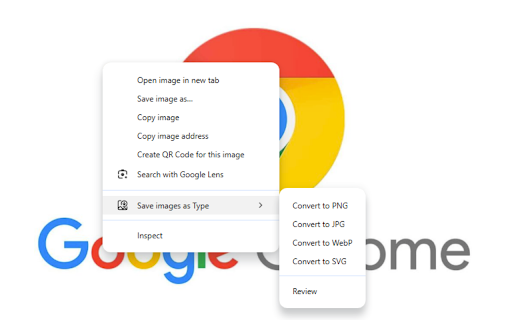
Save images as Type is the ultimate browser extension for quickly converting images between popular formats. With just a few clicks, transform any image to PNG, JPG, WebP, or SVG format.
🚀 Key Features:
🔄 Simple & Intuitive Interface: Easy-to-use design for both beginners and professionals
📊 Multiple Format Support: Convert to PNG, JPG, WebP, and SVG formats
📦 Batch Conversion: Process multiple images simultaneously to save time
👁️ Preview Before Saving: See how your converted image will look before downloading
🔌 No Internet Required: All conversions happen locally in your browser
🔒 Privacy Focused: Your images never leave your device
👍 Perfect For:
🎨 Web designers needing different image formats for websites
🖌️ Digital artists saving work in various file types
📱 Content creators optimizing images for social media
💻 Anyone who needs to quickly change image formats without installing software
Whether you need to reduce file size with WebP, maintain transparency with PNG, ensure compatibility with JPG, or scale infinitely with SVG, Save images as Type handles it all with ease.
🔄 Supported Conversions:
📸 JPG Conversions:
🖼️ JPG to PNG
🌐 JPG to WebP
📊 JPG to SVG
🎨 PNG Conversions:
📷 PNG to JPG
🌐 PNG to WebP
📊 PNG to SVG
🌐 WebP Conversions:
📷 WebP to JPG
🖼️ WebP to PNG
📊 WebP to SVG
📊 SVG Conversions:
📷 SVG to JPG
🖼️ SVG to PNG
🌐 SVG to WebP
✨ With our extension, you can easily convert between any of these formats with just a few clicks! No matter what image format you have, Save images as Type has you covered! ✨
⬇️ Download now and simplify your image conversion workflow! ⬇️
Contact: danielsancheztool@gmail.com
Reviews (1 cached)
★★☆☆☆2024-05-07
Ramahavonjy Mamy
I can only drag and drop one image at a time. Not worth it.
Permissions (3)
Permissions
contextMenusℹ Can add items to the right-click menu downloadsℹ Can manage and monitor downloads offscreen
Details
| Version | 1.0.7 |
| Updated | Mar 18, 2025 |
| Size | 531KiB |
| First Seen | Mar 26, 2026 |
Popular in workflow

Adobe Acrobat: PDF edit, convert, sign tools
by Adobe Inc.
331M
★ 4.40
workflow
331M
★ 4.40
workflow

AdBlock — block ads across the web
by AdBlock
63M
★ 4.48
workflow
63M
★ 4.48
workflow

迅雷下载支持
by Shenzhen Xunlei Network Technology Co., Ltd.
59M
★ 2.77
workflow
59M
★ 2.77
workflow

Adblock Plus - free ad blocker
by eyeo GmbH
41M
★ 4.39
workflow
41M
★ 4.39
workflow

Chrome Remote Desktop
by Chrome Remote Desktop Release Managers
38M
★ 3.14
workflow
38M
★ 3.14
workflow
Popular Extensions
Adobe Acrobat: PDF edit, convert, sign tools
by Adobe Inc.
331M
★ 4.40
workflow
331M
★ 4.40
workflow
AdBlock — block ads across the web
by AdBlock
63M
★ 4.48
workflow
63M
★ 4.48
workflow
迅雷下载支持
by Shenzhen Xunlei Network Technology Co., Ltd.
59M
★ 2.77
workflow
59M
★ 2.77
workflow

Grammarly: AI Writing Assistant and Grammar Checker App
by Grammarly
42M
★ 4.50
communication
42M
★ 4.50
communication
Adblock Plus - free ad blocker
by eyeo GmbH
41M
★ 4.39
workflow
41M
★ 4.39
workflow