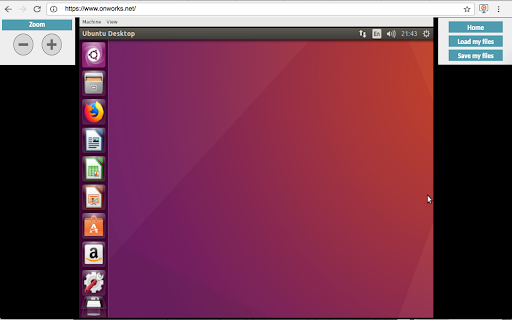
This extension scans browsed URLs to identify and used files for our Ubuntu OS online. The files are presented in a list within the extension popup. This popup is sourced from our systems so the browsed URL are collected and reported to our cloud server. This is then a dynamic file manager to handle files for our Ubuntu OS online. It also allows users to upload files that can be renamed, copied and deleted using an API integration with Ubuntu online.
It also allows to run online Linux Ubuntu versions using your web browser. This extension provides the following OSs: Ubuntu GNOME, Kubuntu, Lubuntu and Xubuntu. All of them run using an integration with our "OnWorks" free servers hosting provider:
1. This Ubuntu online is one of the most well known Linux versions, and comes equipped with the GNOME desktop. Although the previous Unity desktop was evaluated we have opted for GNOME. It has a classic desktop style with icons, a panel on the left mimicking its traditional look and feel. This Ubuntu online comes preinstalled with the most common System tools, Office utilities, Graphic programs and so on.
2. This Kubuntu online inherits all the core features of Ubuntu but it looks different. It includes the KDE Plasma, a desktop environment that a lot of users prefer. This KDE desktop provides access to programs and files clicking a left-bottom K-button (Kickoff Application Launcher), which is similar to the typical Start button. As with Ubuntu GNOME online, it has preinstalled applications like LibreOffice, Okular Document Viewer, Kontact, Rekonq, Amarok, and Dragon player. It must be also noted that our Kubuntu online offers an user interface easier to use for people that comes from Windows and Mac OS.
3. This Xubuntu online also provides a lot of Ubuntu features but without compromising the performance and aesthetics. For that reason Xubuntu provides a desktop with a lot of bells and whistles while still striving not to impact too much on the PC system’s resources. This Xubuntu online comes with the XFCE desktop, which is lighter when compared to GNOME, Unity or KDE.
4. This Lubuntu online provides the lighter desktop based on the LxQt(LxDE) desktop environment. LxQt(LXDE) is a desktop environment to be run on system with poor resources. The desktop is simple and allows for you to place icons. It also supports a right-click menu. There are no desktop effects or animations. Moreover, Lubuntu achieves to be lighter with applications and software that come packed with this particular distro. Instead of LibreOffice or something similar, end users are provided with Gnumeric and Abiword.
Note that all of these Ubuntu online versions are integrated with the file manager that are provided by the "OnWorks" free hosting provider. This file manager can be used to save and load the files handled inside the OnWorks online workstations.
IMPORTANT NOTE: The scanning process to detect files when browsing in the Internet occurs on our servers so the URL are reported there. In this process, no personal data is collected. Of course, users can opt to disable this scanning via a checkbox in the extension popup. However, note that disabling this functionality severely limits the extension's functionality while browsing through the Internet. The search queries of the URLs scanned are not collected.