
⚠️Not updated in over 2 years
Description
BrickTinker adds useful features for sellers on BrickLink.com. All features can be individually enabled/disabled. Features include:
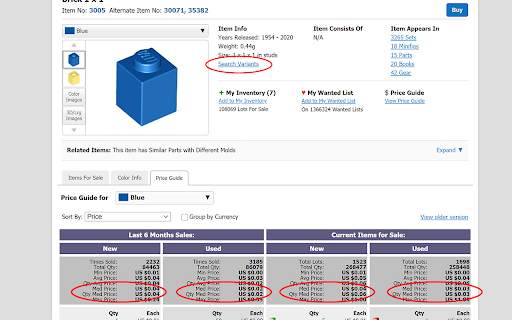
Search Variants Link
Adds a link to catalog entry page to search for variants of that item (e.g., pieces with stickers).
USA Sellers
Defaults the "Items for Sale" list on catalog entry to only USA sellers when the page loads. You can still switch it afterwards.
Show Median Price
Calculates and shows the median price in the Price Guide section of catalog entry and the stand-alone Price Guide, but only if sorted by Price.
USPS Tracking Link
Adds a link on Orders Received page to USPS website for each order that has a tracking number entered. Must have Tracking Number column showing using "Customize Display".
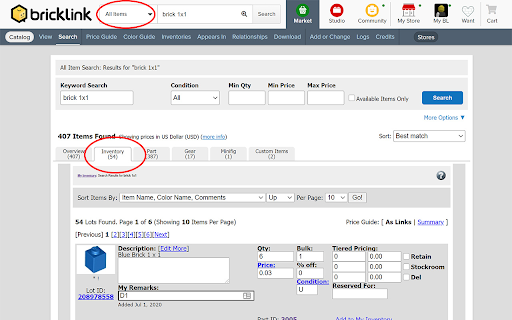
Inventory Tab in Default Search
Adds a tab to "All Items" search results that includes a search of your inventory.
Default to Catalog Search
Defaults the search bar to "Catalog Items" instead of "All Items".
Inventory Page Width
Expands the width of the default inventory page so that inventory category titles to do not line wrap.
"Add to Inventory" Link
Adds a link to each item in inventory detail listing allowing you to add another item of that type to your inventory.
Streamline Inventory Add Page
Removes less used options and explanatory text in the inventory add page and rearranges remaining options to give a more streamlined and compact page that requires less scrolling and/or tabbing. Includes an option to revert back to the standard page if full options are needed.
Auto Show Price Guide
Automatically shows/refreshes the price guide on Inventory Add page when the page loads or the color changes.
Advanced Color Picker
On Inventory Add page, adds a button next to the color drop-down menu that opens a window showing all known colors as images. Click one of the images to select a color.
Show Correct Color Image
On Inventory Add page, automatically refreshes the picture on the inventory add page when the selected color changes.
Default to Full Forum Threads
Modifies all links to show full threads when selecting messages in the forum.
NEW - Collapse Quotations
When reading a response in a forum post, the quoted text from the response being replied to is collapsed. Clicking the collapsed area expands it to show the quoted text. Only works in full thread view.
Forum Filter
Grays out common forum posts such as sales and catalog change requests.
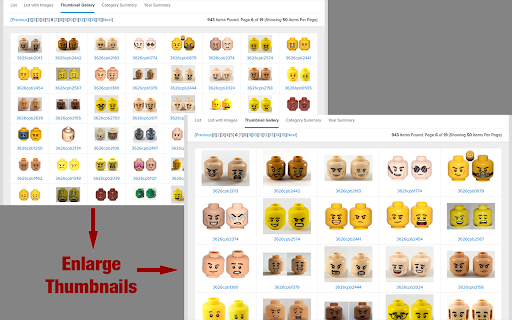
NEW - Enlarge Thumbnail Images
Makes thumbnail images appear twice as big (in Search, Catalog, Store, Order)
NEW - 'Esc' to Close Image Previews
Enables 'Esc' key to close any pop-up image previews (in Search, Catalog, Item, Store, Order).

Reviews
Loading reviews...
Permissions (1)
Permissions
storageℹ Can store data locally in your browser
Details
| Version | 1.2.2 |
| Updated | Jan 28, 2024 |
| Size | 67.56KiB |
| First Seen | Mar 30, 2026 |
Popular in workflow

Adobe Acrobat: PDF edit, convert, sign tools
by Adobe Inc.
331M
★ 4.40
workflow
331M
★ 4.40
workflow

AdBlock — block ads across the web
by AdBlock
63M
★ 4.48
workflow
63M
★ 4.48
workflow

迅雷下载支持
by Shenzhen Xunlei Network Technology Co., Ltd.
59M
★ 2.77
workflow
59M
★ 2.77
workflow

Adblock Plus - free ad blocker
by eyeo GmbH
41M
★ 4.39
workflow
41M
★ 4.39
workflow

Chrome Remote Desktop
by Chrome Remote Desktop Release Managers
39M
★ 3.14
workflow
39M
★ 3.14
workflow
Popular Extensions
Adobe Acrobat: PDF edit, convert, sign tools
by Adobe Inc.
331M
★ 4.40
workflow
331M
★ 4.40
workflow
AdBlock — block ads across the web
by AdBlock
63M
★ 4.48
workflow
63M
★ 4.48
workflow
迅雷下载支持
by Shenzhen Xunlei Network Technology Co., Ltd.
59M
★ 2.77
workflow
59M
★ 2.77
workflow

Grammarly: AI Writing Assistant and Grammar Checker App
by Grammarly
42M
★ 4.50
communication
42M
★ 4.50
communication
Adblock Plus - free ad blocker
by eyeo GmbH
41M
★ 4.39
workflow
41M
★ 4.39
workflow