
⚠️Not updated in over a year
Description
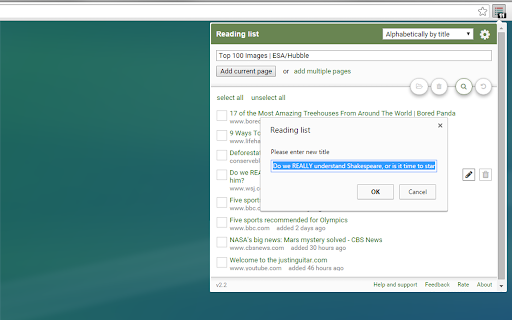
Have you found something interesting on the Internet but don’t necessarily have time now? Reading list is extensions to save articles, videos, and other content for later use. Unlike bookmarks which are meant to be kept indefinitely, the Reading List is meant for pages you’d like to read once or check in the future and then bookmark or just discard.
Features:
- list of web pages to read later
- reading list backup and synchronization*
- reading list searching
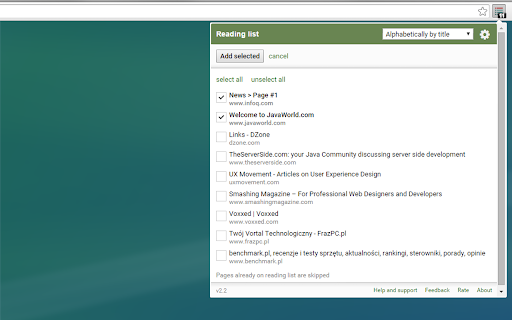
- add multiple pages in one click
- add to reading list from context menu
- quickly add to reading list using shortcut
- open or remove multiple items in one click
- undo recent changes
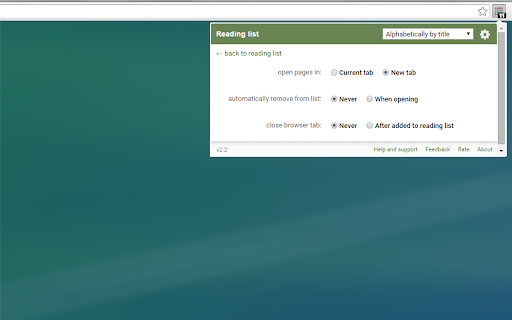
- settings - customize extension
* you need to be signed in to Chrome

Reviews (6 cached)
★☆☆☆☆2018-06-03
Alex Pakh
No export. Useless.
★☆☆☆☆2015-08-27
Emanuel Kingsley
All of my items disappeared after what I believe was an automatic update. I'VE SINCE LOST TRUST in this extension :(
★☆☆☆☆2015-08-21
Nick Redmond
After update all my items were POOF gone. :(
★☆☆☆☆2015-08-15
Victor Almeida
After update, the bookmarks were deleted
★★☆☆☆2021-09-30
Hosty
What is the point of making that extension when I cant add links/pages through right click context menu? Do you know how many extensions I have in my address bar already??
★★☆☆☆2018-06-05
Awkward, clunky, and none of the features make any sense. if this is the best Chrome can provide for a reading list, back to Safari for this surfer.
Permissions (4)
Permissions
activeTabℹ Can access the current tab when you click the extension contextMenusℹ Can add items to the right-click menu storageℹ Can store data locally in your browser tabsℹ Can see your open tabs and their URLs
Details
| Version | 3.1 |
| Updated | Nov 18, 2024 |
| Size | 1.63MiB |
| First Seen | Mar 29, 2026 |
Popular in workflow

Adobe Acrobat: PDF edit, convert, sign tools
by Adobe Inc.
331M
★ 4.40
workflow
331M
★ 4.40
workflow

AdBlock — block ads across the web
by AdBlock
63M
★ 4.48
workflow
63M
★ 4.48
workflow

迅雷下载支持
by Shenzhen Xunlei Network Technology Co., Ltd.
59M
★ 2.77
workflow
59M
★ 2.77
workflow

Adblock Plus - free ad blocker
by eyeo GmbH
41M
★ 4.39
workflow
41M
★ 4.39
workflow

Chrome Remote Desktop
by Chrome Remote Desktop Release Managers
38M
★ 3.14
workflow
38M
★ 3.14
workflow
Popular Extensions
Adobe Acrobat: PDF edit, convert, sign tools
by Adobe Inc.
331M
★ 4.40
workflow
331M
★ 4.40
workflow
AdBlock — block ads across the web
by AdBlock
63M
★ 4.48
workflow
63M
★ 4.48
workflow
迅雷下载支持
by Shenzhen Xunlei Network Technology Co., Ltd.
59M
★ 2.77
workflow
59M
★ 2.77
workflow

Grammarly: AI Writing Assistant and Grammar Checker App
by Grammarly
42M
★ 4.50
communication
42M
★ 4.50
communication
Adblock Plus - free ad blocker
by eyeo GmbH
41M
★ 4.39
workflow
41M
★ 4.39
workflow