
⚠️Not updated in over 2 years
Description
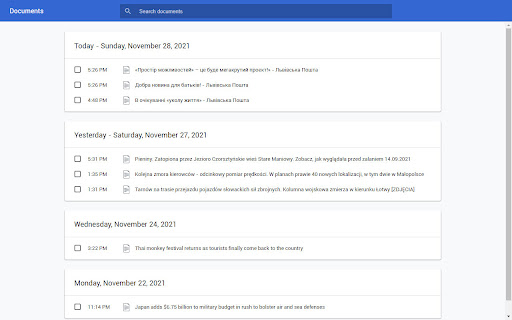
Conradish lets you create print version of online news articles. It strips out ads and other distractions, reformatting text to a uniform, professional look. In addition, it lets you attach footnotes to words and sentences.
The extension was designed with educators in mind, those who wish to make use web materials in the classroom. It is especially useful for teachers of foreign languages thanks to its automatic translation feature.
Features
• Printing only selected portion of an article
• Removal of ads and images
• Simplification of page layout
• Editing of text prior to printing
• Point-and-click content scrubbing.
• Addition of footnotes
• Inflection tables for selected languages
• Integration with Google Translate
User Guide
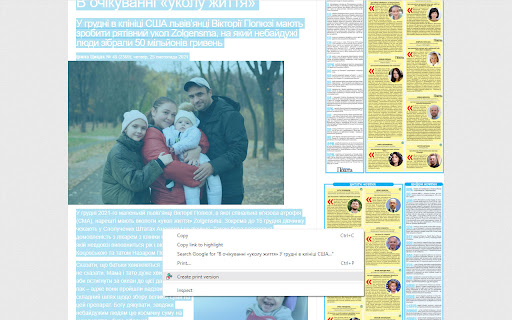
To create a print version of the article that you're viewing, first select the portion you wish to print. Don't worry if the selection ends up including undesired navigational elements—these will get filtered out. After making the selection, right-click on it and choose "Create print version". The print version will open up in a new browser tab.
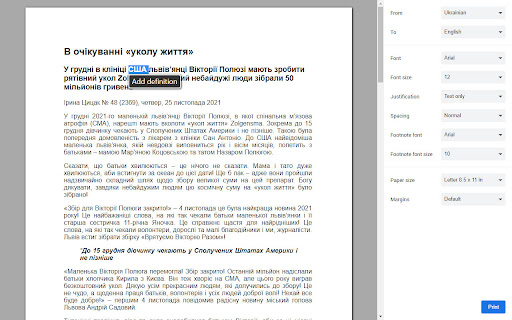
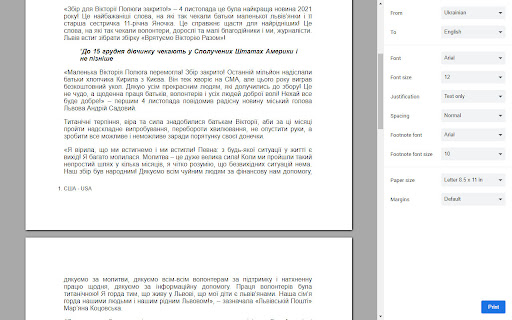
To footnote the definition of a word, first select the word using your mouse, then click "Add definition" in the pop-up menu that appears underneath.
To footnote a whole sentence, select it then click "Add translation".
To remove a footnote, simply delete the associated footnote number or delete the entry in the page footer.
All actions can be reversed by pressing Ctrl-Z.
For more instructions, please consult the built-in user guide. You can access it by clicking the question-mark icon in the lower left-hand corner.
Privacy
Conradish does not capture any user information. It does not monitor your browsing history. All data is stored locally. The extension does send text to Google for the purpose of translation. The privacy implications are the same as those of using Google Translate. When you install the extension, the browser will warn that it can access "your data" at translate.googleapis.com. The data in question is just translated phrases.

Reviews
Loading reviews...
Permissions (6)
Permissions
activeTabℹ Can access the current tab when you click the extension contextMenusℹ Can add items to the right-click menu fontSettings scriptingℹ Can inject scripts into web pages storageℹ Can store data locally in your browser unlimitedStorage
Details
| Version | 1.9 |
| Updated | Sep 20, 2022 |
| Size | 327KiB |
| First Seen | Mar 29, 2026 |
Popular in workflow

Adobe Acrobat: PDF edit, convert, sign tools
by Adobe Inc.
331M
★ 4.40
workflow
331M
★ 4.40
workflow

AdBlock — block ads across the web
by AdBlock
62M
★ 4.48
workflow
62M
★ 4.48
workflow

迅雷下载支持
by Shenzhen Xunlei Network Technology Co., Ltd.
59M
★ 2.77
workflow
59M
★ 2.77
workflow

Adblock Plus - free ad blocker
by eyeo GmbH
41M
★ 4.39
workflow
41M
★ 4.39
workflow

Chrome Remote Desktop
by Chrome Remote Desktop Release Managers
39M
★ 3.14
workflow
39M
★ 3.14
workflow
Popular Extensions
Adobe Acrobat: PDF edit, convert, sign tools
by Adobe Inc.
331M
★ 4.40
workflow
331M
★ 4.40
workflow
AdBlock — block ads across the web
by AdBlock
62M
★ 4.48
workflow
62M
★ 4.48
workflow
迅雷下载支持
by Shenzhen Xunlei Network Technology Co., Ltd.
59M
★ 2.77
workflow
59M
★ 2.77
workflow

Grammarly: AI Writing Assistant and Grammar Checker App
by Grammarly
42M
★ 4.50
communication
42M
★ 4.50
communication
Adblock Plus - free ad blocker
by eyeo GmbH
41M
★ 4.39
workflow
41M
★ 4.39
workflow