
Description




Reviews (35 cached)
1 time it actually showed all of the files in a given folder - 1 time thats it. every other time it always shows all folders to be empty of any files. nice job useless tool
After giving it access, every folder I click tells me "No items in this folder"
Doesn't work. Can't uninstall. Bad idea.
Didn't work. I get an error from Google when trying to authorize the app. Apparently the app has been disabled by Google.
Doesn't show any of my files, so can't use it
Asked for access to my Drive, then did nothing.
messed everything in my google drive when I tried to remove a suffix from files
App not reviewed, doesn't authorise.
Renaming with RegEx option does not work
I can't even select a folder and get this silly App working.
Did not "see" my files in a folder. I had to double check and the files were there. After some restarts and refreshes the app did not locate them at all.
Couldn't get it to work. Hung on checking permissions.
Couldn't rename files from files shared withe me that I had full editing privileges.
Useless, does not work at all
The app doesn't allow you to select multiple files and place them in a specific order and apply a numbering system. No regex system is available for renaming complex folders. For example, imagine you have a directory with files like this: Chapter 1 Chapter 10 Chapter 2 Chapter 20 I see no way to replace 1 with 01 and 2 with 02 etc. I also see no way to select these, drag them around and have the app strip the numbers and apply new ones. Thanks anyhow.
breaks after a month or so
Didn't work, can't select a folder
Doesn't seem to work as described. Apparently, you can only alter "file you have owner or editor permissions for," and yet, shared folders/files I can edit manually are not available when searching.
no custom naming options...
doesn't work for me, setup the change parameters but the 'next' button does nothing, just sits doing nothing.
Doesn't work. At least it isn't at all intuitive. Can't select individual files to rename. Stuck at selecting folder to rename? WTF?
Does not work
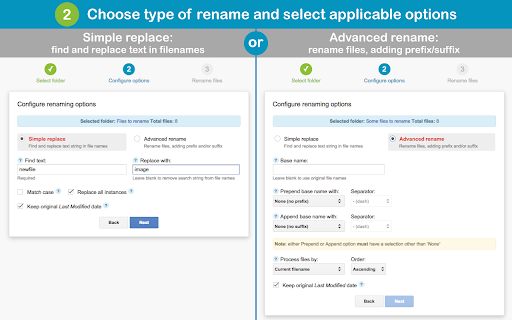
Wont allow adding a prefix or suffix to the original file name... Not much use to me!
Doesn't work. I installed it, gave it permissions, opened it, clicked "Select folder", then it just gives me the error: "The API developer key is invalid." I am unable to click anything or exit without closing the whole page. Uninstalled.
Cant rename images in numerical order. I downloaded this hoping it would help to rename images in numeric order on my Chrome OS but doesn't seem to have this function to my disappointment. If there is a suggestion or solution to this please let me know and i shall update my review. Thank you b
Very limited. Couldn't simply add a phrase before or after the existing names of a few files, a basic function of a batch file renamer imo.
Sign in disable with google sign in. The message said its because the app was not verified.
I have thousands of files that have the wrong extension. This doesn't allow one to change the extension.
Some folders do not show up. Curious.
can select a drive folder but not the files in it. select button is always greyed out. shame. would be such a handy app I would even be willing to pay for..
App is reasonably featureful. Has problems with large folders, often includes files not selected by the user, seems to cap selections at 200 400 600 or some other multiple of 200 files. Preview of rename occasionally shows wrong details about impending rename. But in the end, it does eventually do what it says, to at least some of the selected files.
Am I missing something, or can you not prepend or append custom text to a file? Like if i wanted to add the word "monkey" before each file name, that can't be done?
It used to work flawlessly but now my folders just do not appear
Works but things like sorting by current filename are broken.
How do I remove this? Works okay but conflicting with another extension I deeply need. All i see is "Visit Website" but no instructions to remove.
Details
| Version | 3.0.0.2 |
| Updated | Jun 27, 2019 |
| Size | 44.99KiB |
| First Seen | Mar 29, 2026 |
Popular in workflow




Popular Extensions
