
Capture Master – Full Page Screenshot & Annotation Tool
by MGSVEVO
v1.0.83 Updated Dec 3, 2025 7.04MiB
Description
Capture Master is the ultimate all-in-one tool to capture, annotate, compare, and share anything on the web. Built for maximum productivity, it combines powerful features with a clean, intuitive interface — all while keeping your data 100% private.
Why Capture Master?
🌟 Completely Free – No paywalls, no locked features.
🔒 100% Private & Secure – Everything happens locally on your computer. Nothing is ever uploaded, so your data stays yours. Capture Master works fully offline.
📐 Capture entire web pages in one continuous PNG file.
Key Features
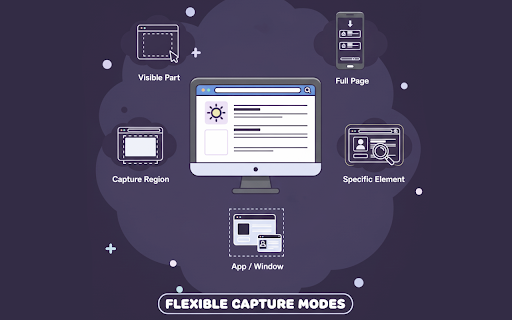
1️⃣ Multiple Ways to Capture – Capture a full page screenshot, visible area, selected regions or elements, or any app/window.
2️⃣ Multiple Export Formats – Save as high-quality PNG, JPEG, or PDF.
3️⃣ Side-by-Side Comparison – Quickly identify visual differences between two screenshots. Ideal for QA teams, developers, and designers. Plus, you can download the side-by-side view as a single image for easy sharing
4️⃣ Pro Annotation Tools – Add text, arrows, highlights, blur sensitive info, crop, or drop in icons.
5️⃣ Seamless Email Integration – Attach captures directly in Gmail or Outlook compose windows.
6️⃣ Delayed Capture Mode – Perfect for menus, hover states, or timed interactions.
7️⃣ One-Click Clipboard Copy – Copy your finished screenshot instantly.
8️⃣ Capture History Panel – Browse, revisit, or delete past captures with ease.
9️⃣ Smart Element Hider – Select any element on any website to hide it during capture. Save your selections so they’re automatically applied every time you revisit that website.
What Makes It Different
🔥 True Full-Page Capture – Save even endless scrolling pages as a single seamless PNG.
✨ Smart Element Snap – Hold Alt to instantly highlight and capture any page element with pixel-perfect precision.
📂 Organized & Accessible – Keep up to 50 recent captures neatly stored and instantly accessible.
With Capture Master, you get a fast, private, and feature-packed screenshot solution — without the clutter or compromises.



Reviews
Loading reviews...
Permissions (8)
Permissions
activeTabℹ Can access the current tab when you click the extension contextMenusℹ Can add items to the right-click menu downloadsℹ Can manage and monitor downloads offscreen scriptingℹ Can inject scripts into web pages storageℹ Can store data locally in your browser tabsℹ Can see your open tabs and their URLs unlimitedStorage
Details
| Version | 1.0.83 |
| Updated | Dec 3, 2025 |
| Size | 7.04MiB |
| First Seen | Mar 29, 2026 |
Popular in workflow

Adobe Acrobat: PDF edit, convert, sign tools
by Adobe Inc.
331M
★ 4.40
workflow
331M
★ 4.40
workflow

AdBlock — block ads across the web
by AdBlock
62M
★ 4.48
workflow
62M
★ 4.48
workflow

迅雷下载支持
by Shenzhen Xunlei Network Technology Co., Ltd.
59M
★ 2.77
workflow
59M
★ 2.77
workflow

Adblock Plus - free ad blocker
by eyeo GmbH
41M
★ 4.39
workflow
41M
★ 4.39
workflow

Chrome Remote Desktop
by Chrome Remote Desktop Release Managers
39M
★ 3.14
workflow
39M
★ 3.14
workflow
Popular Extensions
Adobe Acrobat: PDF edit, convert, sign tools
by Adobe Inc.
331M
★ 4.40
workflow
331M
★ 4.40
workflow
AdBlock — block ads across the web
by AdBlock
62M
★ 4.48
workflow
62M
★ 4.48
workflow
迅雷下载支持
by Shenzhen Xunlei Network Technology Co., Ltd.
59M
★ 2.77
workflow
59M
★ 2.77
workflow

Grammarly: AI Writing Assistant and Grammar Checker App
by Grammarly
42M
★ 4.50
communication
42M
★ 4.50
communication
Adblock Plus - free ad blocker
by eyeo GmbH
41M
★ 4.39
workflow
41M
★ 4.39
workflow