
Web Audio Recorder - Record Browser Audio to MP3 & WAV
by Capture App
v2.4.7 Updated Feb 17, 2026 461KiB
Description
Web Audio Recorder — Your Ultimate Browser Audio Capture Tool
Quickly and effortlessly record browser audio from any tab directly into high-quality MP3 or WAV files — no external software needed. Perfect for creators who need a simple, privacy-focused way to capture streaming audio, internet radio, webinars, lectures, podcasts, and music.
🎙️ Perfect for:
▸ Podcasts & Interviews — record live shows or remote discussions directly from your browser.
▸ Lectures & Webinars — save online classes and training with a single click.
▸ Music & Streams — capture streaming audio, internet radio, or sound effects.
▸ Tutorials & Voice Notes — create voice memos, guides, and quick demos without exporting.
🔧 Key Features (what you can do):
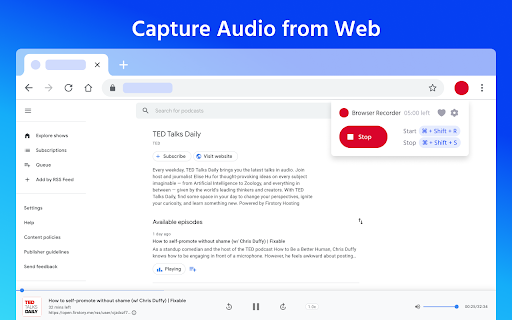
▸ Tab audio capture — record audio from any active tab (system/browser audio).
▸ MP3 & WAV output — choose compressed MP3 (low/medium/high bitrate) or lossless WAV for highest fidelity.
▸ High-quality audio — control MP3 quality and preserve stereo channels when available.
▸ Custom duration — set a maximum recording time (e.g., 20 minutes).
▸ Mute tab while recording — automatically silence the recording tab for private sessions.
▸ Hotkeys — start/stop instantly with Shift + R / Shift + S.
▸ Local saving, no uploads — all files are saved locally; no server uploads, ensuring privacy and offline use.
▸ Lightweight & real-time — records in real time with minimal CPU usage and no delays.
🚀 How it works:
1.Install Web Audio Recorder from the Chrome Web Store.
2.Open the tab with the audio you want to capture.
3.Click Record or press Shift + R.
4.Stop with Shift + S and download your MP3 or WAV file.
⭐ Why choose Web Audio Recorder?
✅ Simple, intuitive interface for fast recording.
✅ Record streaming audio and save locally in MP3/WAV.
✅ High-quality, low-latency capture — suitable for podcasts and music.
✅ Privacy-focused: no ads, no sign-ups, 100% offline.
✅ Free to use and lightweight.
📌 Pro tips: use WAV for lossless archives and MP3 (high) for podcast publishing. For webinars or recordings where you need maximum clarity, enable the highest MP3 quality or choose WAV.
🌟 Start capturing audio from your browser — fast, private, and under your control.
Install Web Audio Recorder now and turn your browser into a powerful audio capture tool.
Reviews (4 cached)
★☆☆☆☆2026-03-27
Godwin Nwokolo
Attempt to save recording crashes the entire browser :(
★☆☆☆☆2024-08-10
Naeem Zekrallah
It is not working for me ,not recording at all
★★☆☆☆2026-02-28
Lena Ansorgová (Lennonka)
Good, simple interface, but crashed my browser on save (Linux problem maybe?).
★★☆☆☆2024-07-31
Chris Pook
Can't record for more than 20mins. Pretty useless.
Permissions (6)
Permissions
activeTabℹ Can access the current tab when you click the extension alarmsℹ Can schedule periodic background tasks downloadsℹ Can manage and monitor downloads offscreen storageℹ Can store data locally in your browser tabCaptureℹ Can capture tab audio/video
Details
| Version | 2.4.7 |
| Updated | Feb 17, 2026 |
| Size | 461KiB |
| First Seen | Mar 30, 2026 |
Popular in tools

Zotero Connector
by Zotero
8M
★ 3.96
tools
8M
★ 3.96
tools

Browsec VPN - Free VPN for Chrome
by Browsec
7M
★ 4.44
tools
7M
★ 4.44
tools

AnyDoc Translator - Translate Web and PDF
by www.wps.com
7M
★ 4.59
tools
7M
★ 4.59
tools

Video DownloadHelper
by Aclap
5M
★ 4.43
tools
5M
★ 4.43
tools

Microsoft Bing Homepage & Search for Chrome
by Microsoft Corporation
4M
★ 3.72
tools
4M
★ 3.72
tools
Popular Extensions

Adobe Acrobat: PDF edit, convert, sign tools
by Adobe Inc.
331M
★ 4.40
workflow
331M
★ 4.40
workflow

AdBlock — block ads across the web
by AdBlock
62M
★ 4.48
workflow
62M
★ 4.48
workflow

Grammarly: AI Writing Assistant and Grammar Checker App
by Grammarly
42M
★ 4.50
communication
42M
★ 4.50
communication

Adblock Plus - free ad blocker
by eyeo GmbH
41M
★ 4.39
workflow
41M
★ 4.39
workflow

Chrome Remote Desktop
by Chrome Remote Desktop Release Managers
38M
★ 3.14
workflow
38M
★ 3.14
workflow