
Yellow Tomato — Pomodoro Timer & Site Blocker
v2.3.0 Updated Mar 29, 2026 473KiB
✅Recently updated
Description
Yellow Tomato is a simple Pomodoro timer that helps you stay focused, avoid distractions, and get more done.
Work in short, focused intervals followed by quick breaks — a proven method used by students, developers, writers, and remote workers to stay productive without burning out.
With Yellow Tomato, you always know when it’s time to work and when it’s time to rest.
⸻
🍅 How It Works
1. Configure your work and break intervals
2. Start the timer and focus on one task until it ends
3. Take a break and get notified when it’s time to get back to work
4. Repeat and build momentum throughout the day
⸻
✨ Features
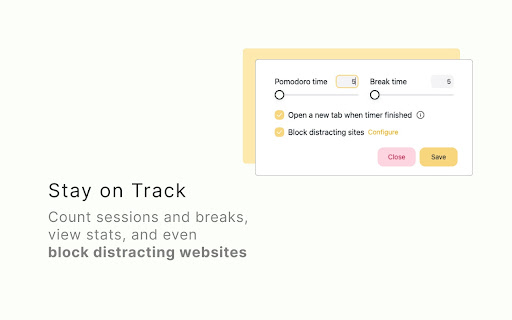
• Custom Pomodoro timer – set your preferred work interval
• Break timer – automatic tracking of break time
• Session counter – see how many Pomodoro sessions you’ve completed
• Distraction blocker – block websites that interrupt your focus
• Custom extension icon display – choose to show:
• completed sessions
• remaining minutes
• nothing
• End-of-cycle notification – get alerted when a session finishes
• Optional sound alert – hear when it’s time for a break
• Open a new tab after each cycle (optional)
⸻
⭐ Why Yellow Tomato?
Many timers are cluttered or complicated. Yellow Tomato stays simple so you can focus on what matters: your work.

Reviews (4 cached)
★☆☆☆☆2025-12-23
Lucio Cascone
installed the extension but there is no sound notification at the end of a cycle.
★☆☆☆☆2024-10-26
Janet Gao
doesn't work to see the time - remaining - when out of the extension and cannot block site
★★☆☆☆2024-11-08
Borjovsky
works, but should allow ANY time interval, not only 5 mins! What if I want to take a break of only 1min?
★★★☆☆2026-02-10
Katherine
Great design, easy to use, like how a Chrome extension should be. To take this to the next level to a consistent 5 stars, there needs to be a notification sound at the beginning and end of the cycles. Also, it didn't block websites for me personally.
Permissions (5)
Permissions
alarmsℹ Can schedule periodic background tasks notificationsℹ Can show desktop notifications offscreen storageℹ Can store data locally in your browser tabsℹ Can see your open tabs and their URLs
Details
| Version | 2.3.0 |
| Updated | Mar 29, 2026 |
| Size | 473KiB |
| First Seen | Mar 31, 2026 |
Popular in workflow

Adobe Acrobat: PDF edit, convert, sign tools
by Adobe Inc.
331M
★ 4.40
workflow
331M
★ 4.40
workflow

AdBlock — block ads across the web
by AdBlock
62M
★ 4.48
workflow
62M
★ 4.48
workflow

迅雷下载支持
by Shenzhen Xunlei Network Technology Co., Ltd.
59M
★ 2.77
workflow
59M
★ 2.77
workflow

Adblock Plus - free ad blocker
by eyeo GmbH
41M
★ 4.39
workflow
41M
★ 4.39
workflow

Chrome Remote Desktop
by Chrome Remote Desktop Release Managers
38M
★ 3.14
workflow
38M
★ 3.14
workflow
Popular Extensions
Adobe Acrobat: PDF edit, convert, sign tools
by Adobe Inc.
331M
★ 4.40
workflow
331M
★ 4.40
workflow
AdBlock — block ads across the web
by AdBlock
62M
★ 4.48
workflow
62M
★ 4.48
workflow
迅雷下载支持
by Shenzhen Xunlei Network Technology Co., Ltd.
59M
★ 2.77
workflow
59M
★ 2.77
workflow

Grammarly: AI Writing Assistant and Grammar Checker App
by Grammarly
42M
★ 4.50
communication
42M
★ 4.50
communication
Adblock Plus - free ad blocker
by eyeo GmbH
41M
★ 4.39
workflow
41M
★ 4.39
workflow