
⚠️Not updated in over a year
Description
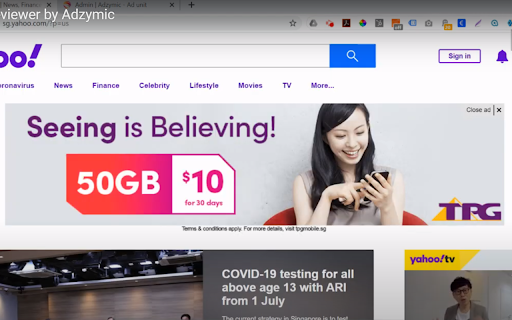
Save time on doing screenshots on how the ad looks like in real publisher's environment. . Rather than relying on manually doing screenshot and replacing the ad using photo editor, using Adzymic Smart Previewer is fast and easy. You can now use Adzymic Smart Previewer to preview creative tags on any live websites, by easy selection of elements and ad container. Once done, you can download the screenshot.
This Chrome extension allows user to select the ad container of a particular web page and replace it with a creative ad tag. User can specify the dimension of the ad. Once the creative ad tag is placed, the ad will be shown on the selected ad container. User can then take a screenshot and download the screenshot as png.
How to use
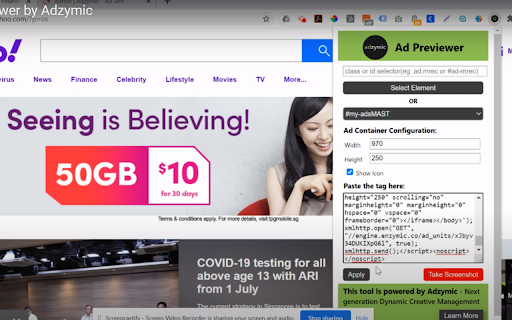
Select Element - Once selected, the mouse pointer will change to "+". Mouse over and click on area beside any ad slot that you want to replace.
OR
Select Ad Container - Choose the ad container that you want replace. Our chrome extension scan the list of ad container available for the page.
Choose Ad Size - Select the dimension of the ad size you want to replace. e.g. 300x250, 970x250.
Show Icon - Select this if you would like to display "Ad Choice" icon.
Paste the Tag - Paste creative tag here. We accept any creative tags.
Click on Apply. Once apply, you should see the existing ad replace with the ad that you inserted.
Take a Screenshot - Click on this button to download the screenshot of the page rendered with the new ad.


Reviews
Loading reviews...
Permissions (7)
Permissions
activeTabℹ Can access the current tab when you click the extension background notificationsℹ Can show desktop notifications pageCaptureℹ Can save web pages as MHTML scriptingℹ Can inject scripts into web pages storageℹ Can store data locally in your browser tabsℹ Can see your open tabs and their URLs
Details
| Version | 2.0 |
| Updated | Mar 7, 2025 |
| Size | 22.82KiB |
| First Seen | Mar 31, 2026 |
Popular in workflow

Adobe Acrobat: PDF edit, convert, sign tools
by Adobe Inc.
322M
★ 4.40
workflow
322M
★ 4.40
workflow

AdBlock — block ads across the web
by AdBlock
62M
★ 4.48
workflow
62M
★ 4.48
workflow

迅雷下载支持
by Shenzhen Xunlei Network Technology Co., Ltd.
59M
★ 2.77
workflow
59M
★ 2.77
workflow

Adblock Plus - free ad blocker
by eyeo GmbH
40M
★ 4.39
workflow
40M
★ 4.39
workflow

Chrome Remote Desktop
by Chrome Remote Desktop Release Managers
37M
★ 3.13
workflow
37M
★ 3.13
workflow
Popular Extensions
Adobe Acrobat: PDF edit, convert, sign tools
by Adobe Inc.
322M
★ 4.40
workflow
322M
★ 4.40
workflow
AdBlock — block ads across the web
by AdBlock
62M
★ 4.48
workflow
62M
★ 4.48
workflow
迅雷下载支持
by Shenzhen Xunlei Network Technology Co., Ltd.
59M
★ 2.77
workflow
59M
★ 2.77
workflow

Grammarly: AI Writing Assistant and Grammar Checker App
by Grammarly
42M
★ 4.50
communication
42M
★ 4.50
communication
Adblock Plus - free ad blocker
by eyeo GmbH
40M
★ 4.39
workflow
40M
★ 4.39
workflow