
⚠️Not updated in over 2 years ⚠️Very few reviews for its user base
Description
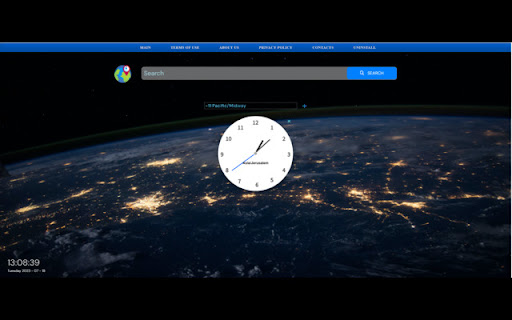
MyWorldlClock is a versatile Chrome extension that enables users to effortlessly add and track multiple clocks from various time zones around the globe. Stay connected with friends, family, and colleagues worldwide, while easily managing different time zones in a user-friendly interface.
By clicking “ADD TO CHROME”, I accept and agree to install MyWorldlClock extension and setting Chrome new tab search provider to Microsoft Bing as described by the service in our Terms of use: Terms of Use: https://mobitech.io/toc.html and Privacy policy: Privacy Policy: https://mobitech.io/pp
You may uninstall the extension at any time
To remove our extension from Google Chrome:
1) Click on the three vertical dots icon in the upper right-hand corner of your Chrome browser
2) Go to "Settings"
3) In the left menu that appears, click on "Extensions"
4) From the list of installed Extensions, locate the extension you would like to uninstall
Reviews
Loading reviews...
Permissions (1)
Permissions
storageℹ Can store data locally in your browser
Details
| Version | 1.0.2 |
| Updated | Jan 17, 2024 |
| Size | 1.42MiB |
| First Seen | Mar 31, 2026 |
More by Mobitech

Popular in workflow

Adobe Acrobat: PDF edit, convert, sign tools
by Adobe Inc.
331M
★ 4.40
workflow
331M
★ 4.40
workflow

AdBlock — block ads across the web
by AdBlock
63M
★ 4.48
workflow
63M
★ 4.48
workflow

迅雷下载支持
by Shenzhen Xunlei Network Technology Co., Ltd.
59M
★ 2.77
workflow
59M
★ 2.77
workflow

Adblock Plus - free ad blocker
by eyeo GmbH
41M
★ 4.39
workflow
41M
★ 4.39
workflow

Chrome Remote Desktop
by Chrome Remote Desktop Release Managers
38M
★ 3.14
workflow
38M
★ 3.14
workflow
Popular Extensions
Adobe Acrobat: PDF edit, convert, sign tools
by Adobe Inc.
331M
★ 4.40
workflow
331M
★ 4.40
workflow
AdBlock — block ads across the web
by AdBlock
63M
★ 4.48
workflow
63M
★ 4.48
workflow
迅雷下载支持
by Shenzhen Xunlei Network Technology Co., Ltd.
59M
★ 2.77
workflow
59M
★ 2.77
workflow

Grammarly: AI Writing Assistant and Grammar Checker App
by Grammarly
42M
★ 4.50
communication
42M
★ 4.50
communication
Adblock Plus - free ad blocker
by eyeo GmbH
41M
★ 4.39
workflow
41M
★ 4.39
workflow