
Peek-a-tab, Tabs Manager for Google Chrome™
Description
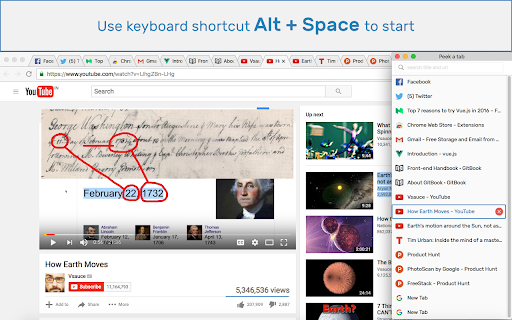


Reviews (20 cached)
Was wonderful to me for years but now your tab count appears as a red numeric notification jewel. Kinda greedy interface move, totally unnecessary yet no way to turn it off. No I don't want the illusion of MORE notifications. I want peace and organization that's why I installed a tab organizing tool. Uninstalling this extension because red notification jewels that don't go away are unacceptable.
Great idea. Doesn't work but great idea.
Simply does not work. No previews, no nothing. Just a long list of open tabs.
Only shows preview of tab if you scroll over it too fast to actually see the preview. Useless.
Pretty good general functionality, mainly being able to see the titles of each tab and where and in which window that tab exists. However the list spawns in super wonky places and on the wrong monitor of dual multi monitor setups (I have 2 displays currently) basically no matter what I try. Just posted this as an issue on the support page. Please fix.
Hover but unable to preview.
Every time a tab is deleted the list switches to the bottom! :( Is not possible to edit tabs position. By the way, thank you
Good idea but poor implementation : the tabs window is put in front of the Chrome window, when it should reduce the size of the Chrome window et appear beside it, or, if opening a new window as it does now, it should present the tabs af the different Chrome windows in columns. Also no way of reorganizing the tabs within a Crome window, or between Chrome windows.
Claims to show previews for tabs which is why i installed it. After 3 days of trying it I am unable to ever get it to show any previews. Useless.
none of the functions work reliably e.g. 1. hover 2. one-click 3. double click. .
can't reorganize/move tabs around? :(
Suggestion: Add a folder option for tabs so people can better organise tabs in terms of content.
When I left t click on my icon, it comes up and then when I go somewhere on the browser screen and click another spot it disappears. WAZZUP??
helpfull
being a good manager sofar becoming "4 star" ...grade up level...
Nice addon. However, I prefer Quick Tabs (https://chrome.google.com/webstore/detail/quick-tabs/jnjfeinjfmenlddahdjdmgpbokiacbbb) simply because it loads the list quicker and ca n be used only using the keyboard, plus it can also do more than just that.
Please allow users to set their own custom keybinds to open the plugin. Thanks.
Dropdown doesn't work with Vivaldi Web Browser and instead opens new tab
it would be great if you could search through your history and pull up old tabs
good app
Permissions (2)
Permissions
Details
| Version | 2.0.1 |
| Updated | May 29, 2024 |
| Size | 198KiB |
| First Seen | Mar 30, 2026 |
Popular in workflow




Popular Extensions
