
Description
Reviews (30 cached)
Be Careful!!!
Boring settings with no results, avoid!
Great extension, but. A huge BUT! But destorts colors to much darker tone and increases jpg compression level which gives to downloaded pictures compression destortions as well. Otherwise would be a great extension. Sorry, gonna to switch off this extension for starter,if won't be any chanes in some close future, defenitly will uninstall one.
Downloaded this as I needed to grab all the images in a gallery on a website (list of text links to img files in the page). It only managed to detect half the images (all were working/resolved fine so not sure what the issue was there). I ran it, it downloaded the half it detected. So, not much help there. Worse still - what I didn't realise until I refreshed the page, was it has also now DELETED all the images in the directory. So now I have half of the images, and one annoyed friend who I was trying to grab these for. AVOID this plugin.
i was saving images that i had previously uploaded to a website. this extension did save the images, but also deleted them off of the website without my permission. i could not find any warnings about this feature (bug?), but it's unacceptable. i nearly lost very important data that was attached to the deleted images.
ABSOLUTLY HORRIBLE!! I'm a toyhou.se user who needed to mass download images from my characters galleries and somehow this extension hacked my toyhouse and deleted my entire gallery for one of my characters and I never got the HD versions of my images and it only saved low-quality thumbnails of my images with watermarks on them. DO NOT USE THIS EXTENSION IF YOU'RE COMING FROM TOYHOU.SE.
Doesn't work
Did not save all of the images on the page. I don't know why everyone is saying it is great, it completely refuses to download many of the images on the page, or it just can't download image on a page framed within a page.
Useless. Downloads thumbnails, not the full image
Sorry, no number of obscure technical options do anything for me if the "save" button is permanently grayed out. It shouldn't take a great deal of headscratching to download a bunch of images off a page, but this extension manages to make it difficult to understand and impossible to accomplish.
awful
Didn't work. Clicking the extension button opens a useless interface that you can't even click on. Attempting to click on it clicks through to the page and closes the interface.
Garbage, did not work, says it finds images but all action buttons are disabled, any button that isn't just goes to this chrome extension page. useless bs.
Doesn't work
While downloading, there is a "Malicious Site Blocked!".
Either downloads all images and puts them in a zip files, or you have to manually select the save folder for every single image (unless you change browser preferences).
1. Cannot detect images in saved offline html files 2. is not capable of detecting images generated from scripts
Can't handle embeded images (src="data:image/png,base64...")
I got this extension to use on a single website that another chrome addon couldn't download, this one didn't work either, if it works on some websites that's good, the interface is nice, but the fact is, it didn't work for me, so it's no good.
Not bad but I can't figure out how to make a selection first, so I'm forced to download all every time, and then look for the images I'm interested in.
While using this extension to downloading the images of the website, the websites are block by antivirus and showing "Malicious Site Blocked! Protection blocked this website:"
My biggest issue with it is that it does not confirm anything. If you have a long running proces (either crawling or downloading a huge set of pics), you click something it just cancels or restarts the whole thing, not asking anything. Other than that, it's fine, has plenty of features.
It works good but it would be much better if we had a option to save the images to our preferred file format... if the found files aren't in that format; convert them to the preferred format before saving them.
Works great when it works, what I mean is it works on the 1st download smoothly and great but it stops working afterwards. I spam click on download and save buttons, blue bar loads but then nothing happens.
It used to work really well, but now it just won't save the images I used to be able to save on the web pages. No idea why, it just doesn't want to save them anymore.
It's the only extension that actually detected every single image I was trying to download so I'll give it 3 stars for that but sadly for some reason it wont let me download them, it might be because I'm trying to download 300+ images, if someone knows how to fix this please tell me.
Guy's I Really Loved this Extension But Recently It Doesn't Show Linked Pictures, Background scripts, and CSS files,Please Solve This Soon!
Things went well on the first download, but on the exact same page and site with different results, the plugin is failing. Everything goes well and displays an alert like "downloading 263 images" but only ends up downloading one file in a zip. It seems there's a bit of an issue on subsequent uses in the same session.
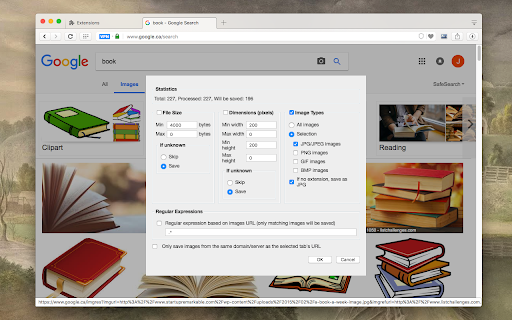
The detection process is very slow, like 10-100 maybe even 1000 times slower than anything else i tried and it was only 1 layer deep, BUT it does do a more thorough job and finds files that others don't, not sure how useful that is, it's very rare when my usual methods don't work. The filtering and/or reporting is only half way working, for example setting the size to min 500px tall and wide still includes files 180x240 in size (even after rescanning), the same with File size, setting it to 40.000 (~40kB) skips files 80KB in size, but not ones 56KB, or 72KB... etc, it's weird. Saving is also weird, nothing from the save dialog seems to be working, the name of that zip file is random, it has nothing to do with anything, not time of download, not the URL you downloaded from, nothing, even though it's supposed to be [title] - [date] [time].zip, and in the preview it seems to do it properly, but when you actually save it's random, also instead of saving all images into a dedicated folder for them (like Video DownloadHelper does) it saves them into a zip file, why ? it's better than saving 1 by 1 i suppose, like most extensions. I was hoping to download image sets with this that don't link straight to the image but the full size image on a new page, and this can kinda do that, really slowly, but the filtering does not work well enough, so instead of 15 images it found 506, so i'm better off downloading them 1 by 1.
This is a very powerful, well-written extension. It's not for people who want a "plug and play" option, like any more powerful functionality, it requires time to learn. The only problem is that I use another extension for this purpose because this does not save its setting. Therefore, upon each use, you are forced to reconfigure the settings. For rare usage, that's fine -- if you use this with any frequency, better to find a tool that saves its preferences between use.
Permissions (7)
Permissions
Details
| Version | 1.0.9 |
| Updated | Feb 17, 2026 |
| Size | 154KiB |
| First Seen | Mar 30, 2026 |
More by MeryDev




Popular in art





Popular Extensions




