
⚠️Not updated in over 2 years ⚠️Below average rating
Description
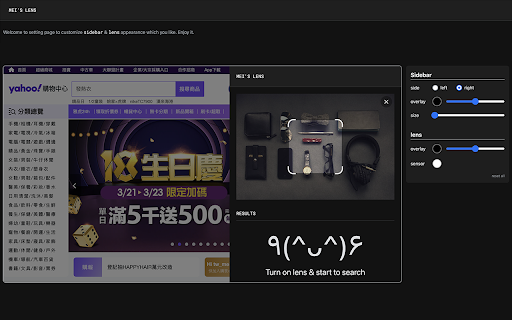
「mei's lens」provides search the web by image feature for web pages.
With 「mei's lens」you could do the following stuff.
- Pick & select image for searching by image.
- Comes with light / dark mode.
※ Usage instructions:
1. Turn on「mei's lens」by context menu or browser bar icon.(「mei's lens」will apply image directly once tap image context menu).「mei's lens」 will ask for google account login for 1st time usage. (This is just for recording request count only)
2. Switch mode to select area which you like to search.
※ How to switch main image source?
1. Drag & drop image file or web page element into main image section.
2. Focus main image section then paste url、image、html string on it.
3. Double click main image section to pick up image you like.
※ Keyboard shortcuts:
- 「ctrl」+「shift」+「L」: toggle「mei's lens」.
- 「esc」: turn off「mei's lens」.
※ Related videos:
- Tutorial: https://www.youtube.com/watch?v=jjUhkBtMGF4
- Switch image source: https://www.youtube.com/watch?v=SDS85iuBDlk
Enjoy it.
※ Change Log:
1.0.5:
a. Add identity permission to connect with user's google account. (This is just for recording request count only)
1.0.4:
a. Add options page for customize appearance.
1.0.3:
a. Keyboard shortcut: 「esc」for turn off「mei's lens」.
b. Performance enhancement.
1.0.2:
a. Keyboard shortcut: 「ctrl」+「shift」+「L」 for toggle「mei's lens」.
b. Add several ways to switch image source. User can copy / paste url、image、html string on main image when focus on it. Besides that,DnD also support drag file or web element into main image to switch its source.
1.0.1
a. fix: data normalize.



Reviews (4 cached)
★☆☆☆☆2022-11-06
Mesut Temel
useless
★☆☆☆☆2022-10-23
Mattia Tonelli
it doesn't work, it just ask you the account and then it does nothing.
★☆☆☆☆2022-10-10
Δ. Σ.
doesn't work
★☆☆☆☆2022-09-08
pseudo David
doesn't work
Permissions (4)
Permissions
contextMenusℹ Can add items to the right-click menu downloadsℹ Can manage and monitor downloads identityℹ Can use your Google account identity storageℹ Can store data locally in your browser
Details
| Version | 1.0.5 |
| Updated | Apr 13, 2022 |
| Size | 2.07MiB |
| First Seen | Mar 26, 2026 |
More by Paul Li

Crop It!
by Paul Li
9K
★ 2.77
workflow
9K
★ 2.77
workflow

Read It!
by Paul Li
140
★ 3.67
workflow
140
★ 3.67
workflow

Pirate
by Paul Li
115
★ 5.00
workflow
115
★ 5.00
workflow

Yahoo奇摩拍賣 - SnR
by Paul Li
61
★ 0.00
workflow
61
★ 0.00
workflow

mei's Handy Tool
by Paul Li
3
★ 5.00
workflow
3
★ 5.00
workflow
Popular in tools

Zotero Connector
by Zotero
8M
★ 3.96
tools
8M
★ 3.96
tools

Browsec VPN - Free VPN for Chrome
by Browsec
7M
★ 4.44
tools
7M
★ 4.44
tools

AnyDoc Translator - Translate Web and PDF
by www.wps.com
7M
★ 4.58
tools
7M
★ 4.58
tools

WPS PDF - Read, Edit, Fill, Convert, and AI Chat PDF with Ease
by www.wps.com
7M
★ 4.45
tools
7M
★ 4.45
tools

Video DownloadHelper
by Aclap
5M
★ 4.43
tools
5M
★ 4.43
tools
Popular Extensions

Adobe Acrobat: PDF edit, convert, sign tools
by Adobe Inc.
331M
★ 4.40
workflow
331M
★ 4.40
workflow

AdBlock — block ads across the web
by AdBlock
62M
★ 4.48
workflow
62M
★ 4.48
workflow

迅雷下载支持
by Shenzhen Xunlei Network Technology Co., Ltd.
59M
★ 2.77
workflow
59M
★ 2.77
workflow

Grammarly: AI Writing Assistant and Grammar Checker App
by Grammarly
42M
★ 4.50
communication
42M
★ 4.50
communication

Adblock Plus - free ad blocker
by eyeo GmbH
41M
★ 4.39
workflow
41M
★ 4.39
workflow