
Media.io - Free Video and Screen Recorder
by Wondershare Online UniConverter
v1.0.1 Updated Jul 23, 2022 1.13MiB
⚠️Not updated in over 2 years ⚠️Below average rating
Description
Media.io chrome screen recorder is an all-round video recorder & editor, designed to capture, edit, save or post videos on the fly. 100% free and convenient to use!
With Media.io, you can record your screen, webcam, or both with internal audio and voiceover with minimal effort. It also comes with a multitude of editing tools to level up your captured contents, making information presentation and sharing easier. Perfect for business, education or personal life.
The service is trusted by millions of users, and it would be appreciated if you could provide feedback and suggestions to help us get better.
What can Media.io do for you?
-Recording made easy
Capture an entire desktop screen, window, or tab in 1 click.
Record your face to add a personalized touch.
Support internal & external audio recording.
Output HD results (480P/720P/1080P).
Grab unlimited videos for free.
Watermark-free.
-Powerful in-built editor
Split, cut, crop, flip, rotate, merge your recordings.
Add shapes, texts and markers to add annotations.
AUTO transcribe recordings to texts or subtitles.
Royalty-free stock templates, emojis & music.
Export as MP4, WebM, MP3, or more.
-Save & share your awesome recordings
Access all recordings on the cloud or download locally.
Resize videos with preset sizes for social media.
Copy a shareable link with 1 click (coming soon).
How does it work?
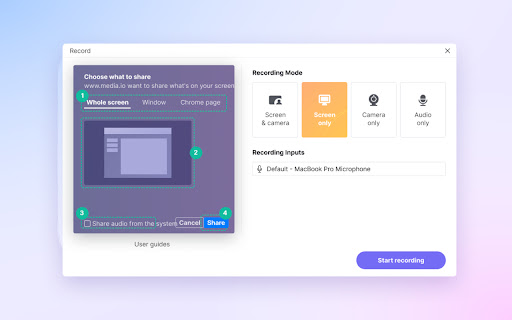
1. Choose a recording mode.
Launch Media.io recorder and select “screen only”, “webcam only”, “audio only” or “screen + webcam” mode based on your needs.
2. Customize settings and start recording.
Input camera and audio devices (when needed). Choose the screen area that you want to capture and hit “Start Recording” button.
3. Edit/Export your recordings.
Once the recording completed, click on “Stop” and “Add to Timeline” to do any edits you deem necessary. Finally, export and share your clips.
Don’t just take our work for it!
Hear what our Customers Say:
“The captured video and voice are in brilliant quality. I use it to record streaming video and radio audio, very often lol. I’ve spun Media.io on my browser for an easy access.” (Lucas W)
“The best free screen recorder chrome extension I’ve met. It handles high performance gaming without any glitches. Highly recommended!” (Matthew B.)
“It does help me quickly record a product demo video for my customers. The best part? I found the hidden video editor more capable than other traditional recorders. I have to say; the auto transcription tool saves me much time and effort! Thank you, guys!” (Edwin Garcia)
“Online lectures or other e-learning materials can be captured in just hitting a button. Sometimes I record myself and put some funny stickers and texts over the video, trying to teach them less, but acquire more…Anyway, Media.io recorder deserves a try. A nice tool without watermark.” (Anastasia C.)
Contact Us:
Facebook: https://www.facebook.com/MediaioOfficial
Support: https://www.media.io/help.html


Reviews (5 cached)
★☆☆☆☆2026-02-03
Casssondra Williams
so bad I had to revome I can't open it!
★☆☆☆☆2025-01-13
Ashish Alexander
not working when clicked.
★★☆☆☆2024-07-11
Brendan
A total disaster! The instructions are unclear. The video capture was lost. The AI bot didn't understand my questions. The live agent went around in circles then made me wait 20 minutes just to ask me the same questions and end the chat, no solution. Definitely not subscribing.
★★☆☆☆2022-10-27
Stefan
One of the only recorders that can export to mp3, but the recorded sound quality is awful, so why include it as a feature
★★★☆☆2023-12-25
Clemens Ratte-Polle
no area selection for Video recording
Permissions (6)
Permissions
activeTabℹ Can access the current tab when you click the extension alarmsℹ Can schedule periodic background tasks scriptingℹ Can inject scripts into web pages storageℹ Can store data locally in your browser tabsℹ Can see your open tabs and their URLs unlimitedStorage
Details
| Version | 1.0.1 |
| Updated | Jul 23, 2022 |
| Size | 1.13MiB |
| First Seen | Mar 26, 2026 |
Popular in workflow

Adobe Acrobat: PDF edit, convert, sign tools
by Adobe Inc.
331M
★ 4.40
workflow
331M
★ 4.40
workflow

AdBlock — block ads across the web
by AdBlock
63M
★ 4.48
workflow
63M
★ 4.48
workflow

迅雷下载支持
by Shenzhen Xunlei Network Technology Co., Ltd.
59M
★ 2.77
workflow
59M
★ 2.77
workflow

Adblock Plus - free ad blocker
by eyeo GmbH
41M
★ 4.39
workflow
41M
★ 4.39
workflow

Chrome Remote Desktop
by Chrome Remote Desktop Release Managers
39M
★ 3.14
workflow
39M
★ 3.14
workflow
Popular Extensions
Adobe Acrobat: PDF edit, convert, sign tools
by Adobe Inc.
331M
★ 4.40
workflow
331M
★ 4.40
workflow
AdBlock — block ads across the web
by AdBlock
63M
★ 4.48
workflow
63M
★ 4.48
workflow
迅雷下载支持
by Shenzhen Xunlei Network Technology Co., Ltd.
59M
★ 2.77
workflow
59M
★ 2.77
workflow

Grammarly: AI Writing Assistant and Grammar Checker App
by Grammarly
42M
★ 4.50
communication
42M
★ 4.50
communication
Adblock Plus - free ad blocker
by eyeo GmbH
41M
★ 4.39
workflow
41M
★ 4.39
workflow