
Description

Reviews (16 cached)
Unfortunately it seems to have stopped working, all of a sudden.
Does not work
Does not Work. Like most said was hopeful. Why does Google not allow you to Label the colors-it should be a very EASY Fix and people have been asking for years! For example: Graphite-labled work' Sage labeled -Medical etc or whatever you want!
Doesn't work
Was hoping it would work but doesn't, please Google add this feature! It's basic organisation management 101
It does not work, got it installed and activated, updated the colour/tag matrix, but when i hover over the colour tags it does not label them. Gave up after a couple of hours mucking around with with it and searching blogs for a bug fix....now waiting for google to fix it.
hasn't worked for me. Yes agree with the others, google should just add this feature, it would add so much to the usefulness . I have 6 categories at the moment and have to keep refering to my list to see what colour I should give it.
I was hopeful, but does not work. Wish this existed natively
this extension just straight up doesnt work.
I have tried multiple times, on already existing and new events, always refreshed the page, but for some reason only the Flamingo tag appears.
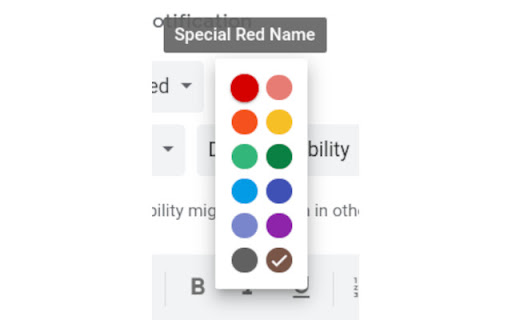
This basically seemed like a very limited version of the Time Insights functionality for non-work/school google accounts. I love that functionality. This doesn't measure up. Pros - you can label the colors for your calendar Cons - HARD to find the place where you can actually set the color labels -labels are ONLY visible when you hover over the choices during color selection -the labels do not display next to the color once it's chosen for the event -limited to default colors (no custom colors can be labeled)
Installed it and it din not work. no new colors in my calendar. Very poor instructions and documentation.
Installed it yesterday. At first I didn't see the additional colors in my Google Calendar. ...then all of a sudden I did. I noticed that when I first saved a new calendar entry it would not show, and then after I went it to edit that entry I had options to add colors (that were then available for new entries going forward.) It was working today when I logged in. I had to restart my computer for a Dell laptop upgrade (no upgrade was made to my Chrome browser at that time.) Now it's not working at all. Very frustrating, because I really liked it. I didn't really use the labeling option, but I used the colors for everything. I hope this can be fixed. I'm not sure why it's not working anymore.
Rated a 3 star for now cause I can't seem to change the name of each colour. Am I allowed/able to do so? For now if I hover over each colour, it'll have a name. That's the only improvement I see. For example Yellow is banana while red becomes tomato. Like to be able to change it to my own settings and description
It "works" for me. The old color still show up first, just gotta give a second for the other label to show up. Not perfect but this will do for now.
I mean it works. Not the most practical thing in the world as you have to hover over the colour for a second or 2 before it shows up, but it's nice if you think it'll help you stay more organized. I do wish that it would transfer over to the mobile app though. Other than that, it's alright.
Permissions (1)
Permissions
Details
| Version | 1.0 |
| Updated | May 24, 2022 |
| Size | 31.34KiB |
| First Seen | Mar 27, 2026 |
Popular in workflow




Popular Extensions
