
⚠️Not updated in over a year
Description
### Time tracking for teams
Track time without the need for opening another tab. Start timer or enter time manually right from the browser extension.
1. Setup your My Hours account
Sign up for My Hours account on myhours.com.
Create Projects, Tasks and Clients and invite your Team members to track time.
2. Download extension
Download Chrome extension from this page.
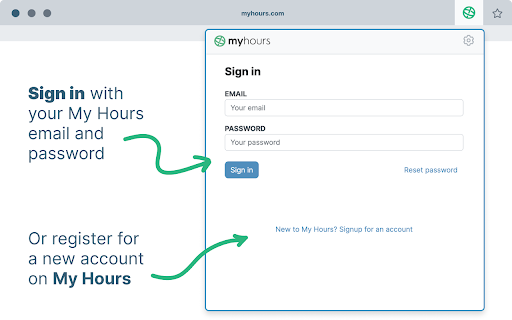
3. Sign in into your account
Each team member logs in with the same email and password they used in the web app.
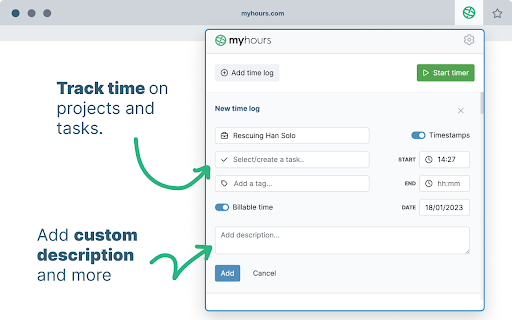
4. Track time on projects & tasks
Select from a list of pre-assigned clients, project and tasks. Optionally add tags or custom description and enter time.
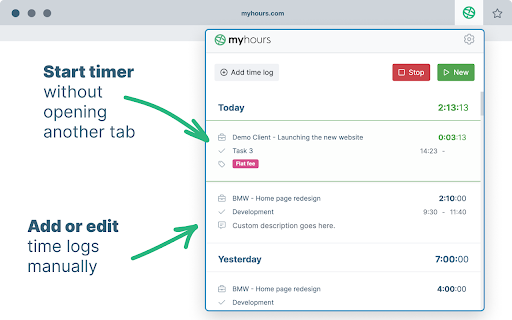
5. Start the timer or enter time manually
Start and stop the running stopwatch without opening another browser tab. Edit your time logs at any time.
6. Generate reports for clients or managers
Finally go to myhours.com web app to create professional-looking reports for your clients or managers. Select from available reports and customize it based on your needs. Download to PDF or export to XLS.
For all questions reach out to support@myhours.com

Reviews
Loading reviews...
Permissions (2)
Permissions
identityℹ Can use your Google account identity storageℹ Can store data locally in your browser
Details
| Version | 1.4.8 |
| Updated | Dec 20, 2024 |
| Size | 2.89MiB |
| First Seen | Mar 31, 2026 |
Popular in workflow

Adobe Acrobat: PDF edit, convert, sign tools
by Adobe Inc.
331M
★ 4.40
workflow
331M
★ 4.40
workflow

AdBlock — block ads across the web
by AdBlock
62M
★ 4.48
workflow
62M
★ 4.48
workflow

迅雷下载支持
by Shenzhen Xunlei Network Technology Co., Ltd.
59M
★ 2.77
workflow
59M
★ 2.77
workflow

Adblock Plus - free ad blocker
by eyeo GmbH
41M
★ 4.39
workflow
41M
★ 4.39
workflow

Chrome Remote Desktop
by Chrome Remote Desktop Release Managers
38M
★ 3.14
workflow
38M
★ 3.14
workflow
Popular Extensions
Adobe Acrobat: PDF edit, convert, sign tools
by Adobe Inc.
331M
★ 4.40
workflow
331M
★ 4.40
workflow
AdBlock — block ads across the web
by AdBlock
62M
★ 4.48
workflow
62M
★ 4.48
workflow
迅雷下载支持
by Shenzhen Xunlei Network Technology Co., Ltd.
59M
★ 2.77
workflow
59M
★ 2.77
workflow

Grammarly: AI Writing Assistant and Grammar Checker App
by Grammarly
42M
★ 4.50
communication
42M
★ 4.50
communication
Adblock Plus - free ad blocker
by eyeo GmbH
41M
★ 4.39
workflow
41M
★ 4.39
workflow