
⚠️Not updated in over 2 years
Description
English (US)
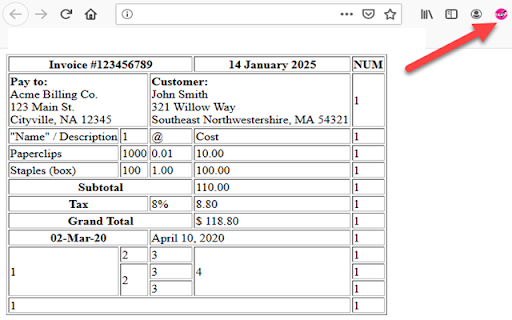
HTML-Table Scraper is a simple Extension that allows you to right click any HTML table and select to copy the data in that table to the Clipboard or Save-to-File in either CSV or Tab delimited.
Right Click Table to Select HTML-Table Scraper to Clipboard or File
If the Right Click Context Menu has been disabled or overwritten:
Hold CTRL down while Right Click will automatically Copy Table to Clipboard without selecting the context menu option. This is useful for website that block the context menu from showing up on right clicks.
Scraper fully supports ColSpan and RowSpan
- ColSpan: Value will be placed in the first Column. Additional Columns in Span will be set to NULL for the value.
- RowSpan: Value will be repeated for each consecutive row in the RowSpan of the table
Automatic Formatting
- All cells are Trimmed of white-space
- All tabs are removed
Available Options to Scrape the Data.
Delimited: CSV or TAB
CRLF Replacement: Replace Carriage Returns inside a string with a NULL or SPACE.
Quote Strings: Option to check each column to see if they are Numeric or String Columns. If selected, all String Columns will be placed inside double quotes with the exception of Numeric Columns.
Remove Quotes: Option to remove any double quotes found inside a string.
Remove Multiple Spaces: Option to Convert Consecutive Spaces to a Single Space within a String
Get Image SRC: Option to get the SRC link of the each image.
Format Dates: Option will attempt to format dates to dd-MMM-yyyy. Currently only looks for 1)dd-MMM-yy 2)Month dd, yyyy to convert to dd-MMM-yyyy
Revisions
V1.0.1
-Removed TABS from permissions (not required)
V1.0.2
-Removed full path from permissions (not required)
V1.0.3
-Added Host Path back to Permissions
V1.0.4
-Fixed bugs with the date format dd-mmm-yyyy
V1.0.5
-Fixed bug introduced in 1.0.4 which was never released
V3.0.0 (May 24 2023)
-Migrated to V3 Manifest
-Converted Deprecated Functions to Current Model
-Updated Console Logs
-Added New Alert Functions
-Added Alert to CTRL Right Click Copy
-Added How to Use to Settings Menu
-Added Troubleshooting Steps to Settings Menu
-Added Load Settings Menu on Install
-Fixed a few minor code issues
V3.0.1
-Removed options open on tab when no option found bug



Reviews (3 cached)
★☆☆☆☆2024-10-18
Miro Skriputa
does not work for me.
★☆☆☆☆2022-11-03
cosimo morelli
Garbage
★★★☆☆2025-04-09
wang zhu
Nice job . I built an alternative table copy extension , https://chromewebstore.google.com/detail/table-copy/kcabmnaniedbimdimdogibamnafkfgnc , guys can try it
Permissions (4)
Permissions
activeTabℹ Can access the current tab when you click the extension contextMenusℹ Can add items to the right-click menu scriptingℹ Can inject scripts into web pages storageℹ Can store data locally in your browser
Details
| Version | 3.0.1 |
| Updated | Jun 7, 2023 |
| Size | 55.43KiB |
| First Seen | Mar 31, 2026 |
Popular in workflow

Adobe Acrobat: PDF edit, convert, sign tools
by Adobe Inc.
331M
★ 4.40
workflow
331M
★ 4.40
workflow

AdBlock — block ads across the web
by AdBlock
63M
★ 4.48
workflow
63M
★ 4.48
workflow

迅雷下载支持
by Shenzhen Xunlei Network Technology Co., Ltd.
59M
★ 2.77
workflow
59M
★ 2.77
workflow

Adblock Plus - free ad blocker
by eyeo GmbH
41M
★ 4.39
workflow
41M
★ 4.39
workflow

Chrome Remote Desktop
by Chrome Remote Desktop Release Managers
38M
★ 3.14
workflow
38M
★ 3.14
workflow
Popular Extensions
Adobe Acrobat: PDF edit, convert, sign tools
by Adobe Inc.
331M
★ 4.40
workflow
331M
★ 4.40
workflow
AdBlock — block ads across the web
by AdBlock
63M
★ 4.48
workflow
63M
★ 4.48
workflow
迅雷下载支持
by Shenzhen Xunlei Network Technology Co., Ltd.
59M
★ 2.77
workflow
59M
★ 2.77
workflow

Grammarly: AI Writing Assistant and Grammar Checker App
by Grammarly
42M
★ 4.50
communication
42M
★ 4.50
communication
Adblock Plus - free ad blocker
by eyeo GmbH
41M
★ 4.39
workflow
41M
★ 4.39
workflow