
⚠️Not updated in over 2 years
Description
This extension helps Japanese learners (especially Kanji).
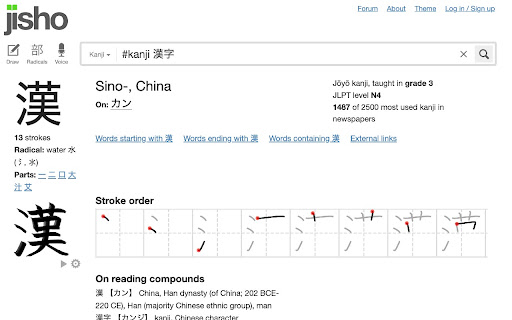
If you see a kanji character that you don't recognise, select it, then right click, then you'll see a "Kanji Search" item in the content menu. Clicking this item, will take you to https://jisho.org/ where you can see the meanings of the words, the stroke order and a lot more.
The extension adds a hot key as well (Ctrl+Shift+K or Cmd+Shift+K) which selects any selected text and does the same.

Reviews
Loading reviews...
Permissions (1)
Permissions
contextMenusℹ Can add items to the right-click menu
Details
| Version | 1.0 |
| Updated | May 31, 2022 |
| Size | 54.77KiB |
| First Seen | Mar 31, 2026 |
More by Ayman Eltemmsahy

Popular in workflow

Adobe Acrobat: PDF edit, convert, sign tools
by Adobe Inc.
331M
★ 4.40
workflow
331M
★ 4.40
workflow

AdBlock — block ads across the web
by AdBlock
63M
★ 4.48
workflow
63M
★ 4.48
workflow

迅雷下载支持
by Shenzhen Xunlei Network Technology Co., Ltd.
59M
★ 2.77
workflow
59M
★ 2.77
workflow

Adblock Plus - free ad blocker
by eyeo GmbH
41M
★ 4.39
workflow
41M
★ 4.39
workflow

Chrome Remote Desktop
by Chrome Remote Desktop Release Managers
38M
★ 3.14
workflow
38M
★ 3.14
workflow
Popular Extensions
Adobe Acrobat: PDF edit, convert, sign tools
by Adobe Inc.
331M
★ 4.40
workflow
331M
★ 4.40
workflow
AdBlock — block ads across the web
by AdBlock
63M
★ 4.48
workflow
63M
★ 4.48
workflow
迅雷下载支持
by Shenzhen Xunlei Network Technology Co., Ltd.
59M
★ 2.77
workflow
59M
★ 2.77
workflow

Grammarly: AI Writing Assistant and Grammar Checker App
by Grammarly
42M
★ 4.50
communication
42M
★ 4.50
communication
Adblock Plus - free ad blocker
by eyeo GmbH
41M
★ 4.39
workflow
41M
★ 4.39
workflow