
⚠️Not updated in over a year
Description
Overcome Lengthy Content with Afterword - Your Chrome Research Powerhouse
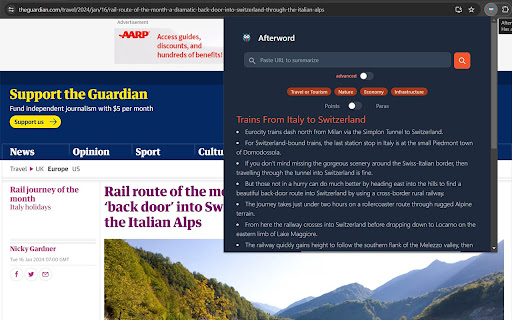
Afterword empowers you to breeze through walls of text with its innovative multi-level summaries and organizational tools.
Key Features:
• Multi-Level Summaries: Get an AI-powered overview of any web page, with the ability to zoom in and out for deeper analysis.
• Subheading Navigation: Effortlessly skim through lengthy articles with automatically generated subheadings that guide you to the information you seek.
• Save & Annotate: Store summaries and original sources for future reference. Highlight key sections and add annotations just like you would in a physical book.
• Hyperdocuments: Create digital scrapbooks called "Hyperdocuments" where you can effortlessly collect and organize saved excerpts and annotated sources.
• Frictionless Hyperdoc Creation: Start a Hyperdoc directly from highlighted text, making information gathering a seamless process.
Benefits:
• Faster Research: Break down complex articles into easily digestible summaries, saving you valuable time.
• Improved Comprehension: Gain a deeper understanding of the content with multi-level summaries and annotations.
• Enhanced Organization: Store research materials and organize your thoughts with Hyperdocuments.
• Effortless Reference: Never lose track of important information - your summaries and annotated sources are readily available in your profile.
Getting Started:
Afterword integrates seamlessly into your Chrome browser. Install the extension from the Chrome Web Store and start summarizing articles with a simple click!
FAQs:
• Q: Does Afterword work on all websites? A: Afterword strives to summarize a wide range of web content.
• Q: How do I access my saved summaries and annotations? A: Your saved summaries and annotations are stored within your Afterword profile.
Afterword - Your research companion for a more productive and insightful browsing experience!
Reviews
Loading reviews...
Permissions (5)
Permissions
activeTabℹ Can access the current tab when you click the extension contextMenusℹ Can add items to the right-click menu scriptingℹ Can inject scripts into web pages storageℹ Can store data locally in your browser tabsℹ Can see your open tabs and their URLs
Details
| Version | 1.1 |
| Updated | Jul 1, 2024 |
| Size | 381KiB |
| First Seen | Mar 26, 2026 |
Popular in workflow

Adobe Acrobat: PDF edit, convert, sign tools
by Adobe Inc.
322M
★ 4.40
workflow
322M
★ 4.40
workflow

AdBlock — block ads across the web
by AdBlock
62M
★ 4.48
workflow
62M
★ 4.48
workflow

迅雷下载支持
by Shenzhen Xunlei Network Technology Co., Ltd.
59M
★ 2.77
workflow
59M
★ 2.77
workflow

Adblock Plus - free ad blocker
by eyeo GmbH
40M
★ 4.39
workflow
40M
★ 4.39
workflow

Chrome Remote Desktop
by Chrome Remote Desktop Release Managers
37M
★ 3.13
workflow
37M
★ 3.13
workflow
Popular Extensions
Adobe Acrobat: PDF edit, convert, sign tools
by Adobe Inc.
322M
★ 4.40
workflow
322M
★ 4.40
workflow
AdBlock — block ads across the web
by AdBlock
62M
★ 4.48
workflow
62M
★ 4.48
workflow
迅雷下载支持
by Shenzhen Xunlei Network Technology Co., Ltd.
59M
★ 2.77
workflow
59M
★ 2.77
workflow

Grammarly: AI Writing Assistant and Grammar Checker App
by Grammarly
42M
★ 4.50
communication
42M
★ 4.50
communication
Adblock Plus - free ad blocker
by eyeo GmbH
40M
★ 4.39
workflow
40M
★ 4.39
workflow