
⚠️Requests 1 sensitive permission
Description
AnySnooze lets you snooze tabs naturally - just type when you want them back.
NATURAL LANGUAGE INPUT
Type like you talk:
• "tomorrow at 3pm"
• "in 2 hours"
• "next Monday morning"
• "later today"
• "in 30 minutes"
No clicking through date pickers. No confusing interfaces. Just type and snooze.
SMART SHORTCUTS
Even faster with single-letter shortcuts:
• l = Later today (6pm)
• t = Tomorrow morning
• m = Next Monday
• f = Friday afternoon
• h = In 1 hour
• r = Last snooze time
KEYBOARD POWER USERS
Cmd/Ctrl+J opens AnySnooze
Cmd/Ctrl+Shift+1/2/3 for instant snooze presets
FREE FEATURES
• Unlimited snoozes
• Natural language parsing
• Keyboard shortcuts (Cmd+J)
• Quick presets (Shift+1-3)
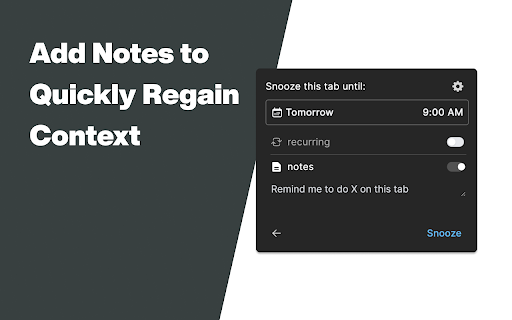
• Notes on snoozed tabs
• Light/dark themes
• 50 tab history
• Privacy-first local storage
• No account required
PLUS FEATURES ($9.99 one-time)
• 10 customizable keyboard shortcuts
• Recurring snoozes ("every Monday 9am")
• 1000 tab history
• Analytics dashboard
• Priority support
PRIVACY FIRST
All data stays on your device. No cloud sync. No tracking beyond optional anonymous analytics.
PERFECT FOR
• Inbox zero practitioners
• Research hoarders
• "I'll read this later" collectors
• Tab overload survivors
• Anyone who says "remind me about this"
WHY ANYSNOOZE?
Other snooze extensions make you click through calendars. AnySnooze understands "next tuesday at 2pm" - just like you'd say it.
4.3★ rating from users who love the clean design and natural language parsing.
SUPPORT
Questions? Feature requests? Email support@anysnooze.com


Reviews
Loading reviews...
Permissions (6)
Permissions
activeTabℹ Can access the current tab when you click the extension alarmsℹ Can schedule periodic background tasks cookiesℹ Can read and modify browser cookies notificationsℹ Can show desktop notifications scriptingℹ Can inject scripts into web pages storageℹ Can store data locally in your browser
Details
| Version | 1.2.3 |
| Updated | Jan 31, 2026 |
| Size | 4.36MiB |
| First Seen | Mar 28, 2026 |
Popular in workflow

Adobe Acrobat: PDF edit, convert, sign tools
by Adobe Inc.
331M
★ 4.40
workflow
331M
★ 4.40
workflow

AdBlock — block ads across the web
by AdBlock
63M
★ 4.48
workflow
63M
★ 4.48
workflow

迅雷下载支持
by Shenzhen Xunlei Network Technology Co., Ltd.
59M
★ 2.77
workflow
59M
★ 2.77
workflow

Adblock Plus - free ad blocker
by eyeo GmbH
41M
★ 4.39
workflow
41M
★ 4.39
workflow

Chrome Remote Desktop
by Chrome Remote Desktop Release Managers
39M
★ 3.14
workflow
39M
★ 3.14
workflow
Popular Extensions
Adobe Acrobat: PDF edit, convert, sign tools
by Adobe Inc.
331M
★ 4.40
workflow
331M
★ 4.40
workflow
AdBlock — block ads across the web
by AdBlock
63M
★ 4.48
workflow
63M
★ 4.48
workflow
迅雷下载支持
by Shenzhen Xunlei Network Technology Co., Ltd.
59M
★ 2.77
workflow
59M
★ 2.77
workflow

Grammarly: AI Writing Assistant and Grammar Checker App
by Grammarly
42M
★ 4.50
communication
42M
★ 4.50
communication
Adblock Plus - free ad blocker
by eyeo GmbH
41M
★ 4.39
workflow
41M
★ 4.39
workflow