
⚠️Not updated in over 2 years
Description
Time is wasted scrolling through websites. You can set time limits on mobile apps, but this experience hasn't been effectively brought over to web.
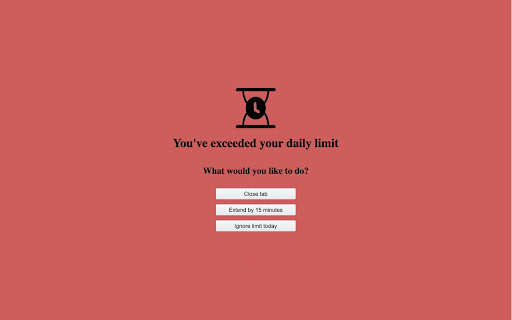
TimeLimit allows you to add time limits to websites, and throughout the day, it tracks the number of times you've visited the website. If you pass the time limit on a site, you get to choose whether to extend by 15 minutes, ignore the limit for the day, or close the tab.
Taking an explicit action should help you make better decisions on how to spend your time.
Q: How do I add new websites to TimeLimit? How do I know how long I've spent on those sites?
A: Click the TimeLimit chrome extension icon to pop up a view that allows you to add/edit/remove websites to track, as well as modify how long your time limit is for that site. You can also use that extension popup to track your time spent on websites and visit history.
- Zain Rehmani (zmrehmani@gmail.com)

Reviews
Loading reviews...
Permissions (3)
Permissions
activeTabℹ Can access the current tab when you click the extension storageℹ Can store data locally in your browser tabsℹ Can see your open tabs and their URLs
Details
| Version | 1.0.0 |
| Updated | Dec 3, 2023 |
| Size | 23.75KiB |
| First Seen | Mar 28, 2026 |
Popular in workflow

Adobe Acrobat: PDF edit, convert, sign tools
by Adobe Inc.
322M
★ 4.40
workflow
322M
★ 4.40
workflow

AdBlock — block ads across the web
by AdBlock
62M
★ 4.48
workflow
62M
★ 4.48
workflow

迅雷下载支持
by Shenzhen Xunlei Network Technology Co., Ltd.
59M
★ 2.77
workflow
59M
★ 2.77
workflow

Adblock Plus - free ad blocker
by eyeo GmbH
40M
★ 4.39
workflow
40M
★ 4.39
workflow

Chrome Remote Desktop
by Chrome Remote Desktop Release Managers
37M
★ 3.13
workflow
37M
★ 3.13
workflow
Popular Extensions
Adobe Acrobat: PDF edit, convert, sign tools
by Adobe Inc.
322M
★ 4.40
workflow
322M
★ 4.40
workflow
AdBlock — block ads across the web
by AdBlock
62M
★ 4.48
workflow
62M
★ 4.48
workflow
迅雷下载支持
by Shenzhen Xunlei Network Technology Co., Ltd.
59M
★ 2.77
workflow
59M
★ 2.77
workflow

Grammarly: AI Writing Assistant and Grammar Checker App
by Grammarly
42M
★ 4.50
communication
42M
★ 4.50
communication
Adblock Plus - free ad blocker
by eyeo GmbH
40M
★ 4.39
workflow
40M
★ 4.39
workflow