
⚠️Not updated in over 2 years ⚠️Requests 1 sensitive permission ⚠️Below average rating ⚠️Very few reviews for its user base
Description
Gemoo Snap is an easy-to-use screenshot tool. Capture screenshots of ChatGPT conversations, add annotations, and instantly share them with anyone.
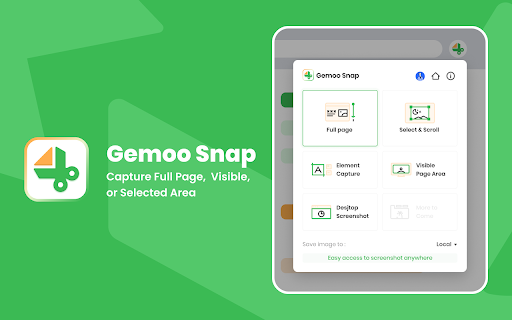
Choose from capture options like full webpages, selected areas, visible parts, or specific elements. Whether it's feedback or sharing thoughts, Gemoo Snap simplifies the process.
Key Features
1. Capture Screenshots
- Screenshot the full page of ChatGPT conversations.
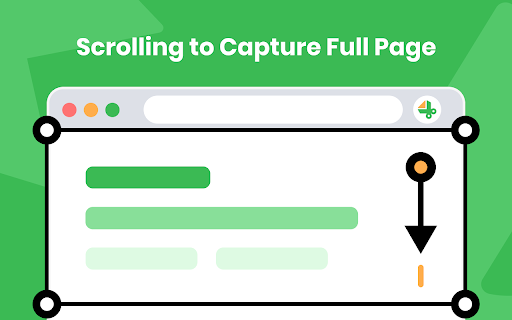
- Scroll to capture the entire web page.
- Select a specific area to capture.
- Take a screenshot of the visible portion of the screen.
- Capture specific elements of the web page.
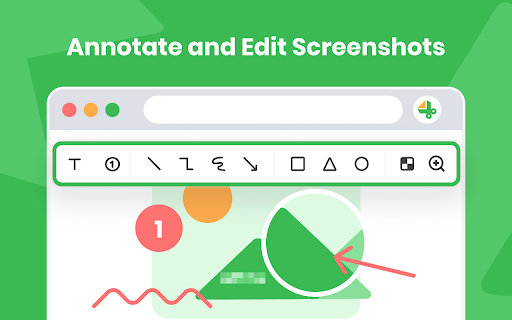
2. Annotate Screenshots:
- Annotate your screenshot with shapes such as rectangles, circles, triangles, arrows, lines, and more.
- Add text to your screenshot and customize the text color and font size.
- Blur sensitive information using a mosaic effect.
3. Share or Download Screenshots:
- Share your screenshot instantly via links.
- Save screenshots as PNG images.
4. Use Cases:
- Quick Screenshot: Capture every moment on your screen and share it with others.
- Screenshot and Annotate: Take a screenshot in a click and annotate it to make it more informative.
- Database: Save recipes, passwords, serial numbers, inspirational materials, or career knowledge for further use.
Contact us:
If you have any questions, suggestions, or feature requests, feel free to submit a report by sending a message to cs@gemoo.com anytime.
Our official site: https://gemoo.com/


Reviews (2 cached)
★☆☆☆☆2023-08-18
Jordan Hughes
Stop spamming people and adding them to mailing lists without consent.
★★☆☆☆2025-09-07
mehrdad
Simply doesn't work, because you can't scroll the page to take the entire conversation.
Permissions (6)
Permissions
activeTabℹ Can access the current tab when you click the extension contextMenusℹ Can add items to the right-click menu desktopCaptureℹ Can capture screen, window, or tab content scriptingℹ Can inject scripts into web pages storageℹ Can store data locally in your browser tabsℹ Can see your open tabs and their URLs
Details
| Version | 2.0.3 |
| Updated | Aug 9, 2023 |
| Size | 2.41MiB |
| First Seen | Mar 30, 2026 |
More by Gemoo Inc.

Popular in workflow

Adobe Acrobat: PDF edit, convert, sign tools
by Adobe Inc.
322M
★ 4.40
workflow
322M
★ 4.40
workflow

AdBlock — block ads across the web
by AdBlock
62M
★ 4.48
workflow
62M
★ 4.48
workflow

迅雷下载支持
by Shenzhen Xunlei Network Technology Co., Ltd.
59M
★ 2.77
workflow
59M
★ 2.77
workflow

Adblock Plus - free ad blocker
by eyeo GmbH
40M
★ 4.39
workflow
40M
★ 4.39
workflow

Chrome Remote Desktop
by Chrome Remote Desktop Release Managers
37M
★ 3.13
workflow
37M
★ 3.13
workflow
Popular Extensions
Adobe Acrobat: PDF edit, convert, sign tools
by Adobe Inc.
322M
★ 4.40
workflow
322M
★ 4.40
workflow
AdBlock — block ads across the web
by AdBlock
62M
★ 4.48
workflow
62M
★ 4.48
workflow
迅雷下载支持
by Shenzhen Xunlei Network Technology Co., Ltd.
59M
★ 2.77
workflow
59M
★ 2.77
workflow

Grammarly: AI Writing Assistant and Grammar Checker App
by Grammarly
42M
★ 4.50
communication
42M
★ 4.50
communication
Adblock Plus - free ad blocker
by eyeo GmbH
40M
★ 4.39
workflow
40M
★ 4.39
workflow