Reports for Trello icon

Reports for Trello

by Infinite Butterfly Studios

v0.0.7 Updated Aug 20, 2016 5.88KiB
CWS
7K
Users
★ 4.05
79 reviews
#7247
of 158.9K
Other
Category
⚠️Not updated in over 2 years

Description

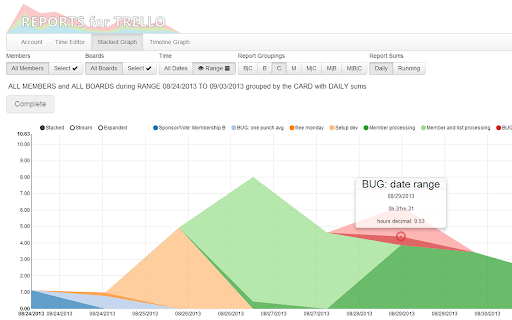
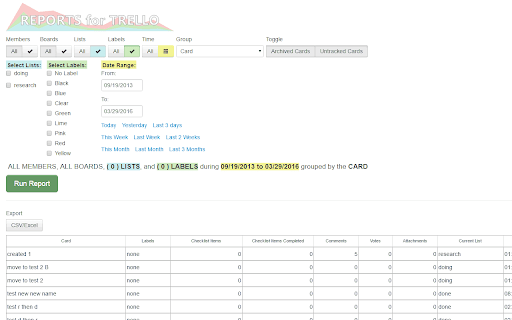
Use Trello? If you don’t you could be tracking your projects collaboratively with a very intuitive interface. Reports for Trello shows the time spent on activities in Trello so your whole team can be on the same page. Without any timers or plugins you can get time tracking data for the card movements and card membership in Trello. This means that you can use pc, mac, iphone, and android clients for Trello to collaborate and get time tracking with this app. See all of your cards across up to 20 boards at once. Group by the cards by the last activity, due dates, and more. Export your cards to excel/csv. Reports for Trello is: • Free every day: See the last 2000 actions per board turned into reports. • Private: There is no signup or registration. All data is deleted after 24min. Run new reports at any time. • Easy: Use your Trello account to sign in. No new passwords! • For Teams: See how many tasks were worked on by each member and how long each team member spent on them. • Flexible: Track your time different ways by only using Trello. Export card info to excel. • Global: Servers spread around the world enable low latency reporting! The three ways to track time using Reports for Trello: 1) List Tracking: a member that moves a card into the “doing” list. This member is associated with the card and the time. 2) Member Tracking: a member adds their membership to a card. No matter what list a card is in the duration of the membership is tracked. 3) List and Member Tracking: A membership is tracked only while the card is in a certain list. This allows you to assign members to a card before it is put into a “doing” list. Please let me know what you think. Thanks! Trello is a registered trademark of Fog Creek Software, Inc. Reports for Trello and Infinite Butterfly Studios LLC are not affiliated with Fog Creek Software, Inc.
Reports for Trello screenshot 1Reports for Trello screenshot 2Reports for Trello screenshot 3

Reviews (7 cached)

★☆☆☆☆2014-09-09
Jay G

Crash, crash, crash.

★☆☆☆☆2013-12-10
Steve Jennings

I installed chrome and ran the report lots of times. When it gets to publishing the report it crashes every time. Let me know when it is fixed.

★★☆☆☆2015-07-25
Stephen Fiksdal

page certificate expired years ago - needs to be removed from WebStore or updated: NET::ERR_CERT_DATE_INVALID; Subject: *.reportsfortrello.com; Issuer: AlphaSSL CA - SHA256 - G2; Expires on: Apr 10, 2017

★★☆☆☆2015-02-25
Ron Colonna

The information is not presented in an easily readable format.

★★☆☆☆2014-02-04
Glennis Griner

Didn't work for my purpose--wanted to print checklist items with a check.

★★★☆☆2017-01-13
Alicia Bethel

I have label names. I'm using 1 color for 3 people. I wish it could pull label name instead of color.

★★★☆☆2014-05-02
Vahan Amirbekyan

sorry, I really tried but the application does not generate reports. Every time I try I am getting Reports for Trello The app is currently unreachable. What am i doing wrong?

Permissions (1)

Permissions

notifications Can show desktop notifications

Details

Version 0.0.7
Updated Aug 20, 2016
Size 5.88KiB
First Seen Mar 30, 2026