
⚠️Not updated in over a year
Description
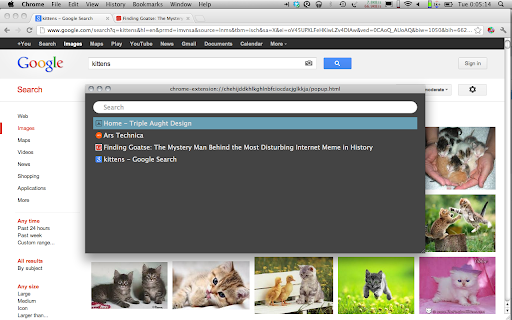
PowerSwitch is a tab switcher that lets you switch tabs instantly with your keyboard. Press command/control-k to open the list of tabs, type to filter the tabs, press enter to select one.
This solves two problems:
- you can pop over to a particular tab just by knowing its name. Lost your Gmail tab in ten windows with twelve tabs each? No problem: Just press command-k and type some of the name of the tab.
- you can easily bounce between two tabs, the way that you can alt-tab between apps: command-k, enter.
Version 2024.8.26 updates to manifest v3.
Version 2013.9.21 fixes bugs with full-screen windows and with not bringing a window to the front when switching tabs (apparently because of a change in Chrome's behavior) and removes the toolbar button. Now the keyboard shortcut is the only way to use PowerSwitch.
Version 2013.4.2 fixes a bug that caused the list of tabs to be empty after loading certain kinds of tabs.
(PowerSwitch is similar to Emacs' iswitchb and also to the Recent Files UI in IntelliJ.)

Reviews
Loading reviews...
Permissions (2)
Permissions
system.display tabsℹ Can see your open tabs and their URLs
Details
| Version | 2024.8.26 |
| Updated | Jan 28, 2025 |
| Size | 58.28KiB |
| First Seen | Mar 30, 2026 |
Popular in workflow

Adobe Acrobat: PDF edit, convert, sign tools
by Adobe Inc.
331M
★ 4.40
workflow
331M
★ 4.40
workflow

AdBlock — block ads across the web
by AdBlock
62M
★ 4.48
workflow
62M
★ 4.48
workflow

迅雷下载支持
by Shenzhen Xunlei Network Technology Co., Ltd.
59M
★ 2.77
workflow
59M
★ 2.77
workflow

Adblock Plus - free ad blocker
by eyeo GmbH
41M
★ 4.39
workflow
41M
★ 4.39
workflow

Chrome Remote Desktop
by Chrome Remote Desktop Release Managers
38M
★ 3.14
workflow
38M
★ 3.14
workflow
Popular Extensions
Adobe Acrobat: PDF edit, convert, sign tools
by Adobe Inc.
331M
★ 4.40
workflow
331M
★ 4.40
workflow
AdBlock — block ads across the web
by AdBlock
62M
★ 4.48
workflow
62M
★ 4.48
workflow
迅雷下载支持
by Shenzhen Xunlei Network Technology Co., Ltd.
59M
★ 2.77
workflow
59M
★ 2.77
workflow

Grammarly: AI Writing Assistant and Grammar Checker App
by Grammarly
42M
★ 4.50
communication
42M
★ 4.50
communication
Adblock Plus - free ad blocker
by eyeo GmbH
41M
★ 4.39
workflow
41M
★ 4.39
workflow