
Sygic Truck Route Sender
v1.4 Updated Mar 29, 2022 234KiB
⚠️Not updated in over 2 years ⚠️Below average rating
Description
This extension sends the route from Google maps to Sygic Truck navigation app on a phone.
The most efficient way to plan your trips. Free for all users of Sygic Truck Navigation. No more typing-in addresses into the search bar.
How to use Sygic browser extension
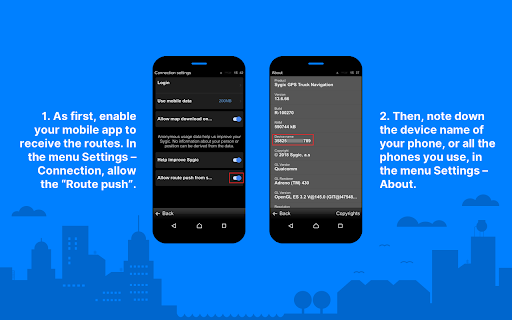
★ As first, enable your mobile app to receive the routes. In the menu Settings – Connection, allow the “Route push”.
★ Then, note down the device name of your phone, or all the phones you use, in the menu Settings – About.
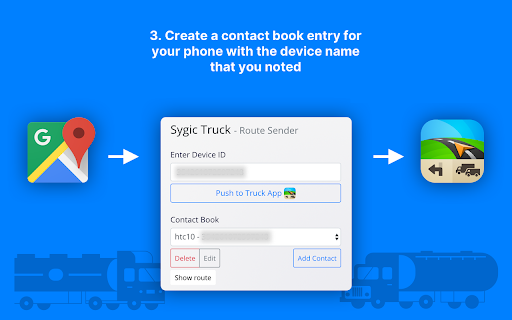
★ After installing the Route Sender, the Sygic Truck Route Sender extension icon will appear in the browser bar. Clicking it will open it.
★ Create a contact book entry for your phone with the device name that you noted.
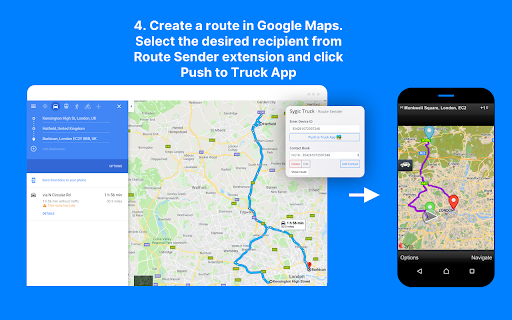
★ Create a route in Google Maps. You can create it by adding stops into the list, or by adding destinations on the map. The limit in Google Maps is 10 stops. The route transferred to navigation will have the same waypoints as seen on Google Maps, road may differ based on the route profile configured.Selecting one of the three alternatives in Google Maps will not make the route different on the phone, move the points on the route instead.
★ Open the extension, select the desired recipient from the Contact book and click Push to Truck App. This will work only if there is a route calculated.
★ The route will get immediately calculated on the phone, if the Truck navigation is running. If not, you will receive a notification about new route.

Reviews (5 cached)
★☆☆☆☆2024-08-15
Antonio José (poison)
Does not work on mobile tablet in 2024. Impossible to install.
★☆☆☆☆2022-05-22
Damian Zakręt
same. does not work and I hope it gets fixed soon. I only paid for this function for this navigation
★☆☆☆☆2022-05-06
Marcio Aleixo
Doesn't work, I have the app on my iphone and to start with, it didn't accept the "Device Name" as requested in the instructions, it must have 16 characters, I didn't invented, it is there I just copied it, how can it be wrong? the other option was with the email, which goes, but never arrives in the sygic truck app in the cell phone. Useless...
★★☆☆☆2025-07-29
Bad Macs
Using an iPhone with Truck and Caravan navigation. Can't find device name in sygic app and no option to enable push.
★★☆☆☆2024-04-23
Derek Gilbert
This does not seem to work on IOS?
Permissions (1)
Permissions
activeTabℹ Can access the current tab when you click the extension
Details
| Version | 1.4 |
| Updated | Mar 29, 2022 |
| Size | 234KiB |
| First Seen | Mar 28, 2026 |
Popular in accessibility

Read&Write for Google Chrome™
by Texthelp
17M
★ 3.44
accessibility
17M
★ 3.44
accessibility

360 Internet Protection
by qihoosafe
17M
★ 4.54
accessibility
17M
★ 4.54
accessibility

Screenshot reader™
by Texthelp
7M
★ 2.57
accessibility
7M
★ 2.57
accessibility

OrbitNote
by Texthelp
7M
★ 2.95
accessibility
7M
★ 2.95
accessibility

Volume Master
by Peta Sittek
6M
★ 4.81
accessibility
6M
★ 4.81
accessibility
Popular Extensions

Adobe Acrobat: PDF edit, convert, sign tools
by Adobe Inc.
331M
★ 4.40
workflow
331M
★ 4.40
workflow

AdBlock — block ads across the web
by AdBlock
63M
★ 4.48
workflow
63M
★ 4.48
workflow

迅雷下载支持
by Shenzhen Xunlei Network Technology Co., Ltd.
59M
★ 2.77
workflow
59M
★ 2.77
workflow

Grammarly: AI Writing Assistant and Grammar Checker App
by Grammarly
42M
★ 4.50
communication
42M
★ 4.50
communication

Adblock Plus - free ad blocker
by eyeo GmbH
41M
★ 4.39
workflow
41M
★ 4.39
workflow