Enhance your Telegram experience with our Chrome extension, designed to effortlessly download media from any group or channel. Whether it’s videos, music, images, or voice messages, our extension offers a stable, user-approved, and reasonably priced solution to save your favorite content directly to your computer. In a market filled with similar tools, ours stands out for its reliability, glowing user reviews, and exceptional value.
Key Features
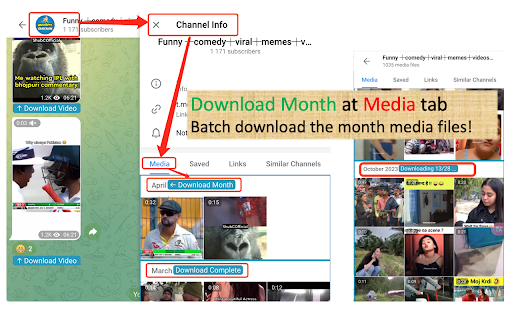
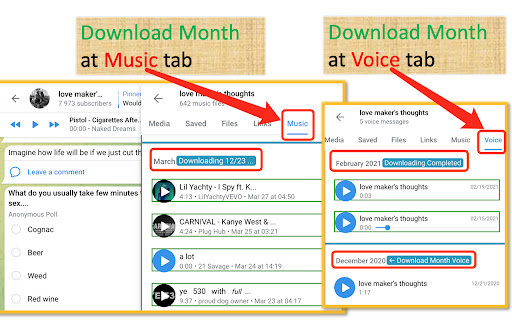
✨ Download Month: Without a doubt, "Download Month" is our original feature, and we have always been the leaders in this space. This groundbreaking capability allows you to batch download all media files from any specific month with ease. Simply navigate to the Media/Music/Voice tab via "Group Info" or "Channel Info", scroll to the end of the month to load all files, then scroll back to the start. Click the "Download Month" button, and watch it seamlessly download everything at once! This feature showcases our pioneering spirit and dedication to enhancing user convenience.
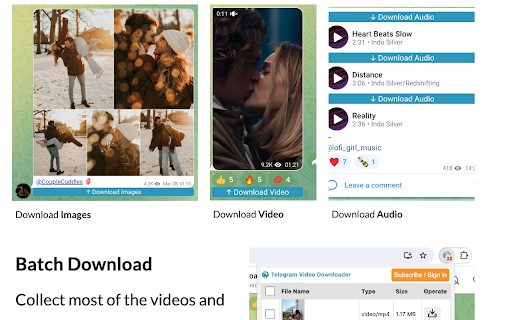
🔹 One-Click Downloads: Save audio and video files in formats like MP4, MPEG, OGG, and more with a single click from any Telegram group or channel.
🔹 Simple and Secure: No passwords, API logins, or extra permissions required—just a straightforward, safe, and user-friendly experience.
🔹 24/7 Support: Our dedicated developer team is available around the clock to assist with any questions or issues.
🔹 Flexible Subscription: Users can try the service. Once the trial limit is reached, users can choose to subscribe.
Why Choose Us?
🌟 Stability and Reliability: Built to deliver a consistent, smooth downloading experience every time.
🌟 Positive User Reviews: Loved by a community of users who rave about its functionality and ease of use.
🌟 Affordable Pricing: Premium features at a budget-friendly price—a cost-effective choice for all your downloading needs.
Getting Started
1. Install the Extension: Grab it directly from the Chrome Web Store.
2.Pin the Extension: Click the "Extensions" button next to your profile avatar, locate our plugin, and click the "Pin" icon to add it to your toolbar.
3. Start Downloading: Open new tab of Telegram web K (https://web.telegram.org/k/), browse your chats, and click the download button in the chat, or in the Group Info ->Media tab.
3.1 In version 2.0.6, experimental support for Web A (https://web.telegram.org/a/) was added.
Tips:
1. Newly installed users: Telegram pages that have been opened before installing the extension need to be refreshed for the extension to take effect.
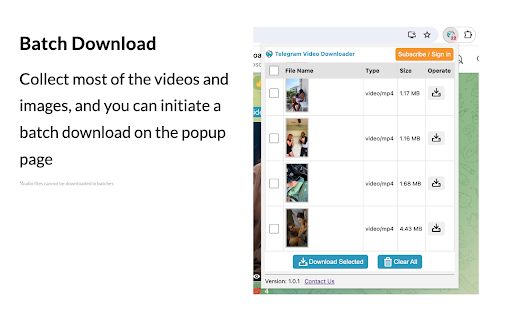
2. Because the Download Month("Download Media" in Web A) function can download a lot of files, you can only try it once. You can try it three times by downloading files in the chat window alone.
3. The download speed depends on your current network environment. If you can start downloading, it means the extension is available.
4. Web A (https://web.telegram.org/a/) version, you can download Music and Voice separately in the chat window, but not in batches in Shared Media->Music/Voice tab. Web K(https://web.telegram.org/k/) support batch download in Group info -> Music/Voice tab.
5. Some users see a blank page when opening the Web K (https://web.telegram.org/k/) version of Telegram. This is a problem with Telegram itself. Please switch to the Web A (https://web.telegram.org/a/) address.
6. When downloading many files using the "Download Month" feature, keep the window visible. If the window is completely invisible, the download will be paused. Also prevent the computer from sleeping and entering screen saver mode.
Disclaimer
⚠️ Please respect local laws and avoid downloading or sharing copyrighted content without permission. This extension is independently developed and not affiliated with the official Telegram app or website.
Experience the Best in Downloading
🎉 Ready to simplify your Telegram downloads? Try our extension today and see why it’s a top pick for functionality and stability. With free trial, there’s no risk—just pure convenience. Install now and elevate your downloading game!
👉 Install Now
🌐 Join us for effortless downloads and a more efficient lifestyle! 🚀
tag:Telegram private video downloader | Telegram restricted video downloader | Telegram private channel group video downloader, chrome extetion not bot.
How can I download videos from a private telegram?
Easily grab telegram private videos from any Telegram group or channel