
⚠️Not updated in over 2 years
Description
Now you can hide your emails in Gmail™ whenever you want so you can get in the flow and do more deep work.
## Overview
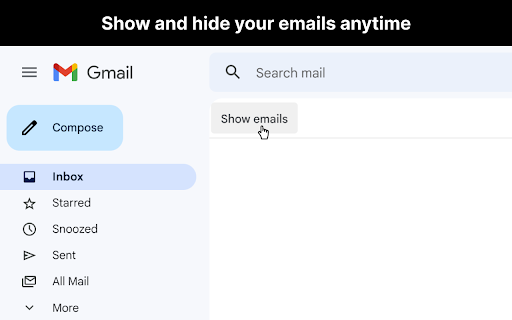
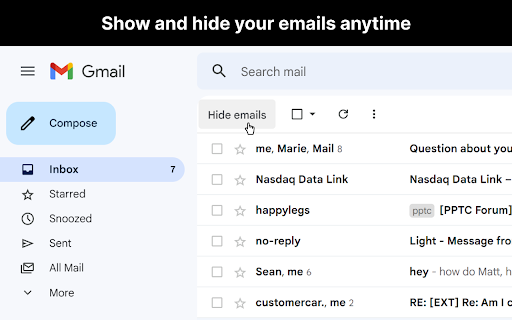
After you open Gmail™, click the "Hide emails" button to hide your messages. You'll still be able to search Gmail™ and use it as a reference, just without all your emails appearing and distracting you.
When you're ready to view your the emails in your inbox again, just click "Show emails".
This extension only works if you use the Gmail™ website on chrome. It doesn't work if you're using the Gmail™ desktop app.
## View the code
https://github.com/mthurmond/hide-my-email-for-gmail
## More helpful extensions
Try my other two extensions to remove distractions. Both are free & open source:
- Distraction free for Linkedin™: https://chrome.google.com/webstore/detail/distraction-free-for-link/kigfnbfbpfpgphbocdkmeablbgdbpfke
- Slack hider: https://chrome.google.com/webstore/detail/slack-hider/ojfkenmmieminleikclgocedgpggeecp
Reviews
Loading reviews...
Permissions (1)
Permissions
storageℹ Can store data locally in your browser
Details
| Version | 2.3 |
| Updated | Jan 5, 2023 |
| Size | 50.95KiB |
| First Seen | Mar 30, 2026 |
More by Matt Thurmond (Digital Detox NYC)


Popular in workflow

Adobe Acrobat: PDF edit, convert, sign tools
by Adobe Inc.
331M
★ 4.40
workflow
331M
★ 4.40
workflow

AdBlock — block ads across the web
by AdBlock
63M
★ 4.48
workflow
63M
★ 4.48
workflow

迅雷下载支持
by Shenzhen Xunlei Network Technology Co., Ltd.
59M
★ 2.77
workflow
59M
★ 2.77
workflow

Adblock Plus - free ad blocker
by eyeo GmbH
41M
★ 4.39
workflow
41M
★ 4.39
workflow

Chrome Remote Desktop
by Chrome Remote Desktop Release Managers
39M
★ 3.14
workflow
39M
★ 3.14
workflow
Popular Extensions
Adobe Acrobat: PDF edit, convert, sign tools
by Adobe Inc.
331M
★ 4.40
workflow
331M
★ 4.40
workflow
AdBlock — block ads across the web
by AdBlock
63M
★ 4.48
workflow
63M
★ 4.48
workflow
迅雷下载支持
by Shenzhen Xunlei Network Technology Co., Ltd.
59M
★ 2.77
workflow
59M
★ 2.77
workflow

Grammarly: AI Writing Assistant and Grammar Checker App
by Grammarly
42M
★ 4.50
communication
42M
★ 4.50
communication
Adblock Plus - free ad blocker
by eyeo GmbH
41M
★ 4.39
workflow
41M
★ 4.39
workflow