
⚠️Not updated in over a year ⚠️Very few reviews for its user base
Description
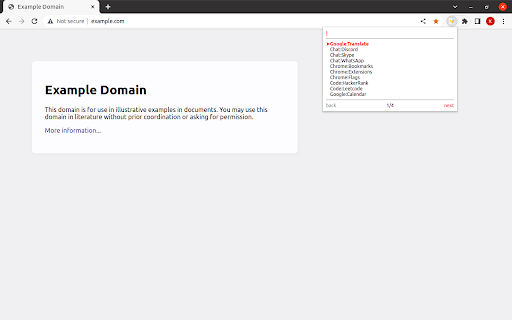
Single and main goal of this extension is fast opening of frequently used bookmarks.
It's possible to update active tab or open new one.
How to use:
1. Install extension;
2. Go to extensions shortcuts page (chrome://extensions/shortcuts) and re-configure keys combination for activation (if needed);
3. Activate extension (Alt+W by default);
4. Type directory or bookmark name (at least partially);
5. Navigate by arrows and select required bookmark;
6. Update active tab by pressing "Enter" or open new tab by "Shift+Enter".
UI customization:
1. Items font size;
2. Active item font weight, color and pointer.
UX customization:
1. Searching algorithms;
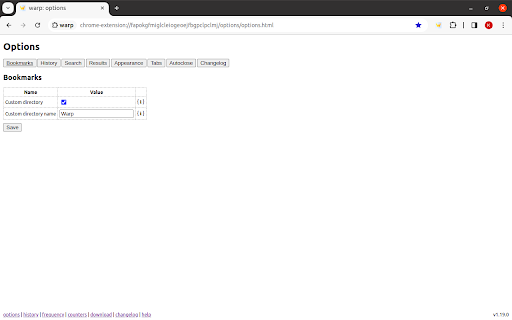
2. Bookmarks directory (all available or just some sub-directory);
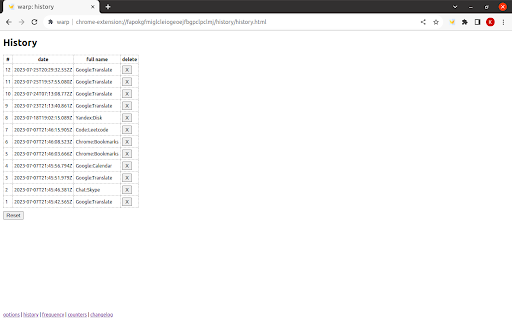
3. History max count and max age;
4. Count of items per page;
5. Items sorting algorithm;
6. Opening of new tab occurs in the same tabs group (or not);
7. Opening of new tab occurs as neighbor of active one (or not always);
8. Autoclosing;
9. Changelog automatic opening.
Tech features:
1. No 3rd party libraries are in use - everything is made for purpose and from scratch;
2. Code is covered by unit tests and e2e tests - quality matters;
3. Automatically updated internal model of bookmarks directory provides really fast work;
4. Internal model stored locally and it's not available for other extensions - it's secure;
5. Bookmarks model and history items are available for download to make custom usage visualization or analytics;
6. Options are synchronized between all extension instances for your Google account via Chrome Sync - it's comfortable.
Changelog is embedded into extension or could be found here: https://github.com/vikian050194/warp/blob/master/CHANGELOG.md


Reviews
Loading reviews...
Permissions (3)
Permissions
bookmarksℹ Can read and modify your bookmarks contextMenusℹ Can add items to the right-click menu storageℹ Can store data locally in your browser
Details
| Version | 1.21.0 |
| Updated | Jun 18, 2024 |
| Size | 64.61KiB |
| First Seen | Mar 31, 2026 |
More by vikian050194dev


Popular in workflow

Adobe Acrobat: PDF edit, convert, sign tools
by Adobe Inc.
331M
★ 4.40
workflow
331M
★ 4.40
workflow

AdBlock — block ads across the web
by AdBlock
62M
★ 4.48
workflow
62M
★ 4.48
workflow

迅雷下载支持
by Shenzhen Xunlei Network Technology Co., Ltd.
59M
★ 2.77
workflow
59M
★ 2.77
workflow

Adblock Plus - free ad blocker
by eyeo GmbH
41M
★ 4.39
workflow
41M
★ 4.39
workflow

Chrome Remote Desktop
by Chrome Remote Desktop Release Managers
39M
★ 3.14
workflow
39M
★ 3.14
workflow
Popular Extensions
Adobe Acrobat: PDF edit, convert, sign tools
by Adobe Inc.
331M
★ 4.40
workflow
331M
★ 4.40
workflow
AdBlock — block ads across the web
by AdBlock
62M
★ 4.48
workflow
62M
★ 4.48
workflow
迅雷下载支持
by Shenzhen Xunlei Network Technology Co., Ltd.
59M
★ 2.77
workflow
59M
★ 2.77
workflow

Grammarly: AI Writing Assistant and Grammar Checker App
by Grammarly
42M
★ 4.50
communication
42M
★ 4.50
communication
Adblock Plus - free ad blocker
by eyeo GmbH
41M
★ 4.39
workflow
41M
★ 4.39
workflow