OnePageCRM Lead Clipper icon

OnePageCRM Lead Clipper

by OnePageCRM

v4.2.2 Updated Mar 21, 2026 2.7MiB
CWS
4K
Users
★ 4.38
47 reviews
#11752
of 207.2K
workflow
#3349 of 31.8K
Recently updated

Description

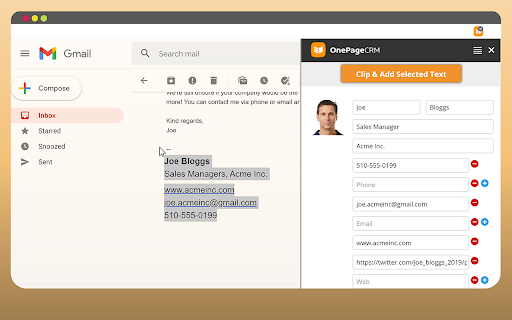
OnePageCRM Lead Clipper is a free browser extension for lead generation. It helps you capture contact details from any web page and auto-create new contacts in your CRM with follow-up reminders next to them. FEATURES • Scrape and extract contact details from any web page (including social media). • Capture contact information from multiple web pages: the captured information will remain in the Clipper’s form even when you close the original page. • Update the existing contact details in one click: if you already have a contact in your CRM, we will recognize it. • Quickly switch between multiple CRM accounts: you don’t need to sign in and out every time. • Toggle the form from left to right: nothing should stand between you and your next captured lead. • Add follow-up reminders and tasks to newly created contacts. • Get browser and desktop notifications: never miss a follow-up. For more information on how Lead Clipper works, check out our Support site. If you have any issues or feedback, send us an email at support@onepagecrm.com ABOUT ONEPAGECRM OnePageCRM is an action-focused CRM software. — No more dead databases: focus on building relationships and closing deals. — Never lose sight of your targets: complete one task at a time. — Straightforward and easy-to-use: a CRM solution for sales teams of all sizes. Don’t have a OnePageCRM account? Start your free 21-day trial at onepagecrm.com NOTE: To use the Lead Clipper, you need to have an active OnePageCRM account. OnePageCRM's pricing and plans are available here: https://www.onepagecrm.com/crm-pricing/
OnePageCRM Lead Clipper screenshot 1OnePageCRM Lead Clipper screenshot 2OnePageCRM Lead Clipper screenshot 3OnePageCRM Lead Clipper screenshot 4

Reviews (7 cached)

★☆☆☆☆2017-06-05
Arthur Godiva

discontinued July 2016. Don't download, broken.

★☆☆☆☆2016-04-15
Kathryn Hooper (MYRK)

Doesn't work. You click on the icon and nothing happens.

★★☆☆☆2020-08-21
Jim F

Works when I don't seem to use it much and whenever I start using it again it just quits. So finicky.

★★☆☆☆2019-05-01
Lee Graham

Doesn't work with Google App login!?!?

★★★☆☆2025-12-09
James Pepper

I will only pay for the full version once the glitch on Linkedin is sorted. Everytime I go to clip a Lead, the contact details are auto filled with the wrong information. such as "1st" or "She/Her" or a "." in the First and Last name columns - Get it fixed!

★★★☆☆2025-07-15
Scott Landsverk

I would like to see it consistently import into the Company field. Sometimes it does, then it doesn't. Otherwise, I think it works great! **Update (9/17/225) I used the OnePageCRM Lead Clipper to capture 25 leads today. The company name imported perfectly, no problems. So, I give it 5 stars! ***Update (1/16/2026 Having problems with the OnePageCRM Clipper now using with Linkedin. It's putting she/he in the name or 2nd or 3rd in last name. Leaving company name blank.

★★★☆☆2024-12-31
Donald H Noble

Does not work on Linkedin. Always got the first name wrong. Often got the wrong email. Sometimes, when highlighting a new contact, it thinks it is an existing but incorrect contact.

Permissions (6)

Permissions

activeTab Can access the current tab when you click the extension gcm notifications Can show desktop notifications scripting Can inject scripts into web pages storage Can store data locally in your browser tabs Can see your open tabs and their URLs

Details

Version 4.2.2
Updated Mar 21, 2026
Size 2.7MiB
First Seen Mar 31, 2026