
Description
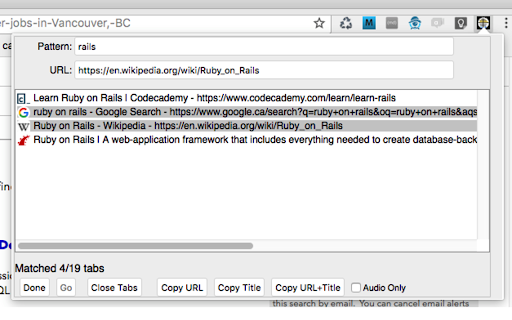
This extension lets browser power-users easily juggle dozens of tabs at any time. Enter a search string (could be a standard JavaScript regex), highlight the URL you want to bring up, and press return, double-click it, or press the "Go" button. Tabhunter will even find and bring up minimized windows containing the target tab.
Tabhunter also lets you easily bulk-close large numbers of tabs. Let's say you have a bunch of github pages all related to a project we'll call "inconsolable-toucan". Enter a pattern like 'github.com/example-user/inconsolable-toucan', click on the first hit in the list, shift-click the last hit, and press the "Close Tabs" button. No-longer-needed tabs gone like that.
Bring up Tabhunter by either pressing the hunter's scope icon, or using the command-key Ctrl-Shift-T on macos, Alt-Shift-T on Linux and Windows.
Drowning in a sea of tabs? Stay afloat with Tabhunter. Users of that other browser have been happily using it since 2008. Now you Chrome folks can use it too.
Under no circumstances should this software be confused with Tab Hunter, an actor best known for his work in the mid-20th century.
Updates:
2.1.6 - support moving a group of tabs to a selected window
2.1.7 - support selecting windows in the pattern field:
* putting `{w:N}` at the start of a pattern shows only tabs in window N
* putting `{w:N:T1-T2}` at the start of a pattern shows only tabs T1 through T2 in window N
* putting `{w:N:T}` shows tabs T through the end in window N
* putting `{w:N:-T}` shows tabs 1 through T in window N
2.2.0 - prefs are now available in the main window via the "More..." button and no longer change only when the "Submit" button is pressed.
2.2.2 - Support for drag+drop when tabs are sorted by window/tab position.
3.0.1 - Reinstate support for searching *inside* the tabs, including by regex or xpath
3.1.0 - Support for "Select All" (Ctrl-A , Cmd-A on macos)
3.2.4 - Rearchitected to deal with very large numbers of tabs (like 1000 or more) gracefully
3.3.0 - Leave maximized and fullscreen windows at that size.
3.4.0 - Migrate the add-on to use the Chrome Manifest V3 version
3.5.0 - Press Backspace or Delete to close selected tabs
3.5.2 - Undo change in 3.5.0. Backspace/Delete now works only on input fields.
3.6.0 - Show the current window number when sorting by windows+tab position (oldest window is no. 1)
3.6.7 - Put `{!:}` at the start of the pattern to negate it.
3.6.9 - Search for URLs in non-latin1-based languages
Reviews
Loading reviews...
Permissions (5)
Permissions
activeTabℹ Can access the current tab when you click the extension clipboardWriteℹ Can write to your clipboard scriptingℹ Can inject scripts into web pages storageℹ Can store data locally in your browser tabsℹ Can see your open tabs and their URLs
Details
| Version | 3.6.9 |
| Updated | Sep 25, 2025 |
| Size | 90.5KiB |
| First Seen | Mar 27, 2026 |
Popular in workflow

Adobe Acrobat: PDF edit, convert, sign tools
by Adobe Inc.
331M
★ 4.40
workflow
331M
★ 4.40
workflow

AdBlock — block ads across the web
by AdBlock
63M
★ 4.48
workflow
63M
★ 4.48
workflow

迅雷下载支持
by Shenzhen Xunlei Network Technology Co., Ltd.
59M
★ 2.77
workflow
59M
★ 2.77
workflow

Adblock Plus - free ad blocker
by eyeo GmbH
41M
★ 4.39
workflow
41M
★ 4.39
workflow

Chrome Remote Desktop
by Chrome Remote Desktop Release Managers
38M
★ 3.14
workflow
38M
★ 3.14
workflow
Popular Extensions
Adobe Acrobat: PDF edit, convert, sign tools
by Adobe Inc.
331M
★ 4.40
workflow
331M
★ 4.40
workflow
AdBlock — block ads across the web
by AdBlock
62M
★ 4.48
workflow
62M
★ 4.48
workflow
迅雷下载支持
by Shenzhen Xunlei Network Technology Co., Ltd.
59M
★ 2.77
workflow
59M
★ 2.77
workflow

Grammarly: AI Writing Assistant and Grammar Checker App
by Grammarly
42M
★ 4.50
communication
42M
★ 4.50
communication
Adblock Plus - free ad blocker
by eyeo GmbH
41M
★ 4.39
workflow
41M
★ 4.39
workflow