
Random Signature Quotes for Gmail™
v2.0.3 Updated Aug 17, 2024 142KiB
⚠️Not updated in over a year
Description
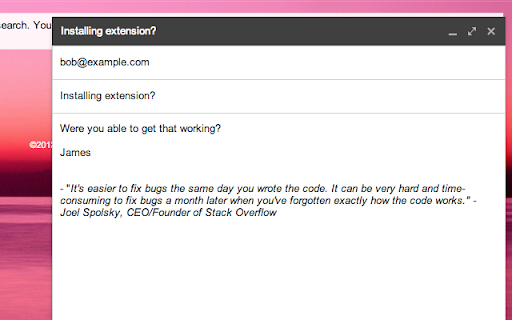
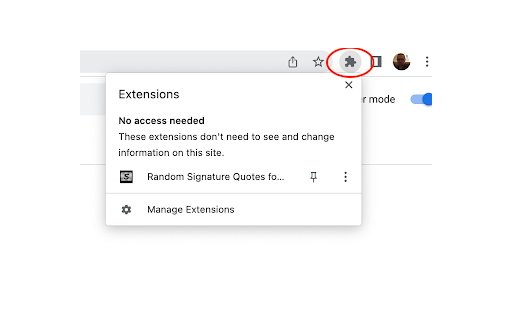
Automatically injects your favorite quotes in your outgoing emails, both original composes and replies. Click on the extension icon, located by clicking on the "puzzle" icon in the top right of the browser, to load the quote manager screen.
----
Version 2.0.3 fixes the deprecated DOMNodeInserted event removal by replacing with MutationObserver, which prevented quotes from being injected as of Chrome version 127.0.6533.120.
----
Version 2.0.2 includes a bug fix where a fade-in and fade-out on save feature was causing errors in the JSON panel.
----
This is version 2.0.1 of Random Signature Quotes for Gmail™, which includes the ability to add quotes to the signature for replies, not just initially composed messages. This has been a highly requested feature for many years now. 2.0.1 also includes upgrades to the extension architecture, moving from manifest v2 to v3, Chrome's newer extension platform.
----
Version 1.0.0 contained major improvements to the quote manager, accessible at the top right in the address bar. 1.0.0 made it much easier to add, edit, or remove quotes, without dealing with the complicated JSON markup from the previous version.
For power users, the JSON panel is still available, in case you want to export quotes or re-import a bulk collection of quotes.
----
To help inspire others, and so I could more easily see quotes I enjoyed hearing from famous, successful technology startup founders and other influential people, I wanted something that would put those quotes randomly in my Gmail signature.
Well, there wasn't anything out there that did that, so I created something that did. I specifically wanted to be able to control the quotes myself.
When you install this extension, my hand-picked quotes are selected by default, but you can change them by clicking the page action 'S' icon next to the favorites star in the address bar and editing the quotes.
The quotes are stored as a JavaScript array, so you may want to export them to a nice text editor like Sublime text if you're going to make extensive changes via the JSON editor.
Gmail™ is a trademark of Google Inc. Use of this trademark is subject to Google Permissions.
Reviews
Loading reviews...
Permissions (1)
Permissions
storageℹ Can store data locally in your browser
Details
| Version | 2.0.3 |
| Updated | Aug 17, 2024 |
| Size | 142KiB |
| First Seen | Mar 27, 2026 |
More by James Mortensen

Popular in social

Cisco Webex Extension
by cisco.chromestore
23M
★ 2.34
social
23M
★ 2.34
social

LINE
by LY Corporation
4M
★ 3.51
social
4M
★ 3.51
social

vidIQ Vision for YouTube
by vidIQ
3M
★ 4.48
social
3M
★ 4.48
social

7TV
by 7TV
3M
★ 4.55
social
3M
★ 4.55
social

Google Mail Checker
by Chrome Developer Relations
2M
★ 4.12
social
2M
★ 4.12
social
Popular Extensions

Adobe Acrobat: PDF edit, convert, sign tools
by Adobe Inc.
322M
★ 4.40
workflow
322M
★ 4.40
workflow

AdBlock — block ads across the web
by AdBlock
62M
★ 4.48
workflow
62M
★ 4.48
workflow

迅雷下载支持
by Shenzhen Xunlei Network Technology Co., Ltd.
59M
★ 2.77
workflow
59M
★ 2.77
workflow

Grammarly: AI Writing Assistant and Grammar Checker App
by Grammarly
42M
★ 4.50
communication
42M
★ 4.50
communication

Adblock Plus - free ad blocker
by eyeo GmbH
40M
★ 4.39
workflow
40M
★ 4.39
workflow