
Dark mode for Google™ docs
Description

Reviews (48 cached)
I cannot find a good dark mode extension for the life of me, this one just doesnt even work, it just makes my whole tab a black screen (all ui missing)
makes everything unreadable and black
Uses a lazy 180 degree color change on all pages instead of just Google Docs. Makes the internet look horrible. Mislabeled extension, stating it is just for Google Docs but applies dark-mode-all-sites-computed to everything.
Just did an update and was hoping it was fixed, but unfortunately it's still not
bad
Its dark, but I cant see anythign at all. Everything is dark. The only thing I can read is the document name
ive been using this extension for years but this new update is terrible. not only is it bugged and effecting other google pages other than docs, but its a completely different app. the settings are entirely different. there needs to be a way to use it the same way we could last week by changing page brightness not page color.
Unfortunately this morning as of about 15 minutes ago, this extension now causes harsh displays on all web pages it is effecting. I would have given it 5 stars a day ago, but there isn't a way to contact the publisher to let them know the update they pushed is causing problems. So here I am.
The new update is not it. It's forcing my entire Chrome into a harsh, hard to read light mode. Please revert to the actually useful settings :(
This extension is now interfering with gmail, gmail is not google docs
just inverted everything and messed up the formatting
doesnt work
While this advertises itself as only for Google Docs, when adding this extension it states that this extension can "Read and change all your data on all websites." If this is only for Google Docs, why does it need those permissions for all websites? Furthermore, why does it need all data?
Doesn't work well at all.
Does not work properly they basically just used high contrast mode and the ui is near impossible to see meaning im straining my eyes anyway
Sorry but this breaks my docs. it simply inverts the colors which means images and emojis in my documents get their colors inverted. also the Document Outline on my left side and other menus are is not inverted.
It's no good. Doesn't functionally work. Also consider a dark grey option instead of black black.
it doesn't work
Tried two Google Doc dark mode extensions and this one isn't working either. It's weird because my default Google chrome settings theme is dark and I could see the Google Doc initially load up as dark but then it immediately turns to light white mode. I even refresh page and it's set on "Global" and "Page" but still not working. It's light white theme still. Does this work with shared Google Doc files?
it does work u just gotta close and open the tab or just reload it
did not change a single thing my screen is cursed to be blinding forever
Literally not work.
Not all parts of the screen are darkened, and it inverts the colours of the images inside the document - rendering the usability of this plugin to - -> *DrumRoll* Worthless. What kind of 5 minute craft plugin is this?
Does not work when toggled on :(
It just doesnt work
stayed on light mode even with both on
doesnt work
literally doesn't do anything
It makes it dark but it inverts colors in text highlights and pictures
It literally just invertes the colors of your google docs, meaning that highlights and other things will simply just become inverted in color, Buuuuuuuuuuuut, at least it takes away the white blinding of normal google docs
Works very well with google docs, but then darkens every other website in chrome browser. it's not dark mode, it's just a dark overlay on everything.
document dark mode is pretty good, no complaints. "global" dark mode is less than useless. Google Docs home remains unchanged bright white with black text, except the menu which is now black with black text so now I can't actually read anything and have to rely on the icons. There is a brightness slider which does work, although it doesn't kick in immediately, and just adds a darker tint to the display for which you can adjust the opacity which does not look very good. I will be uninstalling the extension.
Works alright but it just inverts your page instead of actually making it a dark mode
ya is dark but the photo that i insert change too.....
not working
The dark mode makes stuff look odd
dark mode does not mean invert the colors on my document this is stupid
It kind of works? I don't think it changes the colours to black (yes black, not a dark grey), i think it inverts the colours instead. This means that most images have their colours inverted as well, making them barely readable. The extension also muddles up some other text on the page as well. so close, but not quite :(
Not good at all... it inverts the colours of any images, blacks out buttons on the top bar, and made the table of contents white with light grey text. Gave it 2 stars instead of 1 because it technically did what was promised, but I was expecting better from something that was made specifically for Google Docs. I uninstalled it immediately and am back to File -> Page Setup to make the page colour black and the text white.
it works, but you cant properly see any icons, almost like they just ignored the UI when making it dark
doesnt quite work, it take ssome time to load the darkness in and blinds my eye
While the texts are inverted in colour, sadly the icons are still dark coloured so when I need them, I need to find them one by one. It might be okay if you rarely need them. But overall this is fine, just a little bit issue here and there.
Pretty good. But the tabs are still in light mode and the letters are a little dark for my liking.
Works well. Need to be fixed the photo color change error.
Very nice to finally have. However, it doesn't apply to the Heading List on the side. So, if you need to bounce between Headlines a bunch, you'll have to deal with a big white brick on the side of the screen, stabbing your eyes.
It works but it inverts the colours making some pictures look weird
The toolbar icons (reverse, forward, print out, format tools, bold, cursive, etc.) are grey instead of white, making them hard to see if the background is dark like this extensions does. Also when the document itself is dark for some reason the now white text is harder to read, like it's low resolution. I think that's a byproduct of how google docs work and not something the extension causes, but would be nice if that could also be fixed.
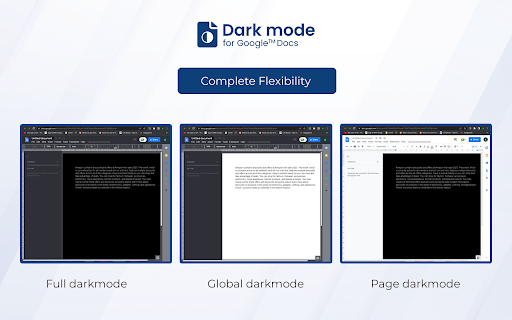
It sorta works... I guess... so three stars for accomplishing that. The "global" dark mode applies a dark layer on top of everything while the "page" dark mode inverts the color of the page. Each of these have their own problems, such as global's covering of the icons, making it very hard to see them; and for page's, inverting the colors does make the white black and vice versa which creates the desired "dark mode," but also changes any colors, such as red becoming some weird shade of blue. Also, if you do use this extension, make sure to "manage" it and prevent it from having full access to all your sites. Change it to "specific sites only" and copy paste in: "https://docs.google.com/" and that's it.
Permissions (2)
Permissions
Details
| Version | 1.3.2 |
| Updated | Mar 27, 2026 |
| Size | 520KiB |
| First Seen | Mar 31, 2026 |
More by Google Doc Darkmode


Popular in workflow




Popular Extensions
