
Always on Top, PiP & Side Panel (3 in 1) - Super Pinned Window
by Pony JI
v4.1.3 Updated Dec 4, 2025 25.45KiB
Description
🪟 Super Pinned Windows - 3 in 1 (PiP, Popup & Side Panel)
Description:
Super Pinned Windows fundamentally improves your multitasking workflow. It empowers you to open any webpage in three flexible modes, ensuring you have the right tool for every task.
🌟 Three Versatile Modes
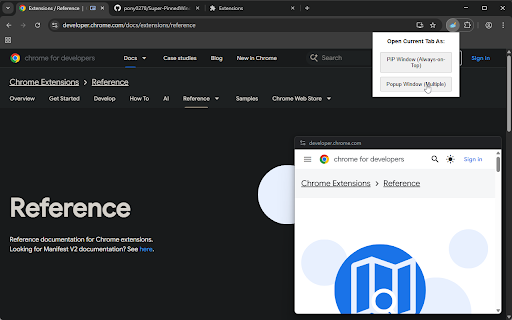
PiP Mode (Picture-in-Picture): A single, always-on-top floating window. Perfect for keeping video content or dashboards visible while you work elsewhere.
Popup Mode: A minimal, independent window. You can open multiple popup windows simultaneously.
Side Panel Mode (Docked): A fully interactive panel locked to the side of your browser. Ideal for notes, media controls, or companion apps.
✨ Key Features
Works on Any Website: Our advanced compatibility engine allows PiP and Side Panel modes to load almost any website—including those that usually block embedding (e.g., Google, YouTube).
Fully Interactive: Unlike standard video PiP, these windows are fully functional browsers. You can scroll, click, type, and log in.
True Multitasking: Run all modes at once! Have a PiP window for a tutorial, a Side Panel for notes, and multiple Popups for reference simultaneously.
Context Menu Integration: Simply right-click any link to open it immediately in your preferred mode.
Cross-Platform Support: Popup Mode automatically enables “Always-on-Top” for macOS and Linux users.
💡 When to Use Each Mode
1. PiP Mode (Always-on-Top)
Best for: Videos, tutorials, stock charts, or monitoring dashboards.
Behavior: Always visible above other applications.
Note: Only one PiP window can be active at a time.
2. Popup Mode (Multi-Window)
Best for: Reference pages, chat windows, or temporary web tools.
Behavior: Independent windows allowing for heavy multitasking.
Note: Windows users, see below for "Always-on-Top" instructions.
3. Side Panel Mode (Docked)
Best for: Persistent tools like Todo lists, calculators, Spotify/YouTube Music controls, or AI chat assistants.
Behavior: Docks neatly to the side of your browser without obscuring your main tab.
🚀 How to Use
Toolbar: Click the extension icon and select your desired mode for the current tab.
Right-Click: Right-click any link and choose “Open as PiP”, “Open as Popup”, or “Open in Side Panel”.
Keyboard Shortcuts:
Alt + Shift + U → Open in PiP
Alt + Shift + O → Open in Popup
Alt + Shift + S → Open in Side Panel
Tip: You can customize these shortcuts at chrome://extensions/shortcuts. Note: If shortcuts do not work immediately, please restart your browser.
🖥️ For Windows Users To enable "Always-on-Top" for Popup Mode on Windows, we recommend using Microsoft PowerToys. Enable "Always on Top" in PowerToys and press Win + Ctrl + T to pin the popup window.
🛠️ Technical Info & Privacy
PiP Mode: Utilizes the Document Picture-in-Picture API with enhanced network compatibility.
Side Panel: Uses the chrome.sidePanel API with iframe integration.
Open Source: This project is MIT Licensed. Source code is transparent and available on GitHub: github.com/pony0278/Super-PinnedWindows-google-extension
Changelog
v4.1.2: Added keyboard shortcuts support.



Reviews
Loading reviews...
Permissions (5)
Permissions
contextMenusℹ Can add items to the right-click menu declarativeNetRequestℹ Can block or redirect network requests sidePanel storageℹ Can store data locally in your browser tabsℹ Can see your open tabs and their URLs
Details
| Version | 4.1.3 |
| Updated | Dec 4, 2025 |
| Size | 25.45KiB |
| First Seen | Mar 31, 2026 |
Popular in workflow

Adobe Acrobat: PDF edit, convert, sign tools
by Adobe Inc.
331M
★ 4.40
workflow
331M
★ 4.40
workflow

AdBlock — block ads across the web
by AdBlock
62M
★ 4.48
workflow
62M
★ 4.48
workflow

迅雷下载支持
by Shenzhen Xunlei Network Technology Co., Ltd.
59M
★ 2.77
workflow
59M
★ 2.77
workflow

Adblock Plus - free ad blocker
by eyeo GmbH
41M
★ 4.39
workflow
41M
★ 4.39
workflow

Chrome Remote Desktop
by Chrome Remote Desktop Release Managers
38M
★ 3.14
workflow
38M
★ 3.14
workflow
Popular Extensions
Adobe Acrobat: PDF edit, convert, sign tools
by Adobe Inc.
331M
★ 4.40
workflow
331M
★ 4.40
workflow
AdBlock — block ads across the web
by AdBlock
62M
★ 4.48
workflow
62M
★ 4.48
workflow
迅雷下载支持
by Shenzhen Xunlei Network Technology Co., Ltd.
59M
★ 2.77
workflow
59M
★ 2.77
workflow

Grammarly: AI Writing Assistant and Grammar Checker App
by Grammarly
42M
★ 4.50
communication
42M
★ 4.50
communication
Adblock Plus - free ad blocker
by eyeo GmbH
41M
★ 4.39
workflow
41M
★ 4.39
workflow