
Description

Reviews (4 cached)
Useless, I can already copy and paste into other apps and fix, I need something that works in gmail or G Docs, why is this so impossible to find? Why not just add to to existing apps?
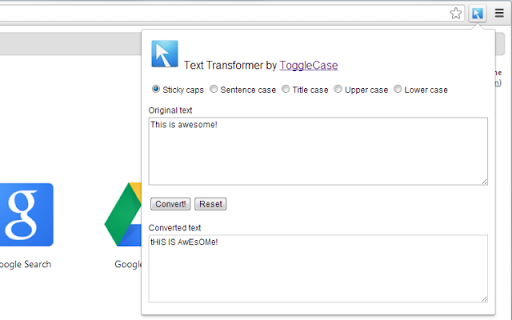
1. Would be a lot more useful without copy-paste, especially in Gmail. The current text selection, if there is one, should be automatically placed in the "Original text" window, with the converted text replacing the selection? Note that Drag-and-Drop works, but it's clunky, as it needs a second window. Clumsy as that is, at least it doesn't clobber the current clipboard contents. 2. Kicking it up a notch, why not put the extension's actions as a context menu (right-click) operation instead of a pop-up window. 3. Needs an options dialog to disable the useless "Sticky caps" option. Productivity, not [puerile] "Fun. This could be a useful tool if it were done right. Cf. Alechko's "Characters and words counter" extension. https://goo.gl/ziHH2B
This extension would be far more useful if selected text was automatically copied into the text field of the window that pops-up if you click the extension icon. Also, the 'sticky caps' option is totally useless. The fact that this option is set as default just adds to the annoyance.
Good app that does what it says. I recommend it for people that use Google docs/sheets/etc and need to transform text. Some simple fixes could make this a killer one: - Automatically add selected text (@Lea) on a page or text copied to the clipboard to the input field. - Turn the 5 options into buttons that convert the copy. It eliminates a click without adding complexity. - Automatically copy output to the clipboard so it's ready for pasting.
Permissions (2)
Permissions
Details
| Version | 0.6 |
| Updated | Jun 11, 2024 |
| Size | 22.06KiB |
| First Seen | Mar 30, 2026 |
Popular in workflow




Popular Extensions
