
YouTube Comment Reader
v1.0.33 Updated Mar 3, 2026 174KiB
Description
+++ New Export functionality in version 1.0.28 +++
All loaded comments now exportable optionally in XML for Excel, JSON, or CSV (comma, tab or semicolon separated) format. The export complies with the current filter and order settings (i.e. you can easily export a filtered part of the comments in a desired order). If you are in dark mode, then the Excel sheet is created in dark mode as well.
+++ New in version 1.0.20 +++
New translate buttons in the comment popups (listening to Alt+Y) ..translating every foreign language comment into your language (back and forth).
+++ New in version 1.0.17 +++
+ Shortcut key now is Ctrl+Shift+Y (for extension popup) ..which can be changed in extension settings
+ Any short video can quickly be opened in a regular video player (where timeline, speed, volume etc. can be adjusted) by clicking the video title in the extension's popup.
+++ New in version 1.0.16 +++
Comments now also visible and sortable ascending by timestamps appearing in comments
Features:
➤ Youtube comment presented in multi-functional spreadsheet format
➤ Sort comments (by table header click) ascending or descending by author, comment time, upvotes count, replies count, last reply time, timestamps appearing in comments, comment length, or channel owner's upvotes (heart symbol)
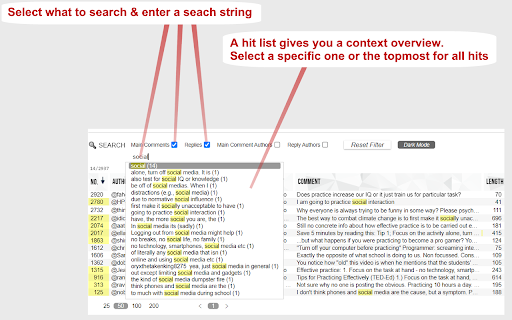
➤ Search main comments and/or replies by author and/or text content
...e.g. filter for an author's main comments and/or responses
...e.g. filter for comments and/or responses containing a specific text phrase
➤ Works in every language
➤ Works with YouTube Shorts as well
➤ Quickly navigate through comments and responses by (left, right, up, down) arrow keys
➤ Easily switch between light and dark mode
Instructions:
1. Open a YouTube video.
2. Click on the extension icon (in the chrome extensions toolbar, to the right of the address bar).
3. Wait for the extension popup to load a brief overview containing the YouTube channel, video title, total comments count etc.
4. In the info popup click on the Comment Reader icon. The Comment Reader opens in a new tab and starts loading comments (from newest to oldest).
5. Watch the progress while comments are loading.
6. Click OK to interrupt the loading process at any time to start reading the comments that has been loaded till then. When all comments are loaded, the progress view and interrupt button will disappear.
7. An interrupted loading process can be continued at any time if loading more comments is desired.
Tips:
Use (left, right, up, down) arrow keys to quickly navigate through comments and replies (although, of course, mouse clicks work as well).
➤ use up & down keys to go from one row to another
➤ use the right arrow key to dive into details (of a currently selected row)
➤ use the left arrow key to leave the details and return to parent list
➤ Quickly open any short video in a regular player (..so you can adjust the timeline, speed, volume etc.) by clicking the video description in the extension's popup
8. To reply to or upvote a comment you may click on the comment time (e.g. "6 hours ago") above the comment text. This will open a new regular YouTube window with the targeted comment (as the "highlighted comment") appearing immediately under the video player. That way you can interact via the regular YouTube user interface.


Reviews (7 cached)
★☆☆☆☆2024-11-14
Slim Natural
"cant detect Youtube video" error
★☆☆☆☆2024-04-02
Random Box
Comments do not load for me. Any tricks to get the comments to load?
★☆☆☆☆2024-03-30
plautus egal
doesnt load any comments. Doesnt work!
★★☆☆☆2026-02-21
Julius Nash
Just two stars! Does not show hidden comments. Loads of dishonest YouTubers will hide geniuine comments that criticise and call out their dishonesty. So these YouTubers either delete or hide these comments. Despicable behaviour.
★★★☆☆2024-09-25
Tiby
Works well, but I would've preferred to see the actual source code in the github repo: https://github.com/acs-reichelt/youtube-comment-reader
★★★☆☆2024-05-18
Tolga Balci
Great, but unable to thumbs up a review (pressing thumbs up does nothing) and can't reply
★★★☆☆2024-04-30
Ian Katzeff
The extension isn't working on my 2015 mac version 10.13.6 for me at all. The icon is not even showing up. Could my mac info be the reason?
Permissions (1)
Permissions
activeTabℹ Can access the current tab when you click the extension
Details
| Version | 1.0.33 |
| Updated | Mar 3, 2026 |
| Size | 174KiB |
| First Seen | Mar 28, 2026 |
Popular in social

Cisco Webex Extension
by cisco.chromestore
23M
★ 2.34
social
23M
★ 2.34
social

LINE
by LY Corporation
4M
★ 3.51
social
4M
★ 3.51
social

vidIQ Vision for YouTube
by vidIQ
3M
★ 4.48
social
3M
★ 4.48
social

7TV
by 7TV
3M
★ 4.57
social
3M
★ 4.57
social

Google Mail Checker
by Chrome Developer Relations
2M
★ 4.12
social
2M
★ 4.12
social
Popular Extensions

Adobe Acrobat: PDF edit, convert, sign tools
by Adobe Inc.
331M
★ 4.40
workflow
331M
★ 4.40
workflow

AdBlock — block ads across the web
by AdBlock
63M
★ 4.48
workflow
63M
★ 4.48
workflow

迅雷下载支持
by Shenzhen Xunlei Network Technology Co., Ltd.
59M
★ 2.77
workflow
59M
★ 2.77
workflow

Grammarly: AI Writing Assistant and Grammar Checker App
by Grammarly
42M
★ 4.50
communication
42M
★ 4.50
communication

Adblock Plus - free ad blocker
by eyeo GmbH
41M
★ 4.39
workflow
41M
★ 4.39
workflow