
Description
Click on extension icon in toolbar to update setting of extension.
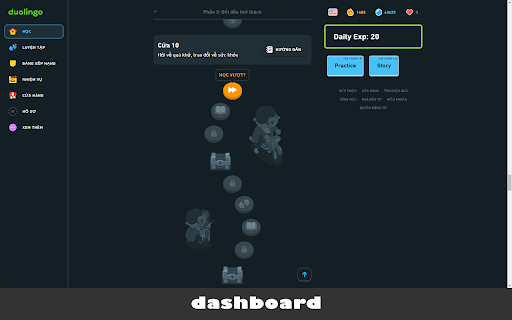
Add up some features when access Duolingo exam: change dashboard UI, add shortcuts in dashboard, exam and story context.
Note:
This extention will make your learning more difficult with no hints any more and you must use keyboard to enter answer without vocabularies.
---
** Keyboard Shortcuts **
* Exam Context
`Digit Keyboard`: to select on selectable buttons correspondingly in exam context.
`Esc`: To ignore the current question.
`Ctrl + Space`: To make Duo speaking again current sentence.
* Home Context
`Shift + L`: start entering next lesson.
`Shift + P`: start entering practice (to recover hearts).
`Alt + Shift + Q`: start entering story.
---
* Only show custom panel for your EXP and spent study time today
* See config options of this extension for more options
* Automatic shortcuts for wordbanks and other elements
* Auto-click "Next" button for more focus on the exam
-------
[Source of project]: https://gitlab.com/nmhillusion/duolingo-chrome-extension/


Reviews
Loading reviews...
Permissions (2)
Permissions
declarativeContentℹ Can show the extension icon based on page content storageℹ Can store data locally in your browser
Details
| Version | 1.4.6 |
| Updated | Apr 21, 2025 |
| Size | 29.69KiB |
| First Seen | Mar 27, 2026 |
More by nmhillusion

Popular in accessibility

Read&Write for Google Chrome™
by Texthelp
19M
★ 3.44
accessibility
19M
★ 3.44
accessibility

360 Internet Protection
by qihoosafe
17M
★ 4.54
accessibility
17M
★ 4.54
accessibility

Screenshot reader™
by Texthelp
7M
★ 2.57
accessibility
7M
★ 2.57
accessibility

OrbitNote
by Texthelp
7M
★ 2.95
accessibility
7M
★ 2.95
accessibility

Volume Master
by Peta Sittek
6M
★ 4.81
accessibility
6M
★ 4.81
accessibility
Popular Extensions

Adobe Acrobat: PDF edit, convert, sign tools
by Adobe Inc.
331M
★ 4.40
workflow
331M
★ 4.40
workflow

AdBlock — block ads across the web
by AdBlock
63M
★ 4.48
workflow
63M
★ 4.48
workflow

迅雷下载支持
by Shenzhen Xunlei Network Technology Co., Ltd.
59M
★ 2.77
workflow
59M
★ 2.77
workflow

Grammarly: AI Writing Assistant and Grammar Checker App
by Grammarly
42M
★ 4.50
communication
42M
★ 4.50
communication

Adblock Plus - free ad blocker
by eyeo GmbH
41M
★ 4.39
workflow
41M
★ 4.39
workflow