
⚠️Not updated in over 2 years
Description
Supercharge your productivity in ChatGPT.
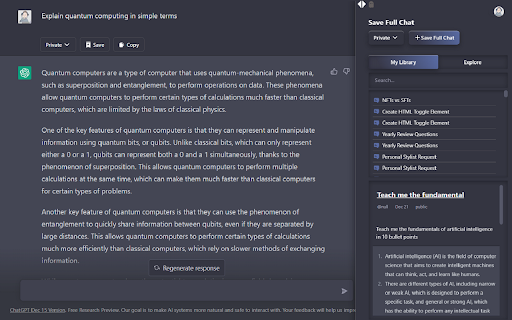
Save your ChatGPT chats in Public, Private or Protected mode.
You can also explore other public chats people had with AI.
How it works:
Step 1) Download the extension and login to Listgpt.com
Step 2) Go to https://chat.openai.com/chat
Step 3) A sidebar will automatically open, enabling you to save your chats.
Features:
- Save private chatgpt chats.
- Set privacy to Public, Private or Protected (share link with people)
- Get access to prompt library
- Save your whole conversation with ChatGPT
- Save only certain messages
- Download messages as text files
- Share a private link with others
- Explore public conversations
- Access your chats faster
You can automatically save your chats in private, public or protected mode.
Reviews
Loading reviews...
Details
| Version | 1.1.2 |
| Updated | Feb 11, 2023 |
| Size | 58.47KiB |
| First Seen | Mar 29, 2026 |
Popular in workflow

Adobe Acrobat: PDF edit, convert, sign tools
by Adobe Inc.
331M
★ 4.40
workflow
331M
★ 4.40
workflow

AdBlock — block ads across the web
by AdBlock
63M
★ 4.48
workflow
63M
★ 4.48
workflow

迅雷下载支持
by Shenzhen Xunlei Network Technology Co., Ltd.
59M
★ 2.77
workflow
59M
★ 2.77
workflow

Adblock Plus - free ad blocker
by eyeo GmbH
41M
★ 4.39
workflow
41M
★ 4.39
workflow

Chrome Remote Desktop
by Chrome Remote Desktop Release Managers
39M
★ 3.14
workflow
39M
★ 3.14
workflow
Popular Extensions
Adobe Acrobat: PDF edit, convert, sign tools
by Adobe Inc.
331M
★ 4.40
workflow
331M
★ 4.40
workflow
AdBlock — block ads across the web
by AdBlock
63M
★ 4.48
workflow
63M
★ 4.48
workflow
迅雷下载支持
by Shenzhen Xunlei Network Technology Co., Ltd.
59M
★ 2.77
workflow
59M
★ 2.77
workflow

Grammarly: AI Writing Assistant and Grammar Checker App
by Grammarly
42M
★ 4.50
communication
42M
★ 4.50
communication
Adblock Plus - free ad blocker
by eyeo GmbH
41M
★ 4.39
workflow
41M
★ 4.39
workflow