
⚠️Not updated in over 2 years
Description
Save Links to ClickUp is a simple and easy to use tool for managing the hyperlinks in ClickUp document. This extension helps the user to store important Links according to various categories. So next time the user wants to access any link from their document they can simply open the extension and access them.
𝐅𝐞𝐚𝐭𝐮𝐫𝐞𝐬:
●Easy , Simple UI
●Create new categories
●View links
●Add title to your links.
●Delete link
𝐔𝐬𝐞𝐫-𝐆𝐮𝐢𝐝𝐞:
1.Install the Extension .
2.Click on Connect and wait for few seconds.
3.Wait till a window for clickUp authorization opens.
4.Login with your clickUp Id(email) and password.
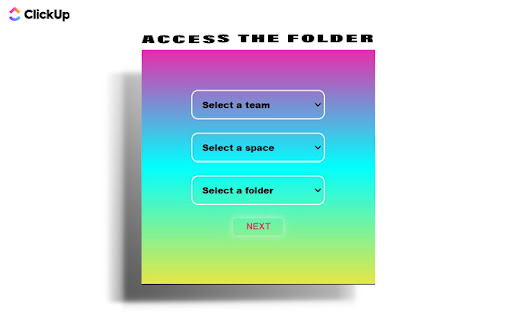
5.Select the team , then select the space within the team and finally select the folder inside which you want to store all the hyperlinks.
6.Make sure that you create a folder(for the links) in advance at clickUp website.
7.Now you are all set .
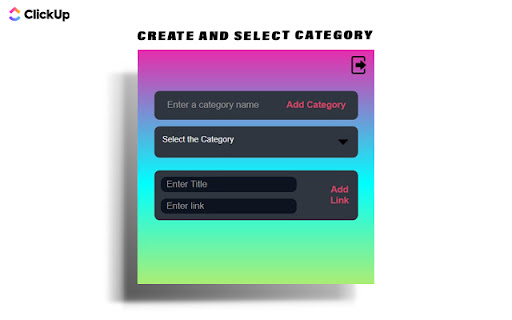
8.To create a new category simply type the category name and click on Add category.
9.To select a category click on "Select the Category" dropdown.
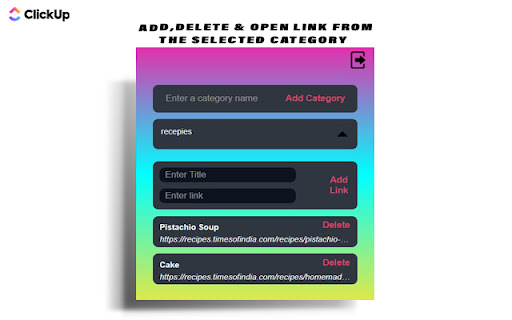
10.All Links within the category will be displayed.
11.To open a link click on the hyperlink or the title . To delete it click on the delete button.
12.To add a link select the category and enter the link title and the link in their respective section , then click on the "Add Link" button .
13. In case you find any difficulty simply restart the extension and also check the internet connection.

Reviews
Loading reviews...
Permissions (2)
Permissions
identityℹ Can use your Google account identity storageℹ Can store data locally in your browser
Details
| Version | 1.1 |
| Updated | Oct 7, 2022 |
| Size | 22.63KiB |
| First Seen | Mar 29, 2026 |
Popular in workflow

Adobe Acrobat: PDF edit, convert, sign tools
by Adobe Inc.
331M
★ 4.40
workflow
331M
★ 4.40
workflow

AdBlock — block ads across the web
by AdBlock
63M
★ 4.48
workflow
63M
★ 4.48
workflow

迅雷下载支持
by Shenzhen Xunlei Network Technology Co., Ltd.
59M
★ 2.77
workflow
59M
★ 2.77
workflow

Adblock Plus - free ad blocker
by eyeo GmbH
41M
★ 4.39
workflow
41M
★ 4.39
workflow

Chrome Remote Desktop
by Chrome Remote Desktop Release Managers
39M
★ 3.14
workflow
39M
★ 3.14
workflow
Popular Extensions
Adobe Acrobat: PDF edit, convert, sign tools
by Adobe Inc.
331M
★ 4.40
workflow
331M
★ 4.40
workflow
AdBlock — block ads across the web
by AdBlock
63M
★ 4.48
workflow
63M
★ 4.48
workflow
迅雷下载支持
by Shenzhen Xunlei Network Technology Co., Ltd.
59M
★ 2.77
workflow
59M
★ 2.77
workflow

Grammarly: AI Writing Assistant and Grammar Checker App
by Grammarly
42M
★ 4.50
communication
42M
★ 4.50
communication
Adblock Plus - free ad blocker
by eyeo GmbH
41M
★ 4.39
workflow
41M
★ 4.39
workflow