
⚠️Not updated in over 2 years ⚠️Very few reviews for its user base
Description
❔ WHAT IS SUMMARY GENERATOR
============================
The Summary Generator is such an useful tool for generating:
Article Structure
Article Overview
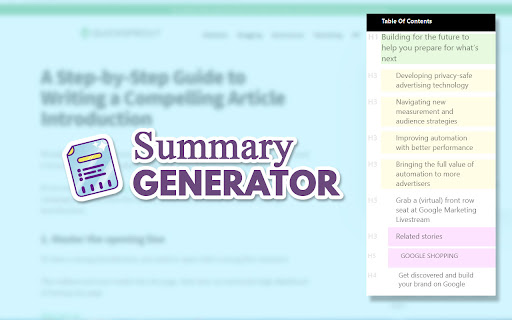
Article Table of Contents
If you want to summarize a text, a blog post, an article or any other website page, use the Summary Generator browser extension for Chrome.
✨ MAIN FEATURES
================
A text summarization is useful not only for readers but also for writers.
As a reader, you will be able to see from the beginning the structure of an article. The plugin generates a table of contents that is easy to read with all the headings and subheadings. You can click on any article section to jump directly on the article paragraph that you want to read.
As a writer, you get to better organize your article and to improve your writing skills. It’s important to know how to structure a blog post not only for your readers but also for SEO purposes.
For summarizing a text simply install the Summarization Generator on your browser. The summary of text helps you make a clear idea on what the article is about.
So, this is not a summary maker software, this plugin generates a browsable table of contents. It is a useful tool for easy reading. There are lots of automated tools that make the summarizing text task much easier for you.
Reading headlines becomes an easy task. This natural reader chrome extension does a very good job in making easy articles to read.
If you are looking for a story summary generator or an article summarizer online, try this free Chrome extension.
✔️ HOW TO SUMMARIZE AN ARTICLE
=============================
The text reader chrome extension improves the pre reading process. Pre-reading provides an overview that can increase reading speed and efficiency. There are lots of pre-reading strategies to increase comprehension and making a table of contents is one of them.
1. Click on the install button to install the Chrome plugin.
2. Then, go to any website article or blog post you want and use the free summarizer.
3. To see the table of contents simply click on the extension button.
4. The article summary generator has three themes: light, dark & colorful. Choose the one that you like.
5. Finally, click to go to the paragraph that you want to read.
TIP: Use an online summary tool to make a paragraph summary. The best summary generator free that I use for my work uses artificial intelligence to create unique text.
Our easy reader Chrome extension is probably the best Chrome reader extension that customizes and improves the readability of long web articles.
Long articles are usually hard to read. So, you can now make any article or blog post more readable!
Reviews (2 cached)
★☆☆☆☆2023-02-10
Brandon Perez
Does not do what it's made for
★★☆☆☆2022-11-01
shehroz raza
Nothing as described
Permissions (3)
Permissions
activeTabℹ Can access the current tab when you click the extension scriptingℹ Can inject scripts into web pages storageℹ Can store data locally in your browser
Details
| Version | 1.1 |
| Updated | Oct 17, 2023 |
| Size | 19.4KiB |
| First Seen | Mar 29, 2026 |
More by MockoFun

Popular in workflow

Adobe Acrobat: PDF edit, convert, sign tools
by Adobe Inc.
322M
★ 4.40
workflow
322M
★ 4.40
workflow

AdBlock — block ads across the web
by AdBlock
62M
★ 4.48
workflow
62M
★ 4.48
workflow

迅雷下载支持
by Shenzhen Xunlei Network Technology Co., Ltd.
59M
★ 2.77
workflow
59M
★ 2.77
workflow

Adblock Plus - free ad blocker
by eyeo GmbH
40M
★ 4.39
workflow
40M
★ 4.39
workflow

Chrome Remote Desktop
by Chrome Remote Desktop Release Managers
37M
★ 3.13
workflow
37M
★ 3.13
workflow
Popular Extensions
Adobe Acrobat: PDF edit, convert, sign tools
by Adobe Inc.
322M
★ 4.40
workflow
322M
★ 4.40
workflow
AdBlock — block ads across the web
by AdBlock
62M
★ 4.48
workflow
62M
★ 4.48
workflow
迅雷下载支持
by Shenzhen Xunlei Network Technology Co., Ltd.
59M
★ 2.77
workflow
59M
★ 2.77
workflow

Grammarly: AI Writing Assistant and Grammar Checker App
by Grammarly
42M
★ 4.50
communication
42M
★ 4.50
communication
Adblock Plus - free ad blocker
by eyeo GmbH
40M
★ 4.39
workflow
40M
★ 4.39
workflow