
⚠️Below average rating
Description
SQLite Reader is an extension that helps you easily browse, edit and render SQLite databases.
You can execute any SQLite command that you would like (SQL and SQLite have many differences but SQLite has most of the SQL standard). This add-on uses SQLite library which is compiled from C language to JavaScript with Emscripten compiler. Emscripten is a source-to-source compiler that can compile native C/C++ codes to JavaScript language.
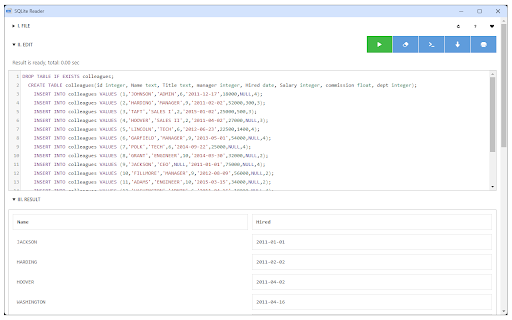
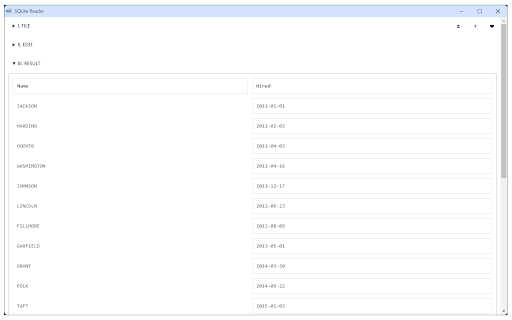
To work with this add-on, just open the app UI and drag an SQLite file to the designated area in the app (top section). Once the SQLite is fully loaded, you will see the commands in the text area (middle section) within the UI. Simply add/edit the code and then click on the - Execute SQLite - button at the top left corner (the green button). Please note that executing any command may take some time depending on the SQLite database size. The result is rendered in the result section (section III) within the app UI. You can also save the database by pressing the - Save Database - button at the top. Moreover, there is also a button to insert a "sample" SQLite code. Simply press this button and then click on the - Execute SQLite - button to see the results.
Note 1: since this add-on runs SQLite commands within the browser, it runs slower than the native SQLite application/library. However, using it is very easy compared to the native SQLite application. Please note that, for a very large SQLite database, you still need the native application. This add-on is only suitable for a reasonable database size.
Note 2: this add-on is still in beta and may work as expected. Please report your bugs or any feature request via addon's homepage (https://mybrowseraddon.com/sql-reader.html), bug report form.



Reviews (3 cached)
★☆☆☆☆2019-10-30
Vishal
Doesn't work.
★☆☆☆☆2018-12-26
C D
Useless! Six hours later, file still not loaded. Only 2mb. CANNOT even give detailed report, took the time to fill it out in DETAIL, then SORRY, TRY LATER! Yeah, sure. Waste my time again later ?? Left it to TRY to load while I slept. NOTHING, still 'loading'.
★☆☆☆☆2018-11-13
Randy Juber
Loaded the DB, but didn't display any correct information and I'm only using a 2 MB database. Extension should be removed from the Chrome Store.
Permissions (2)
Permissions
contextMenusℹ Can add items to the right-click menu storageℹ Can store data locally in your browser
Details
| Version | 0.1.6 |
| Updated | Jan 22, 2026 |
| Size | 535KiB |
| First Seen | Mar 29, 2026 |
More by loora

Video Popout
by loora
100K
★ 4.33
functionality
100K
★ 4.33
functionality

Sound Meter (Noise & Decibel)
by loora
50K
★ 3.10
tools
50K
★ 3.10
tools

ZIP Reader
by loora
10K
★ 3.78
tools
10K
★ 3.78
tools

Audio Converter
by loora
10K
★ 3.30
tools
10K
★ 3.30
tools

Video Converter
by loora
8K
★ 3.00
tools
8K
★ 3.00
tools
Popular in tools

Zotero Connector
by Zotero
8M
★ 3.96
tools
8M
★ 3.96
tools

Browsec VPN - Free VPN for Chrome
by Browsec
7M
★ 4.44
tools
7M
★ 4.44
tools

AnyDoc Translator - Translate Web and PDF
by www.wps.com
7M
★ 4.58
tools
7M
★ 4.58
tools

WPS PDF - Read, Edit, Fill, Convert, and AI Chat PDF with Ease
by www.wps.com
7M
★ 4.45
tools
7M
★ 4.45
tools

Video DownloadHelper
by Aclap
5M
★ 4.43
tools
5M
★ 4.43
tools
Popular Extensions

Adobe Acrobat: PDF edit, convert, sign tools
by Adobe Inc.
331M
★ 4.40
workflow
331M
★ 4.40
workflow

AdBlock — block ads across the web
by AdBlock
63M
★ 4.48
workflow
63M
★ 4.48
workflow

迅雷下载支持
by Shenzhen Xunlei Network Technology Co., Ltd.
59M
★ 2.77
workflow
59M
★ 2.77
workflow

Grammarly: AI Writing Assistant and Grammar Checker App
by Grammarly
42M
★ 4.50
communication
42M
★ 4.50
communication

Adblock Plus - free ad blocker
by eyeo GmbH
41M
★ 4.39
workflow
41M
★ 4.39
workflow