
⚠️Requests 1 sensitive permission
Description
This extension allow users to open issues in Jira by:
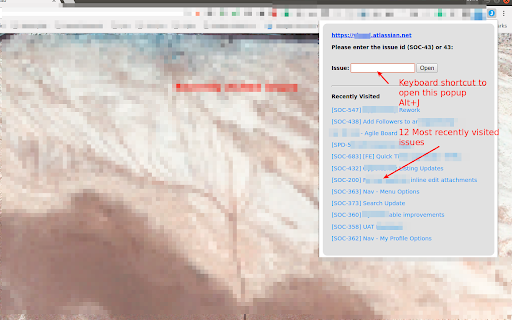
1. Clicking on the extension icon and providing issue id like 56 or SOC-56
2. Choosing option from the context menu by right click after selecting the issue id. This is helpful when the story/issue id is mentioned in email or pull requests etc.. User can just select the issue id and right click to open issue in jira.
3. Supports keyboard shortcuts. (A) Alt+J to open issue opener popup (B) Alt+Shift+J to open the selected/highlighted issue id in jira directly
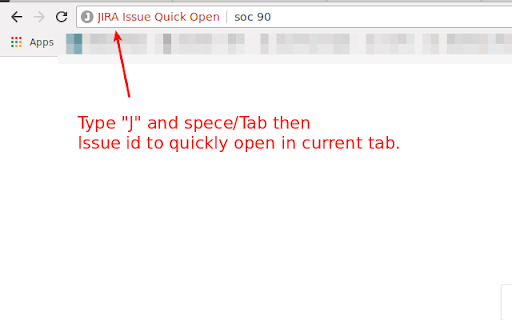
4. Supports Omnibox. In the address bar type J + TAB then issue id to open issue in current tab. This also suggests matching issues.
5. See recently visited issues.
* This extension does not make any api calls to JIRA
** This extension does not share any data with the extension developer



Reviews
Loading reviews...
Permissions (5)
Permissions
activeTabℹ Can access the current tab when you click the extension contextMenusℹ Can add items to the right-click menu historyℹ Can read and modify your browsing history scriptingℹ Can inject scripts into web pages storageℹ Can store data locally in your browser
Details
| Version | 12.1.1 |
| Updated | Jul 23, 2025 |
| Size | 17.19KiB |
| First Seen | Mar 29, 2026 |
Popular in workflow

Adobe Acrobat: PDF edit, convert, sign tools
by Adobe Inc.
322M
★ 4.40
workflow
322M
★ 4.40
workflow

AdBlock — block ads across the web
by AdBlock
62M
★ 4.48
workflow
62M
★ 4.48
workflow

迅雷下载支持
by Shenzhen Xunlei Network Technology Co., Ltd.
59M
★ 2.77
workflow
59M
★ 2.77
workflow

Adblock Plus - free ad blocker
by eyeo GmbH
40M
★ 4.39
workflow
40M
★ 4.39
workflow

Chrome Remote Desktop
by Chrome Remote Desktop Release Managers
37M
★ 3.13
workflow
37M
★ 3.13
workflow
Popular Extensions
Adobe Acrobat: PDF edit, convert, sign tools
by Adobe Inc.
322M
★ 4.40
workflow
322M
★ 4.40
workflow
AdBlock — block ads across the web
by AdBlock
62M
★ 4.48
workflow
62M
★ 4.48
workflow
迅雷下载支持
by Shenzhen Xunlei Network Technology Co., Ltd.
59M
★ 2.77
workflow
59M
★ 2.77
workflow

Grammarly: AI Writing Assistant and Grammar Checker App
by Grammarly
42M
★ 4.50
communication
42M
★ 4.50
communication
Adblock Plus - free ad blocker
by eyeo GmbH
40M
★ 4.39
workflow
40M
★ 4.39
workflow