
⚠️Not updated in over 2 years
Description
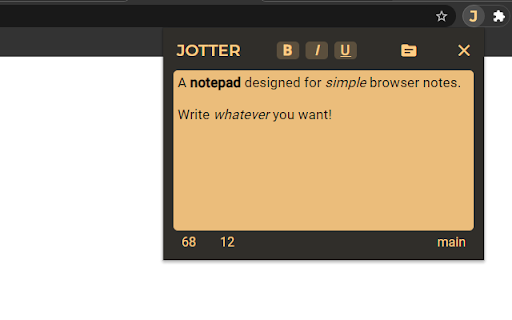
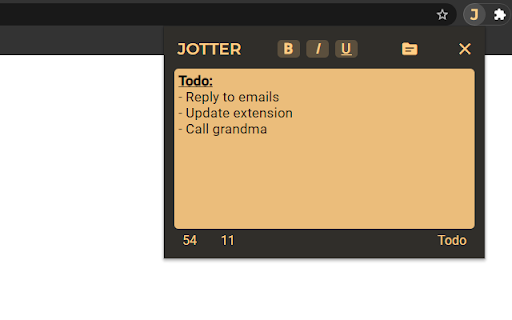
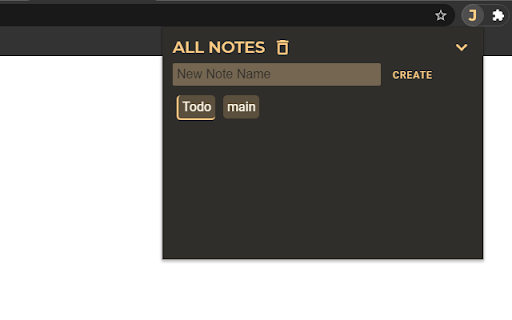
Jotter allows you to jot some quick notes by clicking the icon in the corner of your browser. Create multiple notes to organize your thoughts or ideas. Great way to save things to copy and paste later somewhere else.
Features:
- Create and switch between multiple notes
- Sync notes
- Auto Save
- Links
- Change text style
- Character Count
- Word Count
Tip: Click and hold "JOTTER" in the extension for 2 seconds to switch to an alternate theme!
CHANGE LOG:
v2.0.5
- Support for hyperlinks
------------------------------------------------------------------
v2.0
- Redesign
- Rebuilt from ground up to improve performance, appearance, and user experience
------------------------------------------------------------------
v1.1.2.4
- Bug fix with Chrome API limitations
------------------------------------------------------------------
v1.1
- Added ability to create more than one note
- Reduced size dramatically
------------------------------------------------------------------
v1.0.8
- Merry Christmas Message Removed
- Warning message if text is over 7000 characters long
------------------------------------------------------------------
v1.0.7
- Merry Christmas and Happy Holidays!
------------------------------------------------------------------
v1.0.6
- View text Formatting. Buttons change color.
------------------------------------------------------------------
v1.0.5
- Auto Saving
- Paste as plain text
------------------------------------------------------------------
v1.0.4
- Word Count Button
- Release Notes link to view changes
------------------------------------------------------------------
v1.0.3
- New Fonts
- Simplified
------------------------------------------------------------------
v1.0.2
- Flatter, Simpler Design
- New Shadow Animation
- Lighter, Softer Background
------------------------------------------------------------------
v1.0.1
- Temporary fix for notes not saving
- Autosave not working
------------------------------------------------------------------
v1.0.0 Release Notes
- Yellow Background
- Bold, Italics, and Underline
Reviews
Loading reviews...
Permissions (1)
Permissions
storageℹ Can store data locally in your browser
Details
| Version | 2.0.5 |
| Updated | Feb 23, 2023 |
| Size | 70.49KiB |
| First Seen | Mar 26, 2026 |
Popular in workflow

Adobe Acrobat: PDF edit, convert, sign tools
by Adobe Inc.
331M
★ 4.40
workflow
331M
★ 4.40
workflow

AdBlock — block ads across the web
by AdBlock
63M
★ 4.48
workflow
63M
★ 4.48
workflow

迅雷下载支持
by Shenzhen Xunlei Network Technology Co., Ltd.
59M
★ 2.77
workflow
59M
★ 2.77
workflow

Adblock Plus - free ad blocker
by eyeo GmbH
41M
★ 4.39
workflow
41M
★ 4.39
workflow

Chrome Remote Desktop
by Chrome Remote Desktop Release Managers
39M
★ 3.14
workflow
39M
★ 3.14
workflow
Popular Extensions
Adobe Acrobat: PDF edit, convert, sign tools
by Adobe Inc.
331M
★ 4.40
workflow
331M
★ 4.40
workflow
AdBlock — block ads across the web
by AdBlock
63M
★ 4.48
workflow
63M
★ 4.48
workflow
迅雷下载支持
by Shenzhen Xunlei Network Technology Co., Ltd.
59M
★ 2.77
workflow
59M
★ 2.77
workflow

Grammarly: AI Writing Assistant and Grammar Checker App
by Grammarly
42M
★ 4.50
communication
42M
★ 4.50
communication
Adblock Plus - free ad blocker
by eyeo GmbH
41M
★ 4.39
workflow
41M
★ 4.39
workflow