
⚠️Not updated in over a year
Description
(Kurdî/English/Türkçe):
https://www.youtube.com/watch?v=6vuf7gObJ1g
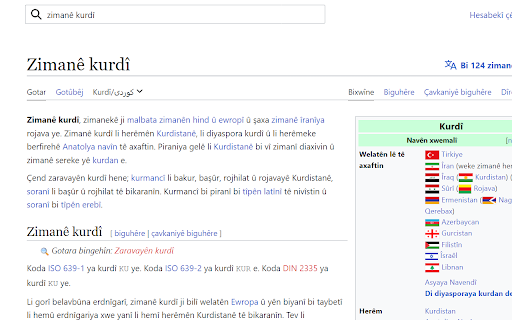
Bi tîpên Kurdî yên Latînî binivîse!
Çewa bikarînim?
Install bike û ev bernamij "pin" bike. Kengî te vîya bi tîpên Kurdî binivîsî, yan tavê dewsîne yan ctrl+shift+K bidewsîne û dê hil bit û temirit.
Bi Chrome bikarîne (Li ser Edge Ctrl+Shift+K şûl nakit!)
Bo nivîsandina tîpên "çêîşû," hema "shift" bidewsîne (û tila xwe nerake) û "c" yan "e", "i", "s", "u" carekê bidewsîne. Heger te divêt pît mezin bit (ç -> Ç) hema carek dî "c" bidewsîne (û tila xwe ji "shift" her nerake). Û heger te divêt pîtê mezin ya adî bit (C) hema carekê dî bidewsîne. Nefsî tişte ye bo tîpên "êîşû".
Sîstem hene da ku nivîsandin gelek bêzehmet bit. 2 sîstemên hûsa hene:
1. Ewilîn pît dê bi otomatîkî mezin bit.
2. Gelek caran ne hewce ye tu tila xwe ji "shift" rakî. Evan dukma bidewsîne da tu bibînî çewa: shift (tila xwe ne rake!) + ccirok. Rast e ku te tila xwe nerakir, lê her "Çîrok" hat nivîsandin. Eve jî biceribîne: shift+ccebu. Dibit "Çêbû"!
Eger mişkîleyek li ser malperek heye, emailek bo min rêke: thekurdishkeyboard@gmail.com.
----------------------------------------------------------------------------------------------------
Type in Kurdish in the Latin script!
How do I use it?
Install the extension and pin it using the "extensions" (top right.) When you want to type in Kurdish, click the sun or press ctrl+shift+K (for Kurdish) and it will turn on/off.
Chrome browser recommended (Ctrl+Shift+K shortcut won't work on Edge!)
To type çêîşû, just press shift (and do not let go of it) and press "c" or "e", "i", "s", "u" once. To type an uppercase Kurdish letter (ç -> Ç), just press "c" again (while still not letting go of shift). Finally, if you want to type a regular uppercase letter in ceisu, just type c again. This is the same for "êîşû".
There are features meant to make writing very easy.
1. The first letter, when writing, will auto-capitalize (first to C, then to Ç, then ç.)
2. You often don't have to lift your finger from shift. Type these inputs to see how: (without lifting your finger until the word is done) shift+ccirok. Despite never letting go of shift, "Çîrok" is still written! Also try shift+ccebu, which will type "Çêbû"!
If you experience an issue on a certain website, please email me: thekurdishkeyboard@gmail.com.
----------------------------------------------------------------------------------------------------
Latin alfabesiyle Kürtçe yaz!
Nasıl kullanılır:
Eklentiyi indirin ve sağ üstteki "eklentiler" ile kısayola ekleyin. Kürtçe yazmak istediğinizde güneş işaretine tıklayın veya ctrl+shift+K (Kürtçe için) tuşlarına sırasıyla basın. Her iki seçenek de Kürtçe alfabeyi etkinleştirmeyi ve kapatmayı sağlar.
Chrome tarayıcı önerilir (Ctrl+Shift+K Edge tarayıcısında çalışmaz)
Ç, ê, î, ş, ve û harfleri için shift tuşuna basılı tutarken "c", "e", "i", "s" veya "u" harfine bir kere basın. Aynı karakterlerde büyük harfler için shift tuşuna basılı tutmaya devam ederek bir kere daha 'c'ye basın. Son olarak, ceisu'dan herhangi birinin büyük harfini elde etmek için tekrar 'c'ye basın ("êîşû" için de aynı kısayl geçerlidir).
Yazmayı kolaylaştırmak için konulmuş olan kısayollar:
Yazarken cümle başında kullanılan ilk harf otomatik olarak büyük harfe dönüştürülür.
Genellikle parmağınızı shift tuşundan kaldırmanız gerekmez. Örnek için shift tuşuna basılı tuturken "ccirok"u yazmayı deneyin (shift+ccirok): shift tuşunu bırakmamanıza rağmen "Çîrok"un yazıldığını göreceksiniz! Benzer şekilde, shift+ccebu ile "Çêbû" yazabilirsiniz!
Eğer bu sitede bir sorun ile karşılaşırsanız aşağıdaki eposta adresinden bana ulaşabilirsiniz: thekurdishkeyboard@gmail.com.


Reviews
Loading reviews...
Permissions (4)
Permissions
clipboardReadℹ Can read from your clipboard clipboardWriteℹ Can write to your clipboard scriptingℹ Can inject scripts into web pages storageℹ Can store data locally in your browser
Details
| Version | 1.19 |
| Updated | Oct 14, 2024 |
| Size | 34.41KiB |
| First Seen | Apr 1, 2026 |
Popular in accessibility

Read&Write for Google Chrome™
by Texthelp
17M
★ 3.44
accessibility
17M
★ 3.44
accessibility

360 Internet Protection
by qihoosafe
17M
★ 4.54
accessibility
17M
★ 4.54
accessibility

Screenshot reader™
by Texthelp
7M
★ 2.57
accessibility
7M
★ 2.57
accessibility

OrbitNote
by Texthelp
7M
★ 2.95
accessibility
7M
★ 2.95
accessibility

Volume Master
by Peta Sittek
6M
★ 4.81
accessibility
6M
★ 4.81
accessibility
Popular Extensions

Adobe Acrobat: PDF edit, convert, sign tools
by Adobe Inc.
331M
★ 4.40
workflow
331M
★ 4.40
workflow

AdBlock — block ads across the web
by AdBlock
62M
★ 4.48
workflow
62M
★ 4.48
workflow

迅雷下载支持
by Shenzhen Xunlei Network Technology Co., Ltd.
59M
★ 2.77
workflow
59M
★ 2.77
workflow

Grammarly: AI Writing Assistant and Grammar Checker App
by Grammarly
42M
★ 4.50
communication
42M
★ 4.50
communication

Adblock Plus - free ad blocker
by eyeo GmbH
41M
★ 4.39
workflow
41M
★ 4.39
workflow