
⚠️Not updated in over 2 years
Description
CHANGES
Version 31.1
• Alt+K keyboard shortcut now works again.
• Minor bug fixes.
OVERVIEW
Search Site WE provides facilities to search within the current subdomain or within the entire domain, using a selected search engine.
TOOLBAR BUTTON AND POPUP PANEL
After installation, there will be a new green 'magnifying-glass' button on the main toolbar.
To search within a site, first click on the toolbar button to show the popup panel, then type the search terms into the text box, and then click on either of the search buttons.
Normally, the text box is filled with the text from the previous search. However, if text in the page is selected before opening the popup panel, the text box will be filled with the selected text.
CONTEXT MENU ITEMS
To search within a site, first select some text within the web page, then right-click on the selected text and choose the 'Search Site WE' menu item, and then click on either of the search sub-menu items.
SEARCH DEFAULTS
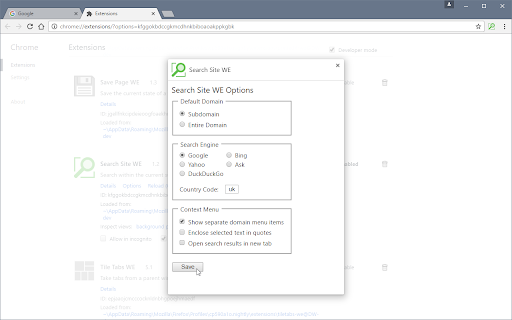
In the Options page, there are options to specify the default search settings.
KEYBOARD SHORTCUTS
To open the toolbar button popup panel, press Alt+K.
SUPPORT
Please e-mail: dw-dev@gmx.com
LICENSE
Distributed under the GNU General Public License version 2.
See LICENCE.txt file and http://www.gnu.org/licenses/


Reviews
Loading reviews...
Permissions (5)
Permissions
contextMenusℹ Can add items to the right-click menu notificationsℹ Can show desktop notifications storageℹ Can store data locally in your browser tabsℹ Can see your open tabs and their URLs webNavigationℹ Can monitor navigation events
Details
| Version | 31.1 |
| Updated | Oct 13, 2022 |
| Size | 68.55KiB |
| First Seen | Apr 1, 2026 |
More by DW-dev

Print Edit WE
by DW-dev
100K
★ 4.40
tools
100K
★ 4.40
tools

Save Page WE
by DW-dev
100K
★ 4.44
tools
100K
★ 4.44
tools

Tile Tabs WE
by DW-dev
80K
★ 3.58
functionality
80K
★ 3.58
functionality

Zoom Page WE
by DW-dev
10K
★ 4.12
accessibility
10K
★ 4.12
accessibility

Navigate Up WE
by DW-dev
1K
★ 3.40
tools
1K
★ 3.40
tools
Popular in tools

Zotero Connector
by Zotero
8M
★ 3.96
tools
8M
★ 3.96
tools

Browsec VPN - Free VPN for Chrome
by Browsec
7M
★ 4.44
tools
7M
★ 4.44
tools

AnyDoc Translator - Translate Web and PDF
by www.wps.com
7M
★ 4.59
tools
7M
★ 4.59
tools

WPS PDF - Read, Edit, Fill, Convert, and AI Chat PDF with Ease
by www.wps.com
7M
★ 4.45
tools
7M
★ 4.45
tools

Video DownloadHelper
by Aclap
5M
★ 4.43
tools
5M
★ 4.43
tools
Popular Extensions

Adobe Acrobat: PDF edit, convert, sign tools
by Adobe Inc.
331M
★ 4.40
workflow
331M
★ 4.40
workflow

AdBlock — block ads across the web
by AdBlock
62M
★ 4.48
workflow
62M
★ 4.48
workflow

迅雷下载支持
by Shenzhen Xunlei Network Technology Co., Ltd.
59M
★ 2.77
workflow
59M
★ 2.77
workflow

Grammarly: AI Writing Assistant and Grammar Checker App
by Grammarly
42M
★ 4.50
communication
42M
★ 4.50
communication

Adblock Plus - free ad blocker
by eyeo GmbH
41M
★ 4.39
workflow
41M
★ 4.39
workflow