Save Page WE icon

Save Page WE

by DW-dev

v33.9 Updated Sep 5, 2023 96.34KiB
CWS
100K
Users
★ 4.44
435 reviews
#1096
of 207.1K
tools
#182 of 64.4K
⚠️Not updated in over 2 years

Description

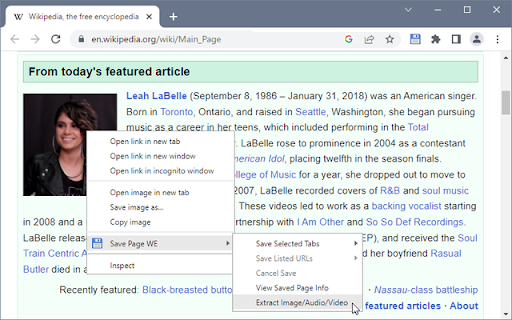
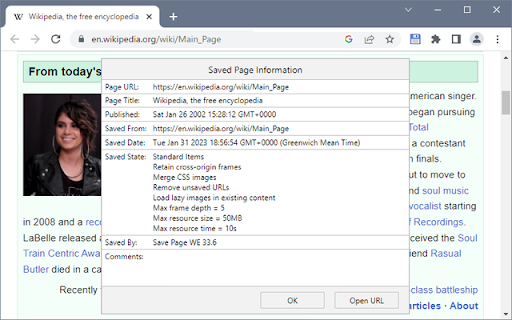
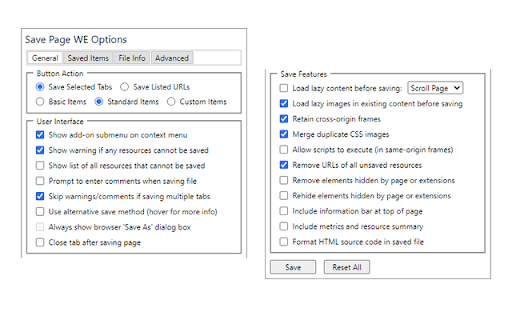
CHANGES Version 33.9 • Automatically selects the original or new save method. • Minor bug fix. OVERVIEW Save Page WE provides a simple facility to save a web page (as currently displayed) as a single HTML file that can be opened in any browser. The saved page is a highly accurate representation of the original page. Multiple pages can be saved either by selecting multiple tabs or by loading a list of page URLs. If used with Print Edit WE, Save Page WE now requires Print Edit WE 26.1 or later for full compatibility. TOOLBAR BUTTON After installation of Save Page WE, there will be a new blue 'floppy-disk' button on the main toolbar. To save the web pages in all of the currently selected tabs file, just click on the Save Page WE toolbar button. There are options to set the button action as: • Save Selected Tabs (Basic, Standard or Custom Items) • Save Listed URLs (Basic, Standard or Custom Items) There is an option to use the new save method, which can save more pages (see the 'Save Methods' section below). By default the saved HTML file will have a '.html' extension. CONTEXT MENU & BUTTON MENU To save a web page as an HTML file, or to perform operations on a previously saved page, right-click on the page contents to open the context menu, select the 'Save Page WE' sub-menu, and then select one of the menu items: • Save Selected Tabs (Basic, Standard or Custom Items) • Save Listed URLs (Basic, Standard or Custom Items) • Cancel Save • View Saved Page Info (when viewing a saved page) • Remove Resource Loader (when viewing a saved page - pre 15.2) • Extract Image/Audio/Video (when viewing a saved page) KEYBOARD SHORTCUTS To save a web page as an HTML file, press Alt+A. To cancel a single or multiple page save, press Alt+C. SAVING MULTIPLE PAGES There are two ways to save multiple pages: • Highlight multiple tabs and then select the 'Save Selected Tabs' menu item. • Load a file containing a list of URLs in the Zoom Page WE Options dialog and then select the 'Save Listed URLs' menu item. When saving multiple pages, tabs are switched to foreground if the load lazy content option is enabled. SAVED ITEMS There are options to select the saved items: • Save Basic Items - saves the essential items. • Save Standard Items - saves the Basic Items and some addtional items. • Save Custom Items - saves the Basic Items and items selected from a list. SAVED FILE NAME There is an option to specify the format of the saved file name. This format is used when saving the complete page and when extracting a resource (Image/Audio/Video). The saved file name may contain the following predefined fields: • %TITLE% - (saving page) the document title, or if missing same as %FILE%. • %TITLE% - (extracting resource) the same as %FILE%. • %DATE(x)% - saved date in YYYYxMMxDD format, 'x' is optional separator. • %TIME(x)% - saved time in HHxMMxSS format, 'x' is optional separator. • %DATEP(x)% - published date in YYYYxMMxDD format, 'x' is optional separator. • %TIMEP(x)% - published time in HHxMMxSS format, 'x' is optional separator. • %DATEPF(x)% - same as %DATEP(x)%, or if missing falls back to saved date. • %TIMEPF(x)% - same as %TIMEP(x)%, or if missing falls back to saved time. • %HOST% - host name in URL. • %HOSTW% - same as %HOST%, but without 'www.' prefix. • %PATH% - path name in URL. • %PATHW% - same as %PATH%, but without '.extension' suffix. • %FILE% - file name in the last segment of URL path. • %FILEW% - same as %FILE%, but without '.extension' suffix. • %QUERY(p)% - query string in URL if 'p' omitted, else value of parameter 'p'. • %FRAGMENT% - fragment string in URL. There are options to replace spaces in the saved file name with a user-defined character and to set the maximum length of the saved file name. SAVE METHODS There are two alternative save methods: old and new. The old save method is the default The old save method remembers the last save location, but it cannot save a some pages (e.g Yahoo) in Chrome 84 or later. The new save method does not remember the last save location, but it can save all pages. CONFIGURING CHROME Go to Chrome Menu Button > Settings > Advanced. In the Downloads section, set the downloads folder location, and enable or disable the 'Ask where to save each file before downloading' option. After saving a page, a download item will appear in the download bar at the bottom of the browser window. Click on the arrow in the download item and enable or disable the 'Always open files of this type' option. USING AUTOMATION There is an option to use automation mode, allowing a page to be saved from the command line. If this option is enabled: • When Firefox starts, Save Page WE will be automatically initiated using the current Button Action. • When the save operation is complete, Firefox will be automatically closed. To exit automation mode, immediately after Firefox starts up, use the 'Cancel Save' menu command or keyboard shortcut to cancel the save operation, and then disable the option to use automation. SUPPORT Please e-mail: dw-dev@gmx.com LICENSE Distributed under the GNU General Public License version 2. See LICENCE.txt file and http://www.gnu.org/licenses/
Save Page WE screenshot 1Save Page WE screenshot 2Save Page WE screenshot 3Save Page WE screenshot 4Save Page WE screenshot 5

Reviews (37 cached)

★☆☆☆☆2025-08-18
D

90% of the pages I was trying to download were blank.

★☆☆☆☆2025-04-16
J. S. (darkocean)

Doesn't save the file!

★☆☆☆☆2023-12-18
Stranger Than Fiction

Don't like the new automatic save thing. Can't tell if it's doing its thing or not. It never saves. Smh.

★☆☆☆☆2023-11-10
Xalomon

Clicking the icon did nothing. Right clicking it gives an option to save selected tabs, but doesn't give a way to select any.

★☆☆☆☆2023-02-27
amin salam

Why can't save the Twitter page

★☆☆☆☆2023-01-14
sodlock

Not working. Says 27 of 344 resources are not working, and change some setting. I followed it and increased loading time to be 20, still not working. I'm not sure but it could be because picture is wimg format.

★☆☆☆☆2022-08-31
rong yin

not working. images all missing.

★☆☆☆☆2020-12-03
Ming Sheng Quah

Completely breaks Javascript

★☆☆☆☆2020-03-31
E Auer

doesnt work

★☆☆☆☆2020-02-11
Michael Niles

The resulting asset still references assets from the original site. Because of this, I cannot recommend this plugin for archiving websites; once the original site is down, the documents produced by this script will cease to function.

★☆☆☆☆2020-01-01
Jan Menšík

Cant download whole page

★☆☆☆☆2019-06-08
Pol Isidor

It saved one picture and thats all.. Uff..what a catastrophe!

★☆☆☆☆2018-07-29
Nicky East

no autosave feature? useless.

★☆☆☆☆2018-03-22
Khoi Le

Bad

★☆☆☆☆2017-03-17
Rajarshi Vaidya

Couldn't download dynamic web-pages such as https://beta.electronforge.io/

★★☆☆☆2023-09-25
Da Bo

stupid is saving the file name so weird

★★☆☆☆2023-01-27
John Goodwin

Not sure how this is different from File -> Save As... in the browser. I tried it on a website, opened the result (which was much too fast to be the entire website), and it was just the one page as an .html with links to the online versions. I already get that from Save As in Chrome, Firefox, etc.

★★☆☆☆2022-11-02
Thiago Maia

It is spamming downloads when i click to save, i lost my website!

★★☆☆☆2022-08-10
Kenneth

Too bad, was looking forward to this working but it doesn't...at all! Won't save anything neither in Basic or Standard mode even when trying the tweaks suggested by the error page that comes up when it fails to save.

★★☆☆☆2021-05-11
Matthew Dunn

You have to keep right-clicking to do anything. The options are "Basic," "Standard," and "Custom," which is not very ellucidatory. No URL information is provided in the download, so that you don't know the source of the download.

★★☆☆☆2020-02-19
Miles Corless

Downloads an empty zipped folder.

★★☆☆☆2020-02-06
Hosty

Ok... Someone needs to tell me ASAP why saving basic pages that have text and 2 or 3 images makes a 15 MB file, and saving the sames page with chrome or firefox makes 314 KB file, AND I CANT SEE ANY DIFFERENCE BETWEEN THE TWO..

★★☆☆☆2019-11-17
Mateusz Konieczny

Right-Click context menus does not work on this page. All items are blank.

★★☆☆☆2019-10-10
Mihai R

Did you try to save a twitter page ? Does not work, exactly like the built-in chrome save

★★☆☆☆2019-06-06
Alex S.

There is no option "don't use scripts in saved file" There is no option to save article only, or to save highlighted area only. Moved to another extension.

★★☆☆☆2018-12-02
Tony Roger

what i expect is batch mode, which means: all the opened tabs, can be saved by one click, not just the current tab, hope it can be optimized into this style! (can refer to the other extension-singlefile/mpiodijhokgodhhofbcjdecpffjipkle), thanks!

★★☆☆☆2018-08-21
Deja Vu

what the purpose of it? if chrome has chrome://flags/#save-page-as-mhtml

★★☆☆☆2017-09-10

Images are not embeded as singlefile do. If the original pages changes or without internet connection, the images cannot be shown.

★★★☆☆2025-02-24
Vangelis

It did not save any images on my last aliexpress customer care chat session and i can't find an option to save the page as pdf.

★★★☆☆2024-07-16
bubba dam

This was my goto for saving webpages instead of that stupid "print to pdf" but some pages don't save all images on a page and cant get around it which blows so i have to use "print to pdf" again use Stylebot to get page looking right. this extension bad on reddit the comments are not shown.

★★★☆☆2023-10-24
Savio A

I am trying to save a list of URLs loaded from a file. The issues I see: 1. Each URL is loaded on a new tab. That tab then needs to be manually selected, else the Save Page WE plugin doesn't get triggered. Let us call this tab A. 2. Once the page is downloaded and saved, the tab closes (tab A). This happens even if the check box to close the tab after saving, is not selected under Options. 3. Now when the new URL is loaded on a new tab (say tab B), again the tab needs to be manually selected, and so on. This means the plugin cannot function for a bunch of URLs, because each time, the user needs to manually select the newly opened tab. Any reasons why this is happening? Is this be design or is it a bug?

★★★☆☆2023-10-05
Mark Vogel

This was a reasonably good extension, yes sometimes I could not save a page and had to opt for taking a screenshot instead. But in the last week or ten days ago it's started replicating tabs with strange text in the URL area as though it's slowly decoding the page I selected to save as an HTML file, I have three tabs doing that right now with text in the URL area like "font weight: 500" and "font: roboto" which appear to be in the html code/formatting of the web page, but it never makes it to the Save AS menu. I hope this is fixable.

★★★☆☆2023-03-23
duuy

i love this extension, but i find out that this extenesion is most reason make website slow down- fix it ...

★★★☆☆2022-10-04
Timson Robl

Broken in the last update. CORS error preventing loading any recourses from Instagram pages, for example

★★★☆☆2021-08-26
Gwendolyn Mccullough

On some special website which disables browser download option, "Save Page WE" got "13 of 116 resources could not be loaded……" warning while "SingleFile" dumps the same site perfectly.

★★★☆☆2021-05-25
大地

Why don't I use the tool to save pictures online?

★★★☆☆2020-03-14
Andre Hanz

It works with static pictures, but still not with GIFs. Why there is just not such an extension that saves EVERYTHING that Chrome has ALREADY fetched from the server?????

Permissions (7)

Permissions

contextMenus Can add items to the right-click menu downloads Can manage and monitor downloads notifications Can show desktop notifications scripting Can inject scripts into web pages storage Can store data locally in your browser tabs Can see your open tabs and their URLs webNavigation Can monitor navigation events

Details

Version 33.9
Updated Sep 5, 2023
Size 96.34KiB
First Seen Mar 29, 2026