
Description


Reviews (11 cached)
Code editor is not dark -_-
not working
doesnt work
not working
Works very badly. i can not use it there is too much gaps in everything
Looks cool, however needs to be updated to new shopify winter edition
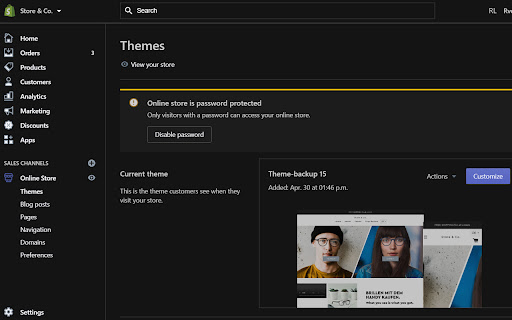
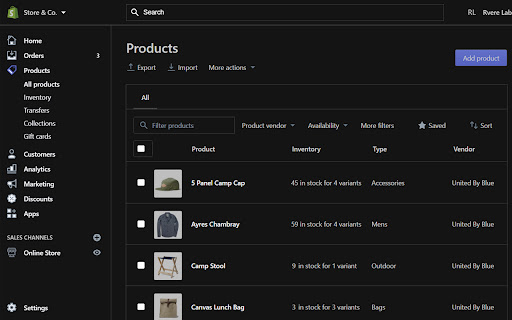
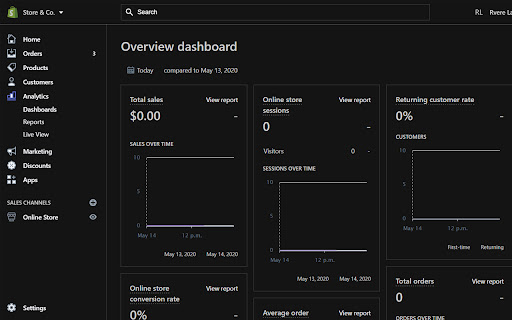
Can read stats graph - visitors, sales etc. Issue with certain colours in dark mode.
needs to be updated some pages dont have the theme
It works, but all the texts in de editor are white. I mostly use it for CSS, and this makes it very hard to quickly read anything.
Shopify loses all color - hyperlinks are shown as white text - Fraud analysis has no color at all - Profile initials have no color Dark mode is nice but even dark mode has colors, not just all white
I liked the idea of a dark mode for Shopify. Gave this extension a whirl, but in the end it was not up to my own needs. Just within 5 mins of use, in the code editor: 1. underscores are invisible. e.g. css properties such as kicker__line which is in the theme I'm currently working on. 2. The cursor is hard to see in the css editor. 3. When selecting a chunk of code, I can't see it's selected at all. 4. I'd expect the save button to be a nice contrasting colour, but it's off-black on top of a black background - don't really understand the reasoning behind that. Then overall: 5. The extension adds lines underneath each menu item on the left, with oddly curved corners. Don't really understand why they are there from a UX viewpoint. 6. I couldn't find the switch to turn it on and off. From the web store it seemed like it may be in a really prominent position. It would be way cool if we had multi-coloured texts depending on type in the code editor but understand that may be beyond the realms of this plugin. A good stab at dark mode and probably fine for most users who don't use the code editor.
If you could remove the "skip to content" link from the top left that would be perfect, otherwise I can't switch stores and stuff, maybe you haven't tested it for a Shopify admin who has their email tied to multiple stores and has the toggle on the top left?
Permissions (1)
Permissions
Details
| Version | 0.1.0 |
| Updated | May 23, 2023 |
| Size | 632KiB |
| First Seen | Mar 31, 2026 |
Popular in workflow




Popular Extensions
