
Description
Reviews (3 cached)
Can't really tell that it does anything.
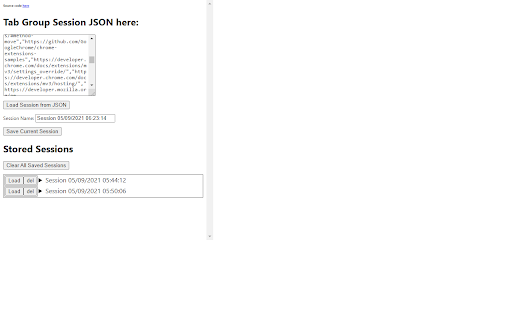
I struggled with the instructions so tried an alternative approach, it worked (but with a large number of links it was slow). What I did was install the extension to both PCs. Cut the JSON from the dialog box on the source PC Paste it into a simple text editor like Notepad, save as json.txt, email that to the new PC On new PC open json.txt, copy the JSON content to the JSON dialog box on the destination PC click "load Session from JSON" and wait! Other reviews say when importing a very large number of tabs it fails so an UNTRIED fix for that MIGHT be as follows. In brief, split the JSON into smaller chunks. In detail: The file appears to start { and end } within that each group starts like "nogroup":[ and ends ], So I think if you took the file into a text editor and split it where a new group starts like ],"finance":[ then replace everything after the comma with } paste what's left into the JSON dialog box (replacing what was there) and click "load Session from JSON" it might load all tabs before in this example Finance. You MAY then be able to do the same again isolating other chunks of JSON code and load that too. The source code is available and at just 144 lines of javascript it might not be too difficult to improve it but I've got better things to do. I was surprised that syncing the two browsers didn't do this all automatically but I expect a future Chrome update will render this extension unnecessary.
With 2100+ tabs, "Save Current Session" did not create a file. After manually copying & pasting the JSON into a new Chrome profile with this extension, and clicking "Load Session From JSON", Chrome tried to open all 2000+ tabs and slowly ground to a halt as I exhausted all 32GB of memory. I ended up closing Chrome after a few minutes before it could finish. The "Save Current Session" button did work in the new profile with just a couple tabs though.
Permissions (3)
Permissions
Details
| Version | 0.1 |
| Updated | Sep 10, 2021 |
| Size | 33.63KiB |
| First Seen | Mar 25, 2026 |
Popular in workflow




Popular Extensions
