
✅Recently updated
Description
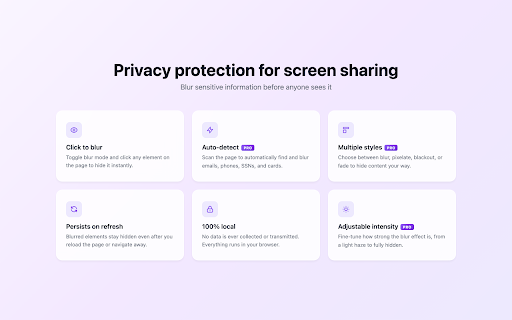
ContextBlur helps you hide sensitive information on webpages before screen sharing, recording a demo, or presenting live. Click any element to blur it instantly, keep it blurred across refreshes, and share real screens without exposing private or confidential details.
Best for
• Screen sharing with colleagues, clients, or teammates
• Product demos and sales calls
• Tutorials, webinars, and live recordings
• Dashboards, admin tools, inboxes, CRMs, and internal systems
• Hiding personal or sensitive information before presenting
Key features
• Click to blur any text, image, input, or page element
• Persistent blur that stays after page refresh
• Smart selection that avoids over-blurring the page
• Keyboard shortcuts for faster workflows
• Optional auto-blur for emails, phone numbers, SSNs, and credit card numbers
• 100% local processing in your browser
• No analytics or tracking
• No data is stored or transmitted
• Open source
How it works
1. Open the ContextBlur side panel
2. Turn on Selection Mode
3. Click the element you want to blur
4. Refresh the page if needed — your blur stays in place
Important
ContextBlur is a visual privacy tool for screen sharing, demos, tutorials, recordings, and live presentations. It helps reduce accidental exposure of sensitive information, but it is not a security control.


Reviews
Loading reviews...
Permissions (2)
Permissions
sidePanel storageℹ Can store data locally in your browser
Details
| Version | 2.0.7 |
| Updated | Mar 16, 2026 |
| Size | 64.88KiB |
| First Seen | Mar 25, 2026 |
More by kodaren1338


Popular in tools

Zotero Connector
by Zotero
8M
★ 3.96
tools
8M
★ 3.96
tools

Browsec VPN - Free VPN for Chrome
by Browsec
7M
★ 4.44
tools
7M
★ 4.44
tools

AnyDoc Translator - Translate Web and PDF
by www.wps.com
7M
★ 4.59
tools
7M
★ 4.59
tools

Video DownloadHelper
by Aclap
5M
★ 4.43
tools
5M
★ 4.43
tools

Microsoft Bing Homepage & Search for Chrome
by Microsoft Corporation
4M
★ 3.72
tools
4M
★ 3.72
tools
Popular Extensions

Adobe Acrobat: PDF edit, convert, sign tools
by Adobe Inc.
331M
★ 4.40
workflow
331M
★ 4.40
workflow

AdBlock — block ads across the web
by AdBlock
62M
★ 4.48
workflow
62M
★ 4.48
workflow

Grammarly: AI Writing Assistant and Grammar Checker App
by Grammarly
42M
★ 4.50
communication
42M
★ 4.50
communication

Adblock Plus - free ad blocker
by eyeo GmbH
41M
★ 4.39
workflow
41M
★ 4.39
workflow

Chrome Remote Desktop
by Chrome Remote Desktop Release Managers
38M
★ 3.14
workflow
38M
★ 3.14
workflow