
Description
Automate Favoriting Artworks on Redbubble
This extension implements Reciprocal Favoring.
Reciprocal Favoring - When users favorite your work, in hopes of receiving favorites back from you on one of their works.
Top Sellers are using this strategy favorites on their artworks. When you favorite other sellers artworks they will favorite your artworks back. This will help you rank higher among other sellers.
How To Use The Redbubble Favs Automata:
There are 2 ways to activate this extension:
⌛1. With a 7-days trial
📝2. With a monthly subscription
👉 Steps on how to use:
1. Install The Extension and start a 7-days trial or buy a monthly subscription
2. Go to Redbubble and search for any keyword, wait until the products are shown.
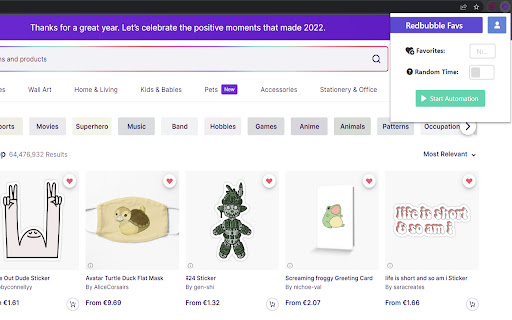
3. Open the Extension 💜 and configure your Settings.
4. Select The "Start Automation" Button!
⚙️ Settings:
Favorites - The number of artworks to favorite per session.
Random Time - ON/OFF if time between each favorite action is randomized
Start Automation - Button to start a favoring session.
⌨️Got questions or feedback?
Make sure to email us at ionutkjdlf@gmail.com if you have suggestions of additional features or want to report bugs.
Thanks!
#Redbubble Favorites #Redbuble Favorites # Redbubble Favorite #Favorites Automator #Favorite Bot #Redbubble Bot #Redbubble Favorite Bot


Reviews
Loading reviews...
Permissions (2)
Permissions
activeTabℹ Can access the current tab when you click the extension storageℹ Can store data locally in your browser
Details
| Version | 1.0.1 |
| Updated | Apr 16, 2025 |
| Size | 2.43MiB |
| First Seen | Mar 29, 2026 |
More by TukoTools


Popular in workflow

Adobe Acrobat: PDF edit, convert, sign tools
by Adobe Inc.
331M
★ 4.40
workflow
331M
★ 4.40
workflow

AdBlock — block ads across the web
by AdBlock
63M
★ 4.48
workflow
63M
★ 4.48
workflow

迅雷下载支持
by Shenzhen Xunlei Network Technology Co., Ltd.
59M
★ 2.77
workflow
59M
★ 2.77
workflow

Adblock Plus - free ad blocker
by eyeo GmbH
41M
★ 4.39
workflow
41M
★ 4.39
workflow

Chrome Remote Desktop
by Chrome Remote Desktop Release Managers
38M
★ 3.14
workflow
38M
★ 3.14
workflow
Popular Extensions
Adobe Acrobat: PDF edit, convert, sign tools
by Adobe Inc.
331M
★ 4.40
workflow
331M
★ 4.40
workflow
AdBlock — block ads across the web
by AdBlock
63M
★ 4.48
workflow
63M
★ 4.48
workflow
迅雷下载支持
by Shenzhen Xunlei Network Technology Co., Ltd.
59M
★ 2.77
workflow
59M
★ 2.77
workflow

Grammarly: AI Writing Assistant and Grammar Checker App
by Grammarly
42M
★ 4.50
communication
42M
★ 4.50
communication
Adblock Plus - free ad blocker
by eyeo GmbH
41M
★ 4.39
workflow
41M
★ 4.39
workflow